CLOCKWORKS FOR MAC OS 9
69
Figure 6-16: Specifying a single MIDI channel in a Device Settings & Routing
connection. To do so, click the input device and then pop-edit the box shown.
3 Type in the desired MIDI channel in the text box and
press return to confirm your choice.
If you want, you can type in several channels as shown
below. This is useful if you are using a keyboard split on
your controller and you want to send the splits to different
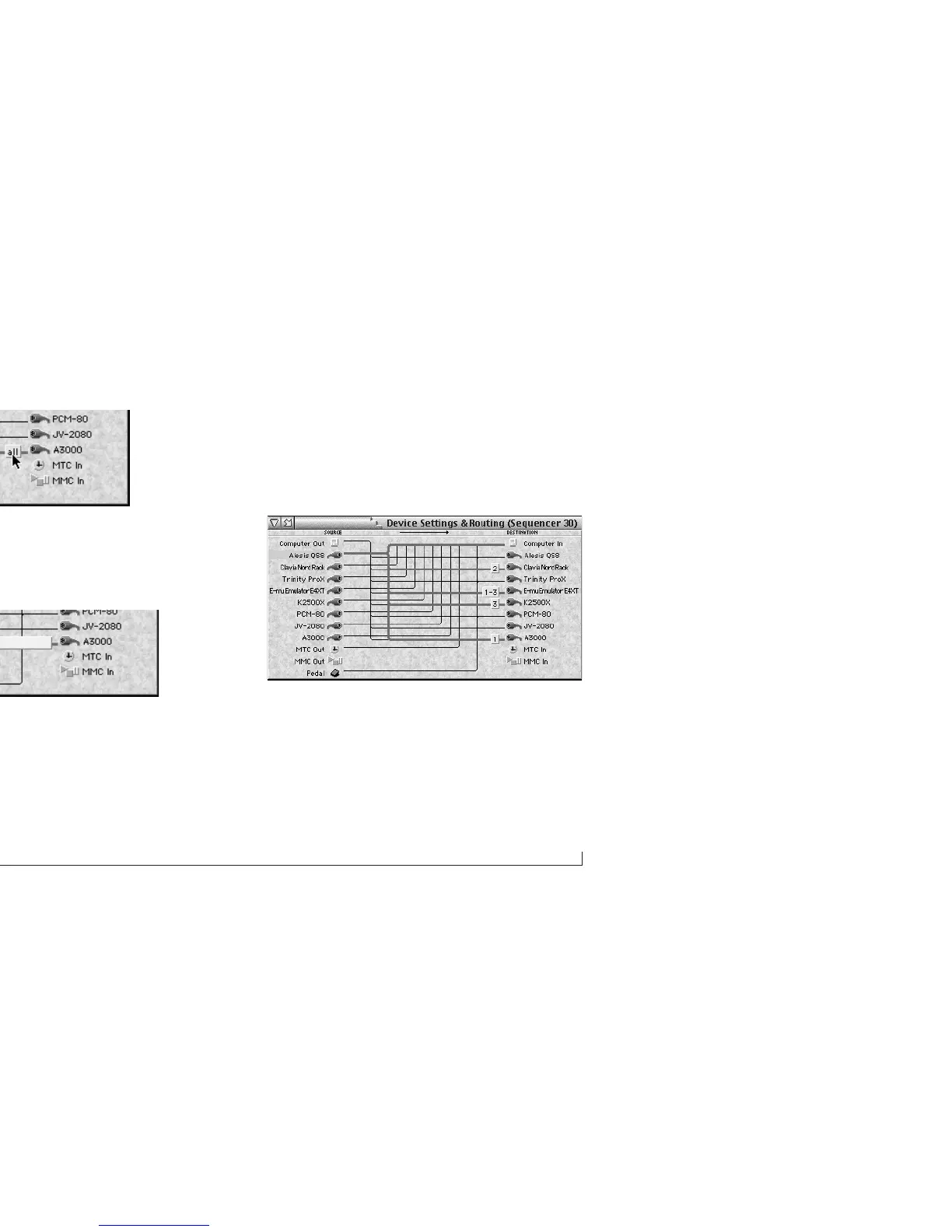
channels of the same synth. In Figure 6-17, the QS8
keyboard is split into three parts, transmitting on channels
1, 2, and 3, which are being connected to channels 1, 2, and
3 on the Emulator E4xt, as well as a few other synths. In
each connection, channel 1 is being mapped to channel 1,
channel 2 is being mapped to channel 2, etc. If you want all
channels to be connected, type “a” for “all” (connect all
channels).
Figure 6-17: Specifying multiple channels when making connections.
☛ Note: channel remapping cannot be done in this
window. For example, you cannot route channel 3 on the
QS8 to channel 5 on the E4. To accomplish this, see
chapter , “Channel Map” (page 74).



 To Next Page