CLOCKWORKS FOR MAC OS 9
70
Making computer connections
When your MOTU interface ships from the factory, it is set
up so that anything connected to the interface can talk to
the computer, and the computer can talk to anything
connected to the interface. These connections are
represented by the lines connected to the Computer icons
in the Device Settings & Routing window.
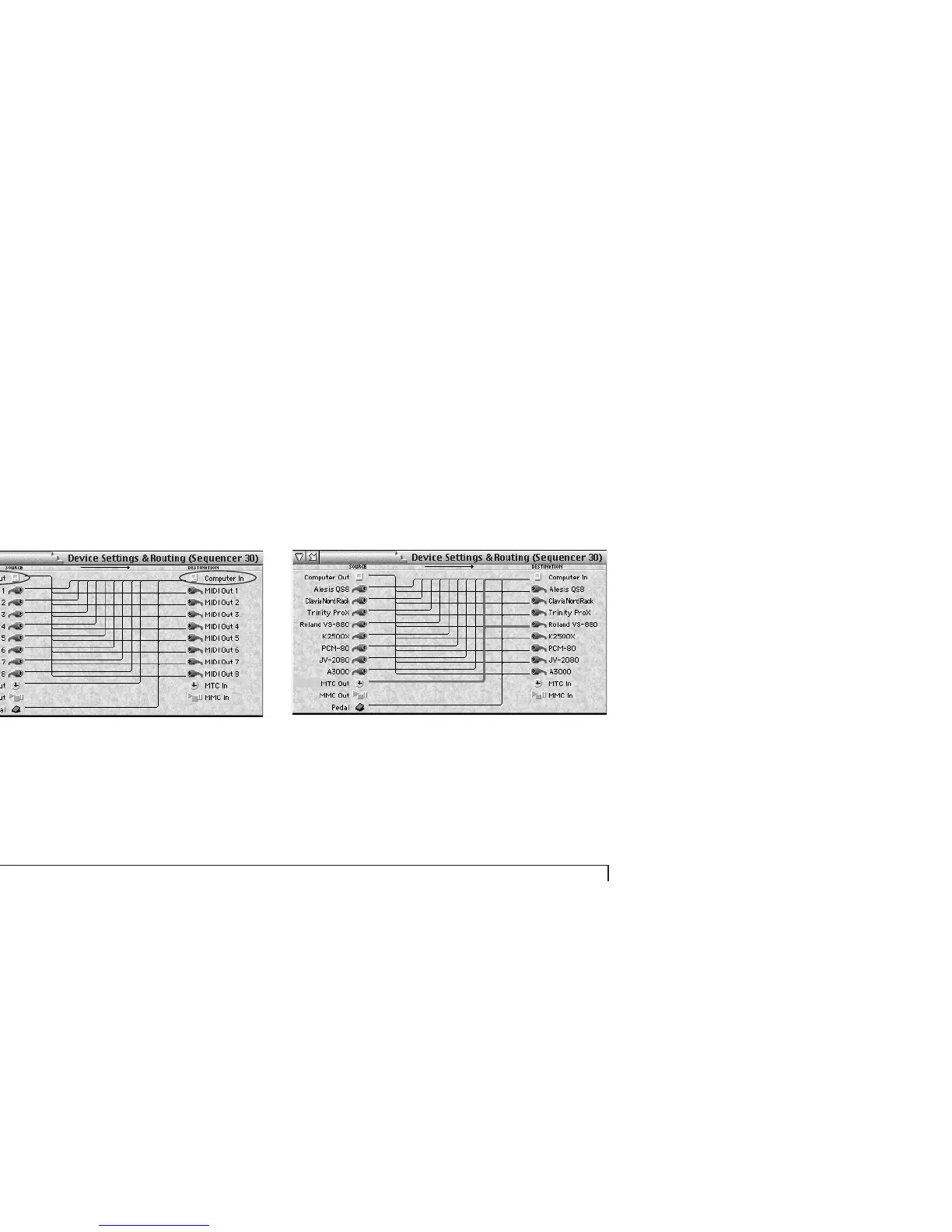
Figure 6-18: Editing computer connections. To route MIDI data to the computer,
use the computer icon on the right. To route MIDI data from the computer, use
the computer icon on the left.
Edit these connections in the same manner as described
earlier in this chapter.
The MTC In and MTC Out connections
The MTC In and MTC Out connectors represent MIDI
Time Code (MTC) routing to and from the interface itself.
If you would like to send MIDI Time Code from your
MOTU interface to devices connected to its MIDI Out
ports, create a connection from the MTC Out port to the
desired devices, as shown in Figure 6-19.
Figure 6-19: To send MIDI Time Code (MTC) generated by your Express interface
to other devices, make a connection from the MTC Out port (on the left) to the
desired devices on the right as shown here. In this example, the MOTU interface
(an Express XT in this example) is programmed to send MTC to the Roland
VS-880 hard disk recorder (and the computer, too, of course).



 To Next Page