8
Buttons and OLED Display
Button Functions:
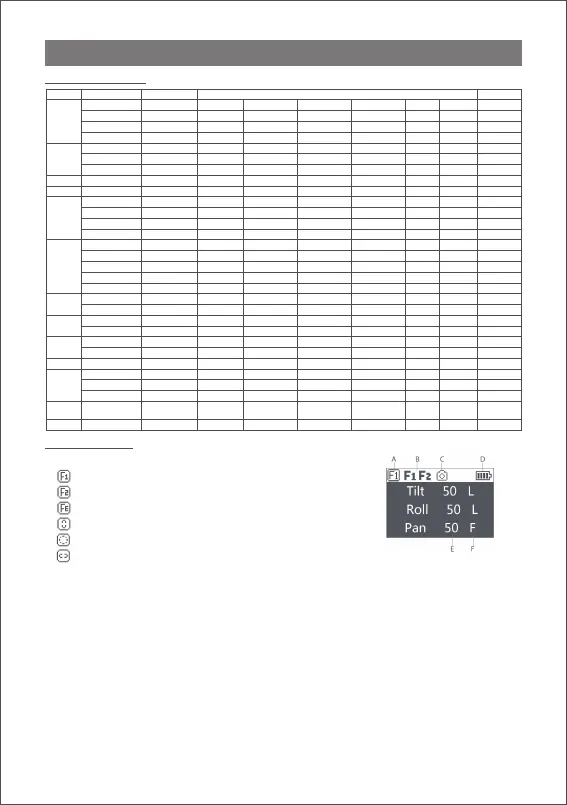
Main interface
A: Smart wheel working modes
Controlling external follow focus motor 1
Controlling external follow focus motor 2
Electronic follow focus
Controlling the tilt axis
Controlling the roll axis
Controlling the pan axis
B: Focus motor connection status. Icon will be displayed after
connection,otherwise it won’t be displayed. Up to two focus motors can
be connected at the same time.
C: Camera connection status. Icon will be displayed after USB connection,
otherwise it won’t be displayed.
D: Battery level. Each grid represents 25% battery level. When the battery is
empty, please charge the battery in time.
E: Follow speed value: 0-100. Turn the dial to adjust the value
F: Follow status
L: Lock. The axis locks and doesn’t follow.
F: Follow. The axis follows.
Q: Sport Gear Mode
Button Operation Function Meun
1 X —— N/A Focus Photo —— —— —— The same
2 X Re-Center N/A Re-Center Selfie —— —— —— The same
3 X Selfie N/A Re-Center Selfie —— —— —— The same
Hold Pan-Tilt Follow N/A Pan-Tilt Follow All lock
—— The same
1 X
—— —— —— —— —— —— The same
2 X Take photo —— —— —— —— —— —— The same
3s ON/OFF —— —— —— —— —— —— The same
Wheel Turn Focus motor 1
Focus motor 2 E-focus Tilt axis Roll axis Pan axis The same
M Button 1 X
—— —— —— —— —— —— The same
1 X
—— —— —— —— —— —— The same
2 X
—— —— —— —— —— —— The same
3 X FPV mode —— —— —— —— —— —— The same
3s Auto tune —— —— —— —— —— —— The same
1 X Pan follow —— —— —— —— —— —— The same
2 X Roll folow —— —— —— —— —— —— The same
3 X Tilt follow —— —— —— —— —— —— The same
Push Up-Down
Tilt axis Roll axis Pan axis —— —— —— The same
Push Left-Right
Tilt axis Roll axis Pan axis —— —— —— The same
1 X TV —— —— —— —— —— —— Option-up
2 X Tilt follow —— —— —— —— —— —— ——
1 X AV —— —— —— —— —— ——
2 X Pan follow —— —— —— —— —— —— ——
1 X ISO —— —— —— —— —— —— Return
2 X Roll folow —— —— —— —— —— —— ——
Right 1 X
—— —— —— —— —— ——
1 X Enter the menu —— —— —— —— —— —— The same
3 X Language —— —— —— —— —— —— The same
3s Sleep/wake up —— —— —— —— —— —— The same
Dial Turn Follow speed —— —— —— —— —— ——
relevant
Combo Joystick+Power Upgrade mode —— —— —— —— —— —— ——
Trigger
Menu
Button
Power
Button
Fn
Button
Joystick
Top
Down
Left



 To Next Page