16
Triple click the right button again to exit the Inception Mode.
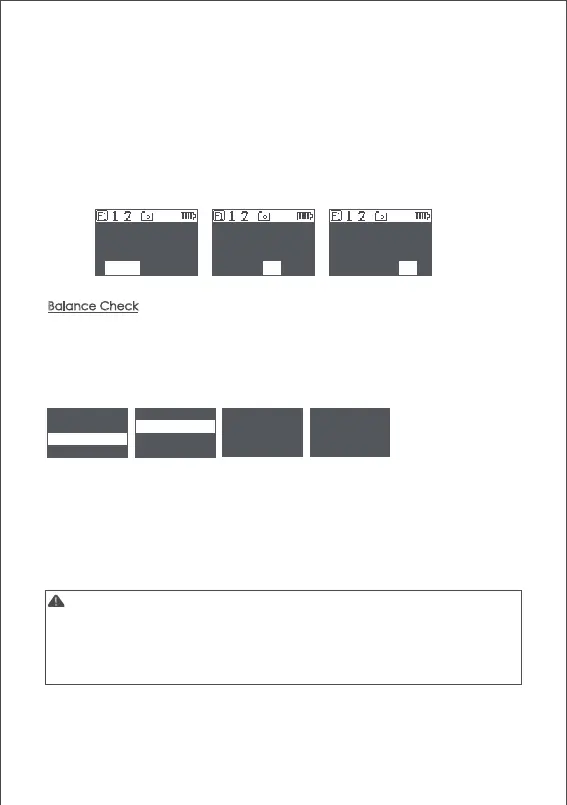
Balance Check
The gimbal can check the balance status of tilt and roll axis automatically
and instruct users to make the correct adjustment.
a. Attach a tripod to the gimbal, turn on the gimbal and place it on a horizontal
tabletop.
b. Enter the menu, select advanced>balance chk, the gimbal begins to check
the balance adjustment.
c. When balance check is completed, the balance status of each axis will be
displayed on the screen, direction guide will be also displayed if the adjustment
is needed.
d. ' C ' means quick release plate, ' T ' means tilt axis, ' R ' means roll axis, then start
the adjustment according to the screen prompts.
e. When adjustment is completed, press the right button and check it again until
the gimbal is well balanced.
Note:
1. Balance check can be only used with the tilt and roll axis, the pan axis balance
can’t be checked.Be sure that the motor lock has been released when using
balance check.
2. Motors turned off after balance check, please long press ‘menu’ button to start
the gimbal
release or turn to a specified angle, the gimbal stops.
●
Turn the dial: adjust the rotation speed
●
Press the left button on the dial once: the gimbal rotates to the left
automatically.If the gimbal is rotating, press once to stop.
●
Press right button on the dial once: the gimbal rotates to the right automatically.
If the gimbal is rotating, press once to stop.
●
Press up/down button on the dial: select rotationangle
●
Normal: gimbal rotatesand does not stop automatically
●
180: the gimbal rotates 180° and stops automatically.
●
360: the gimbal rotates 360° and stops automatically.
camera > autotune C adjust to +
gimbal > balance chk checking T adjust to -
advanced > iFocus > R well balanced
general > inception > exit
Inception Mode
<< Spee :50 >
Normal 180 360
Inception Mode
< Speed:50 >
Inception Mode
< Speed:50 >
Normal 180 360Normal 180 360



 To Next Page