6
Balance Adjustment
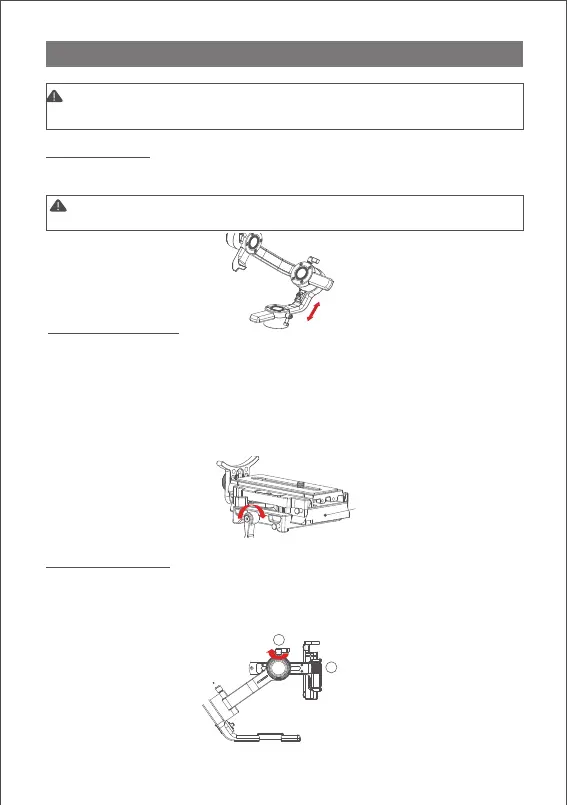
Lock the Roll Axis
Move the roll motor lock to the lock end, rotate the roll arm to the position shown
below, then the roll arm will automatically lock.
Balancing the Camera
a. Mount the camera onto the Air 2, release hands to check if the camera is top
or bottom heavy.
b. If the camera is bottom heavy, loosen the knob to slide the quick release
baseplate forwards until the lens points forward.
c. If the camera is top heavy, loosen the knob to slide the quick release
baseplate backwards until the lens points forward.
d. Tighten the knob.
Balancing the Tilt Axis
a. Rotate the camera so that the lens is pointing upward, release hands to check
the direction in which the camera swings.
b. Loosen the knob 1 on the tilt motor to slide the tilt arm 2 until the camera stays
still without tilting it up or down.
c. Tighten the knob 1.
Note: In order to make the adjustment easier, please refer to the balance
check function of Air 2 on page 16.
Note: If the roll arm locks in the position overlapping the pan arm, please
unlock the roll motor first)
1
Lock
Unlock
2
quick release baseplate



 To Next Page