Trigger Box Quick Start Guide
6
Testing the trigger outputs
You can test that the Trigger Box is
receiving trigger signals from Flair,
without needing to attach anything to
the OUT connectors on the Trigger
Box:
1. In Flair, use menu option
Setups > Outputs > Tes t
Outputs.
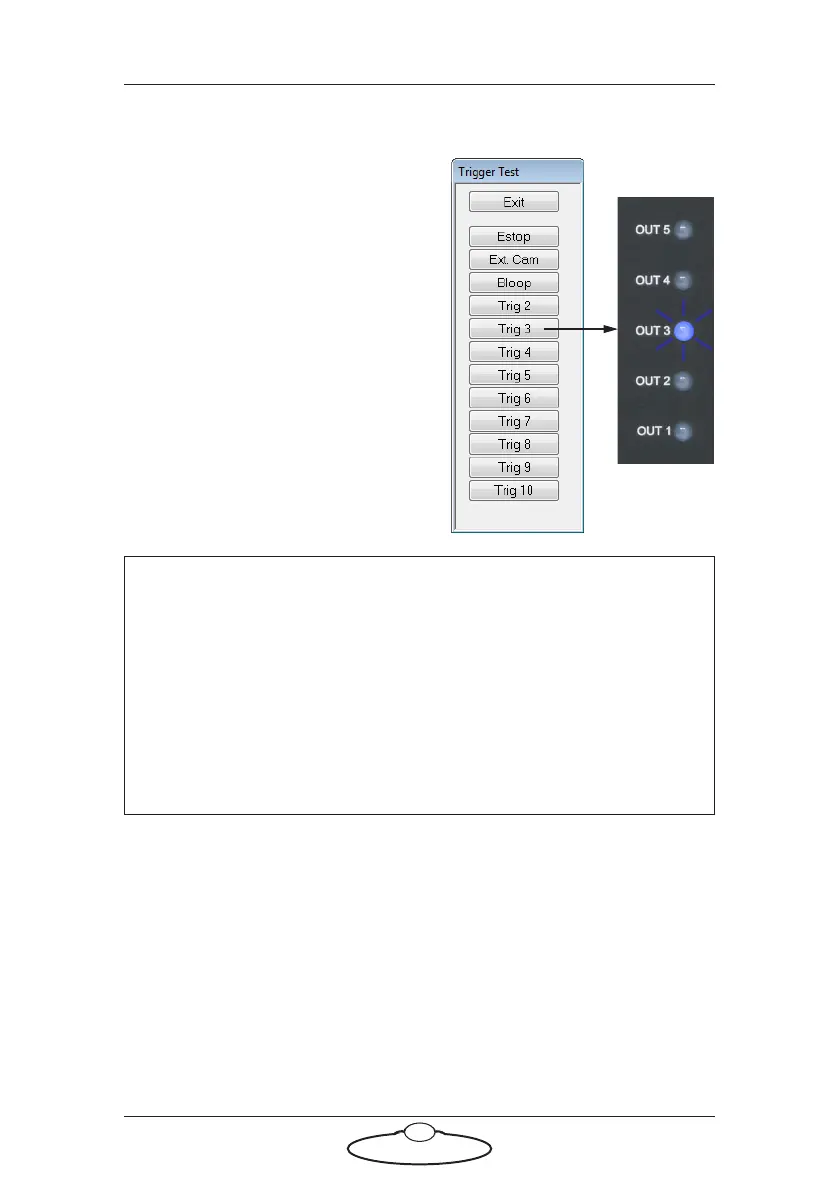
2. In the pop-up, click on one of
the Trig buttons.
When you press the button, the
corresponding numbered OUT LED
should light up in on the Trigger Box
panel. For example pressing Trig 3
makes the OUT 3 LED light up.
To test the External Camera (Ext. Cam) trigger output, see Testing the
Sync input and Camera On/Off trigger output on page 12.
Hint
Trigger Output 1 (Bloop) is a special case due to the way in which
the ribbon cable is cut (see page 2). The Trigger 1 Output signal will
only reach the Trigger Box if the Trigger Box is plugged into the
SYNC or BLOOP connectors. The OUT 1 LED will not light if you
have attached the Trigger Box to the TRIGGER connector on the
RT-14 ribbon cable, although in this case the Bloop light that you
have attached to the BLOOP connector on the same ribbon cable
should light up.


 To Next Page