Trigger Box Quick Start Guide
10
Using the Sync input from a camera
Flair can use the Synchronisation (Sync) signal from a video camera to
control the speed at which the rig moves during a scene. For details of
doing this refer to the Flair documentation.
There are two typical ways to get the Sync signal from the camera into the
RT-14 interface box (and from there into Flair):
• Plug the External Camera Trigger Out/Sync In cable into the
SYNC connector on the ribbon cable (see page 2).
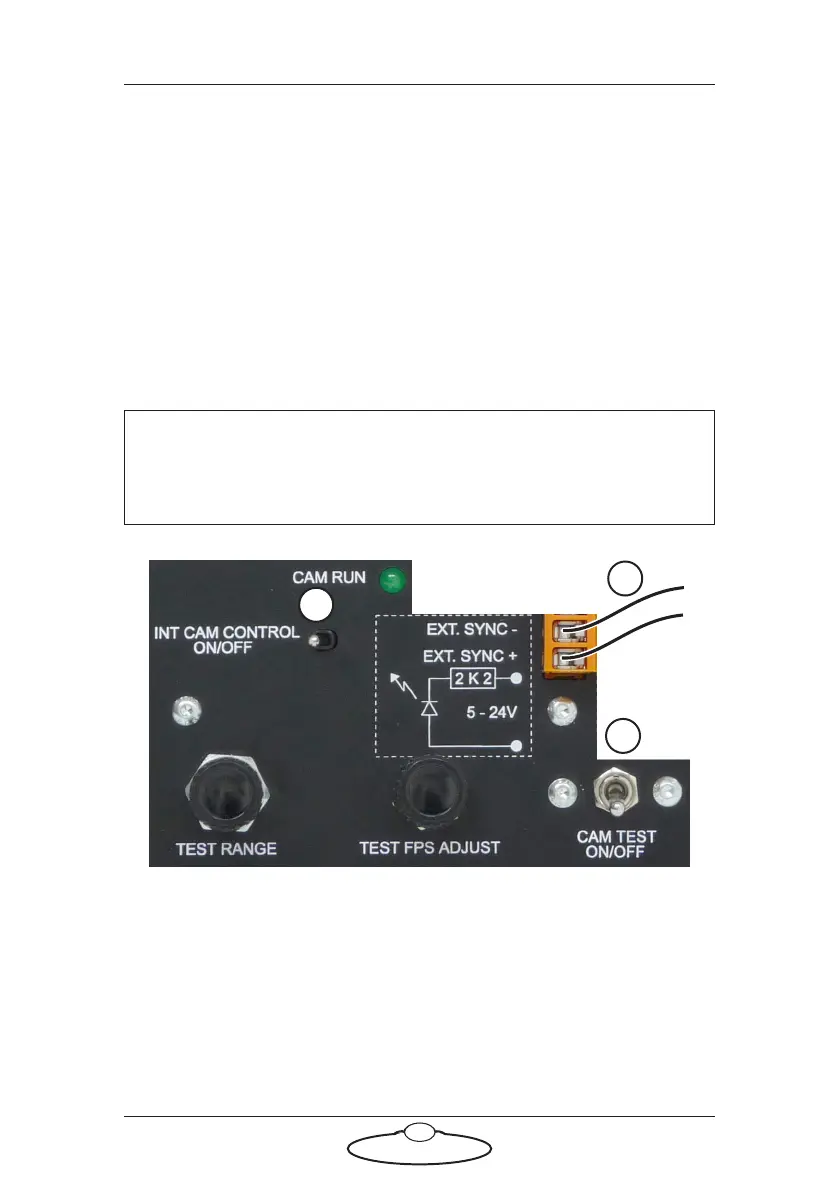
• Connect the Sync In signal wires to the Trigger Box (see
below).
1. Attach the Sync wires from the camera to the pair of EXT. SYNC
connectors on Trigger Box.
The Sync signal coming from the camera must be 5 to 24 Volts DC.
The internal resistance of this circuit is 2.2 kilo-ohms.
2. Make sure the CAM TEST ON/OFF switch is Off. This position
reads the incoming Sync signal from the connectors and sends it on
to Flair, instead of sending the Sync signal that can be generated by
the Trigger Box’s own internal simulated camera.
Hint
The wires for the Sync In signal are not cut on the ribbon cable, so
you can put the Sync In signal into any plug or device on the cable.
1
2
3


 To Next Page