Trigger Box Quick Start Guide
1
Trigger Box Quick Start GuideTrigger BoxQuick Start Guide
Chapter 1 Quick start
Safety
• Do not use around flammable gas. All electrical equipment can
generate sparks that can ignite flammable gas.
• Keep the equipment dry. The system has not been made
weatherproof. Do not use with wet hands.
• Keep cables tidy. Use cable ties to keep them out of harm’s way.
If you have a head with slip rings then make use of them; avoid
running any cables between the base and the rotating head or
camera.
Overview
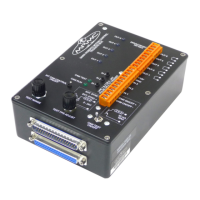
Thank you for using the Trigger Box from Mark Roberts Motion Control
(MRMC). You use the Trigger Box to send and receive trigger and
synchronisation signals between external devices and an RT-14 interface
box. The RT-14 unit itself is, in turn, attached to the motion controlled
robotic camera rig and a Windows computer running Flair Motion
Control Software. You can also use an RT-12 interface box instead of an
RT-14, as these units have similar connectors and features.
The Trigger Box has the following main features:
• Five trigger outputs that you can activate from Flair, either
manually or by pre-programmed camera moves.
• Three trigger inputs that you can use to activate events in Flair,
such as playing a pre-recorded camera move.
• Synchronisation (sync) input for receiving a sync signal from a
video camera and passing it on to Flair and the rig.
• Camera trigger on/off output, for triggering a camera on and
off from Flair.
• Built-in facilities for generating and checking input and output
signals to test components of the system, without needing to
connect all of the system.
The Trigger Box is a robust unit designed for day-in, day-out use in a
professional studio environment.


 To Next Page