Trigger Box Quick Start Guide
16
4. In Flair, use menu option
Setups > Outputs > Tes t
Outputs.
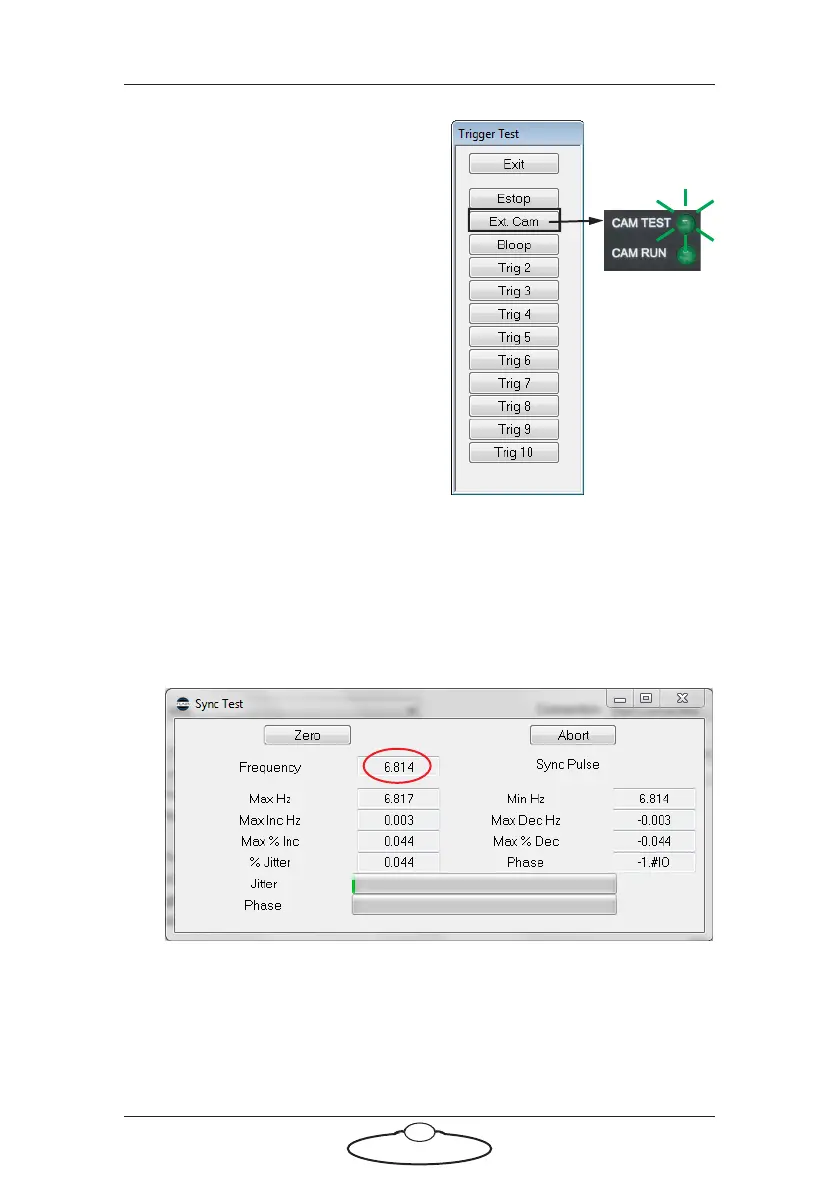
5. In the pop-up, click on the Ext.
Cam button to trigger the
simulated camera (Sync
generator) in the Trigger Box.
When you hold down the Ext. Cam
button, several things should happen:
• The CAM TEST LED lights
up, indicating that the
Trigger Box has received
the External Camera
trigger output from Flair.
• The CAM RUN LED lights
up indicating that the internal simulated camera (Sync
generator) in the Trigger Box is running. This LED blinks in
time with the Sync frequency. You can adjust it using the TEST
RANGE and TEST FPS ADJUST knobs on the Trigger Box.
• The Sync Test pop-up in Flair updates the displayed Frequency
data:
When you release the Ext. Cam button the CAM TEST and CAM RUN
LEDs will go out and Flair will not detect a Sync signal.
This completes the test. Refer to the next section to return the Trigger
Box to its normal working mode.


 To Next Page