10177245 Rev. 2 / OM-243792 Page 10
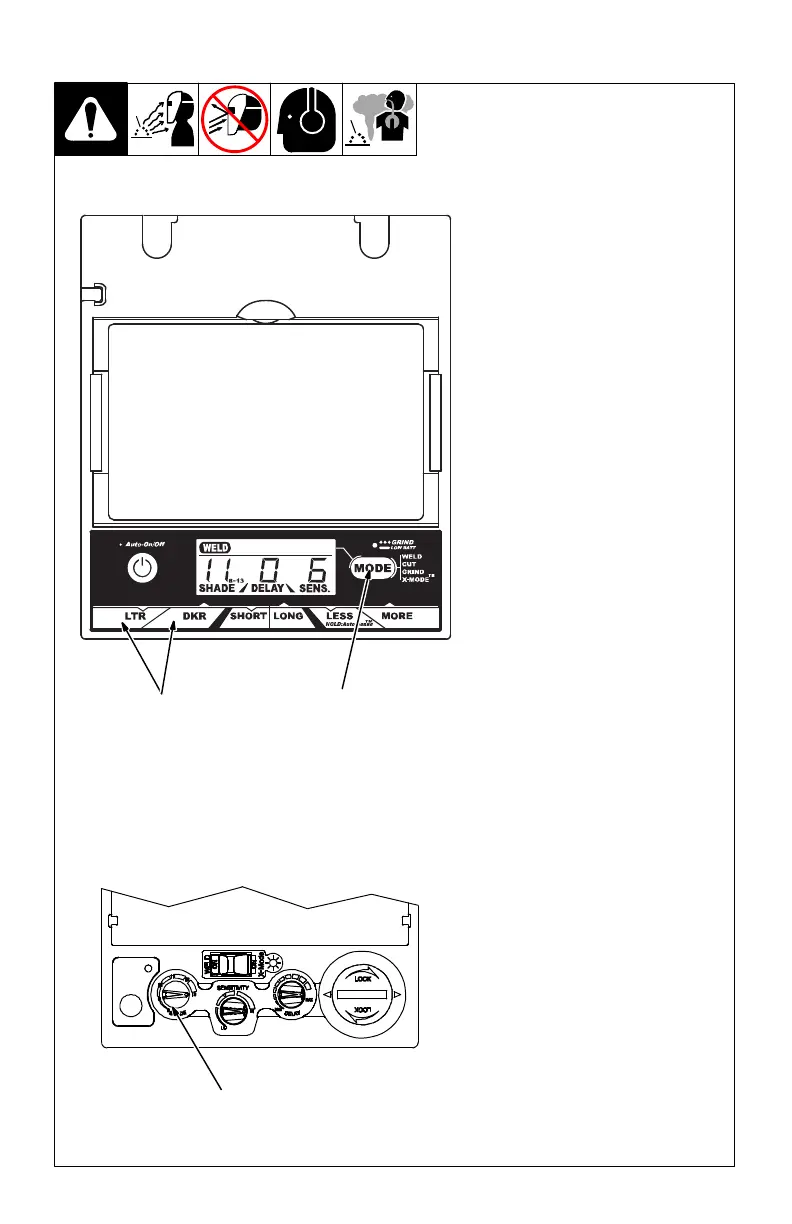
Elite Auto-Darkening Lens
1 Variable Shade Adjustment
Buttons
2 Mode Control Button
Use the LTR and DKR adjustment
buttons to adjust the lens shade in
the darkened state. Use the table in
Section 1-4 to select proper shade
control setting based on your weld-
ing process. The shade ranges for
each mode are as follows:
Weld − No. 8 − No. 13
Cut − No. 5 − No. 8
Grind − No. 3 only
X-Mode − No. 8 − No. 13
Start at the highest setting and ad-
just lighter to suit the application and
your personal preference.
Variable Shade Adjustment Pro-
cedure
Press Auto On/Off button to turn
lens On. Display screen should
show lens settings.
Press Mode Control Button to
select desired function: Weld,
Cut, Grind, or X-Mode.
Use LTR and DKR adjustment
buttons to select desired shade.
Begin welding or continue with
other lens adjustments.
VSi Auto-Darkening Lens
3 Variable Shade Control
Lens shade can be adjusted from
No. 8 − 13.
Use the control to adjust the lens
shade in the darkened state. Use
the table below to select proper
shade control setting based on your
welding process.
Start at darkest shade and adjust
lighter to suit the welding application
and your personal preference.
2
Elite Lens Assembly
1
3-4. Variable Shade Control
VSi Lens Assembly
3



 To Next Page