10177245 Rev. 2 / OM-243792 Page 12
1
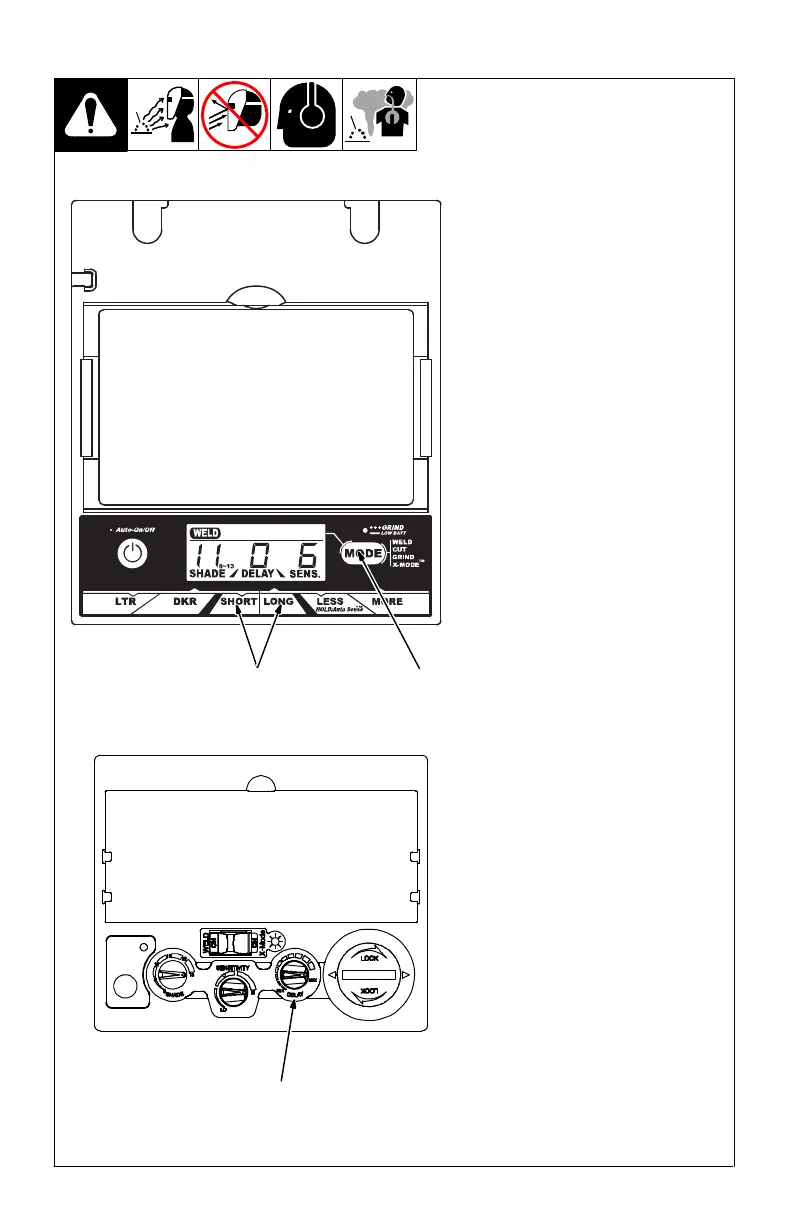
Elite Auto-Darkening Lens
1 Lens Delay Adjustment Buttons
2 Mode Control Button
Use the Lens Delay Short and Long
buttons to adjust the time for the lens
to switch to the clear state after weld-
ing or cutting.
The delay is particularly useful in
eliminating
bright after-rays present
in higher amperage applications
where the molten puddle remains
bright momentarily after welding. Use
the Lens Delay Control buttons to ad-
just delay from 0 to 10 (0.1 to 1.0
second).
The delay ranges for each mode are
as follows:
Weld, Cut, And X-Modes − 0 − 10
Grind Mode − No delay adjustment
There is no lens delay adjust-
ment in the Grind mode, and in
the Cut mode (when sensitivity is
set to 10).
Lens Delay Adjustment Procedure
Press Auto On/Off button to turn
helmet On. Display screen
shows lens settings.
Press Mode button to select de-
sired function: Weld, Cut, or
X-Mode.
Use Short and Long adjustment
buttons to select desired delay.
Begin welding or continue with
other lens adjustments.
VSi Auto-Darkening Lens
3 VSi Helmet Lens Delay Control
The lens delay control is used to ad-
just the time for the lens to switch to
the clear state after welding.
The delay is particularly useful in
eliminating
bright after-rays present
in higher amperage applications
where the molten puddle remains
bright momentarily after welding.
VSi helmet adjusts from Min to Max
(0.1 to 1.0 second).
2
Elite Lens Assembly
3-5. Lens Delay Control
VSi Lens Assembly
3



 To Next Page