10177245 Rev. 2 / OM-243792 Page 20
SECTION 5 − REPLACING THE LENS COVERS
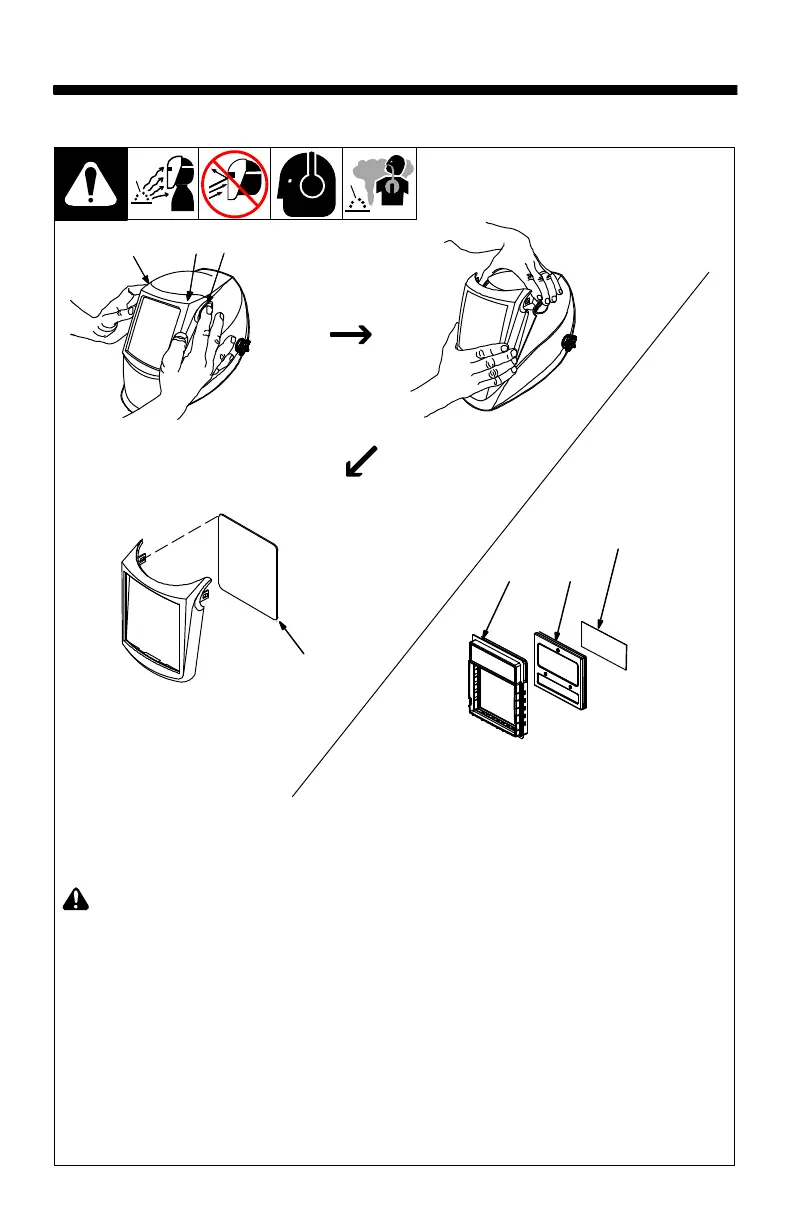
5-1. Replacing Lens Covers On Elite Quick-Release
! Never use the auto-
darkening lens with-
out the inside and
outside lens covers
properly installed.
Welding spatter will
damage the auto-
darkening lens and
void the warranty.
1 Front Lens Holder
2 Release Points
3 Lens Cover
Remove front lens holder
by pressing release points
and pulling the holder away
from the helmet.
Remove lens cover from
the holder, replace lens
cover, and reinstall holder
in helmet.
Inside Lens Cover
4 Gasket
5 Lens
6 Inside Lens Cover
Remove the inside lens
cover by pulling out of re-
taining rails.
Replace the lens cover by
gently bowing it in the cen-
ter and inserting it, one end
at a time, into the retaining
rails.
Be sure the cover lens
is seated properly (flat)
to prevent fogging.
1
2
2
3
4
5
6



 To Next Page