10177245 Rev. 2 / OM-243792 Page 6
SECTION 3 − OPERATING INSTRUCTIONS
Use adjustment buttons to
change shade, delay, and
sensitivity settings.
The lens assembly saves the
shade, sensitivity, and delay
settings.
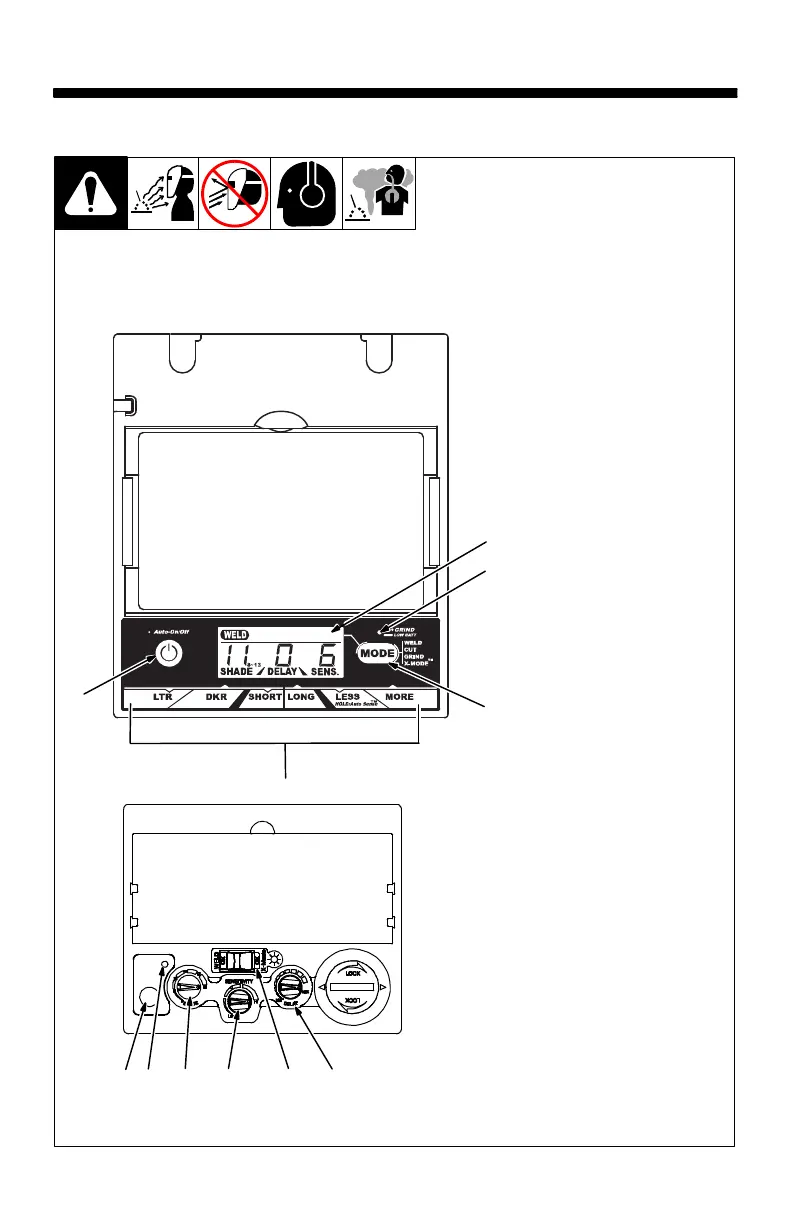
Elite Auto-Darkening Lens
1 Auto On/Off Button (See
Section 3-2)
2 Grind Mode / Low Battery
Light (Section 3-2)
3 Mode Control Button
(See Section 3-3)
4 Display Screen
5 Lens Adjustment Buttons
(Sections 3-3 Thru 3-6)
1
2
3
Elite Lens Assembly
5
4
3-1. Helmet Controls
VSi Lens Assembly
67 8 9 10 11
VSi Auto-Darkening Lens
6 Reset Button
(See Section 3-2)
7 Low Battery Indicator
(See Section 3-2)
8 Variable Shade Control
(No. 9 − 13) (See Section 3-4)
9 Sensitivity Control
(See Section 3-7)
10 Mode Control (See Section
3-3)
11 Lens Delay Control (See
Section 3-5)



 To Next Page