10177245 Rev. 2 / OM-243792 Page 22
SECTION 6 − REPLACING THE BATTERY
Elite Auto-Darkening Lens
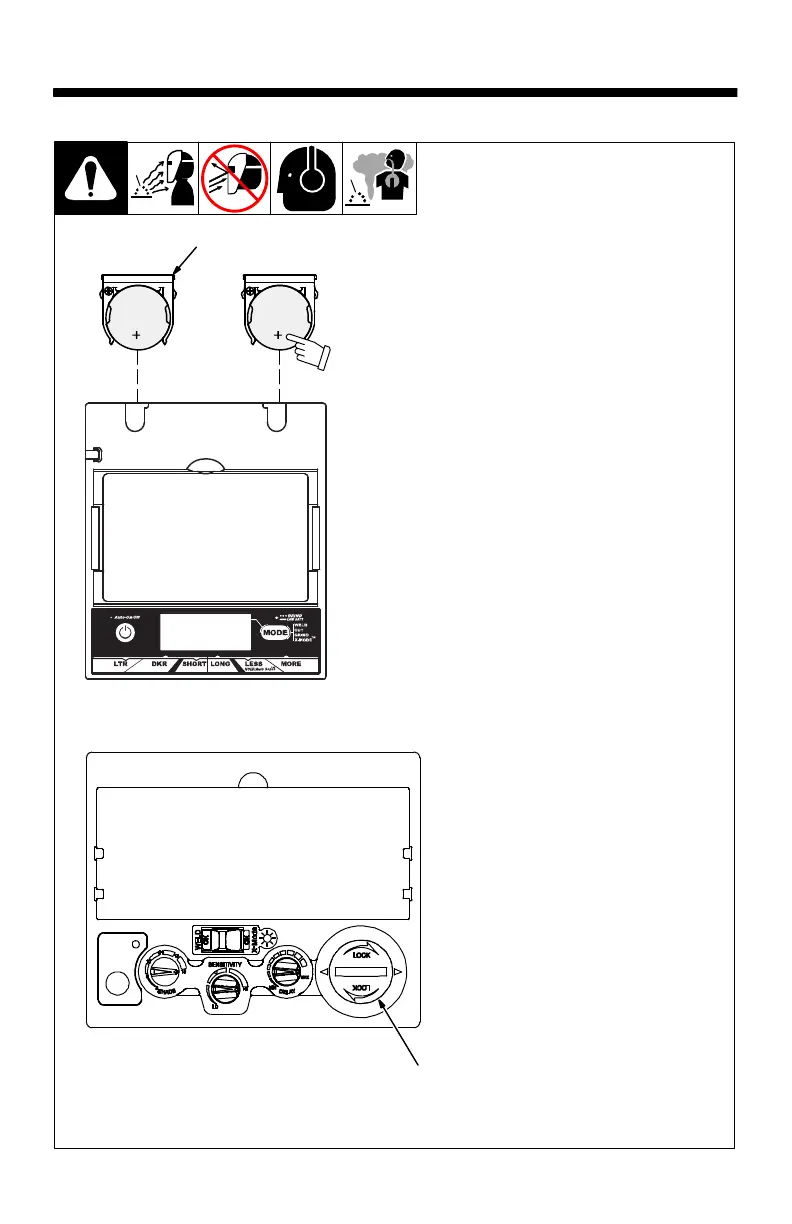
To replace the batteries, remove the
auto-darkening lens assembly (see
Section 5).
1 Battery Tray
After removing the lens assembly,
slide the battery holding trays out
and remove the old batteries.
Replace with Panasonic CR2450
lithium type batteries (2 required,
Miller Part No. 217043; Panasonic
recommended).
Be sure Positive (+) side of the
battery faces up (toward inside
of helmet).
Reinstall the battery trays. To test,
press the On button. The display
screen should turn on. Reinstall the
lens assembly.
Left and right battery trays are
not interchangeable in the Digit-
al Elite lens assembly. The au-
to-darkening helmet will not
work if battery trays are installed
on the wrong sides.
VSi Auto-Darkening Lens
2 Battery Cover
Insert a coin into the slot on the bat-
tery cover. Rotate cover counter-
clockwise to remove battery.
Install CR2450 lithium battery (Miller
Part No. 217043; Panasonic recom-
mended).
Be sure Positive (+) side of the
battery faces up (toward inside
of helmet).
To reinstall battery cover, position
cover with arrows at 6 and 12 o’clock
positions, then turn cap 1/4 turn
clockwise.
1
Be sure
Positive (+)
side of
battery
faces up.
Elite Lens
OTOS / 804847
2
VSi Lens



 To Next Page