3 Interfacing ProtoNode to Devices
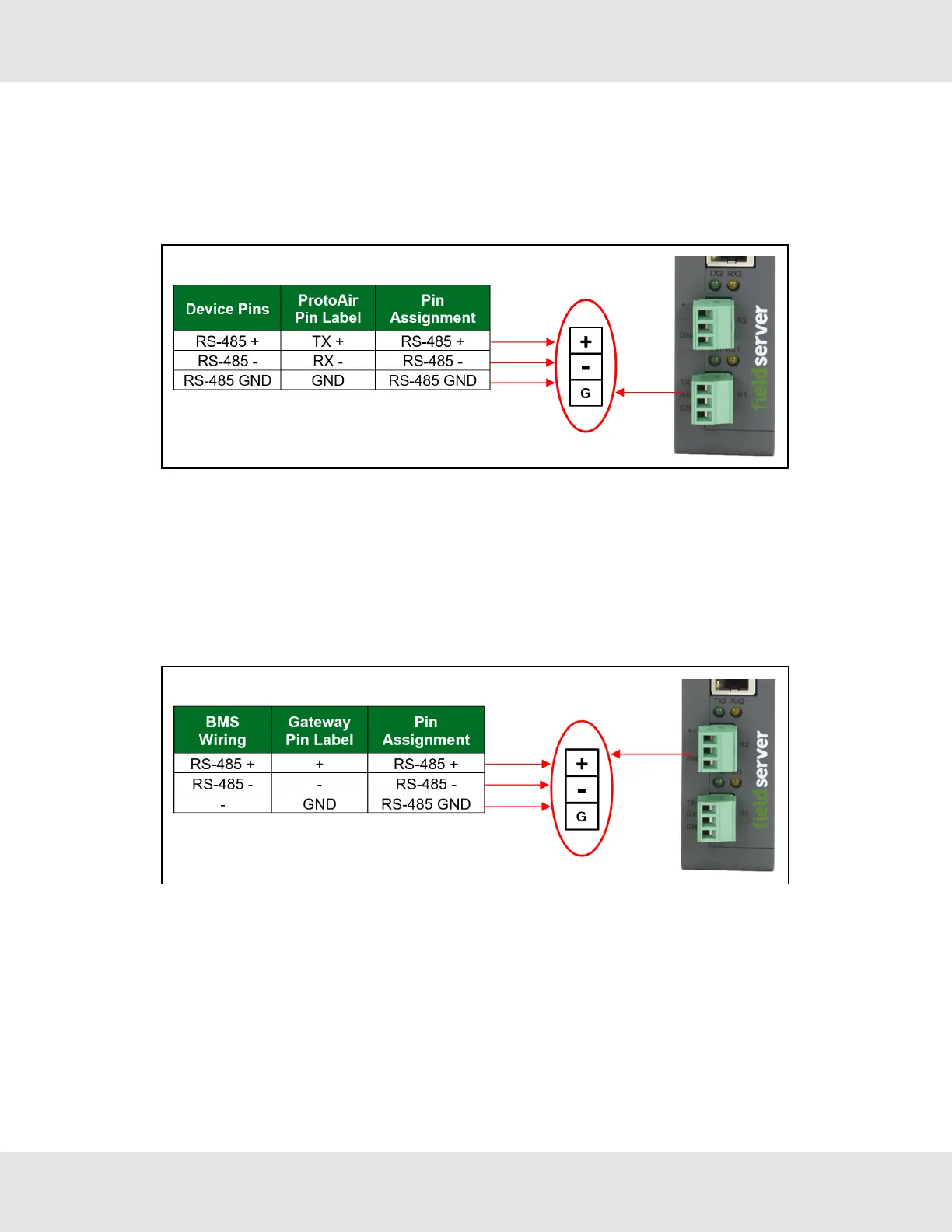
3.1 Device Connections to ProtoNode
The ProtoNode has a 3-pin Phoenix connector for connecting RS-485 devices on the R1 port.
NOTE:Use standard grounding principles for RS-485 GND.
3.2 Wiring Field Port to RS-485 Serial Network
• Connect the RS-485 network wires to the 3-pin RS-485 connector on the R2 port.
◦ RS-485 is part of the RS-485 interface and must be connected to the corresponding terminal on the BMS. If the
cable is shielded, the shield must connected only at one end and to earth ground – it will help suppress the
electromagnetic field interference. (Connecting the shield at both ends will likely produce current loops, which
could produce noise or interference that the shield was intended to block).
• See Section 5.1 Connecting to the Gateway via Ethernet for information on connecting to an Ethernet network.
Hunter Fans ProtoNode FPC-N64 8



 To Next Page