Sensor
The display shows the configured type of sensor operating with each individual detector, e.g.: COMB
[combustible], CO, H
2
S.
Range
The display shows the measuring range predefined for the gas detector, e.g.: 100% LEL.
Countdown
The countdown for sensor stability is displayed.
Normal Operation
After countdown, the gas concentration [ppm, Vol%, % LEL, % UEG, mg/m
3
] is displayed. The heart
symbol flashes to indicate alive status.
4.2 Menu Sequence
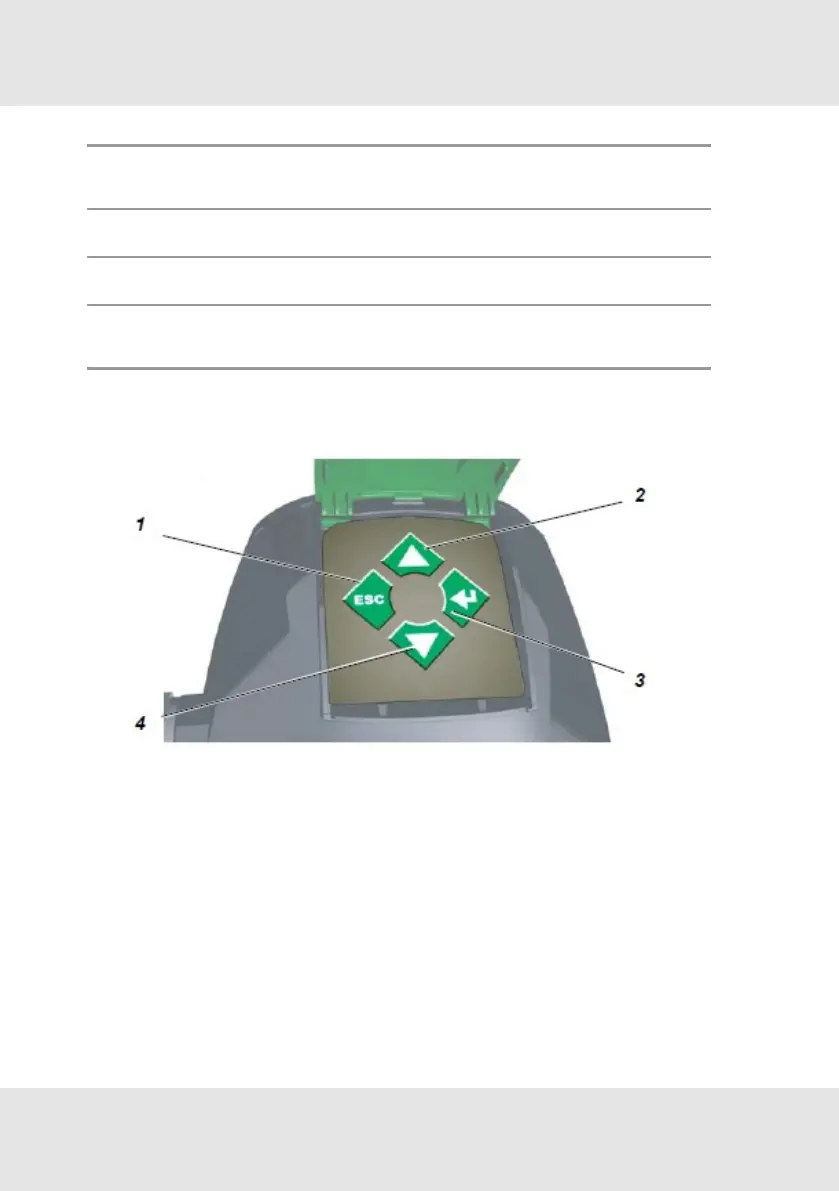
Figure 9 Keypad - operating buttons
1 ESC button 3 ENTER button
2 UP button 4 DOWN button
To navigate in the menu sequence, 4 buttons are available.
In general:
1. Press ENTER to get access to a menu sequence.
2. Press UP or DOWN until the desired menu is displayed.
3. Press ENTER to get access to a menu.
4. Press ESC to cancel the process.
19 PrimaX GB
4 Operation



 To Next Page