5 Maintenance
5.1 Changing the Sensors
DANGER!
Remove and reinstall sensors carefully, ensuring that the components are not damaged; otherwise the
approval may be adversely affected, wrong readings could occur, and persons relying on this product for
their safety could sustain serious personal injury or death.
Failure to follow this warning will result in serious personal injury or death.
Before changing the sensor, the Sensor Exchange mode must be activated. This ensures the
sensor must be calibrated after exchange and the sensor lifetime counter is reset. See
chapter 4.2 Menu Sequence.
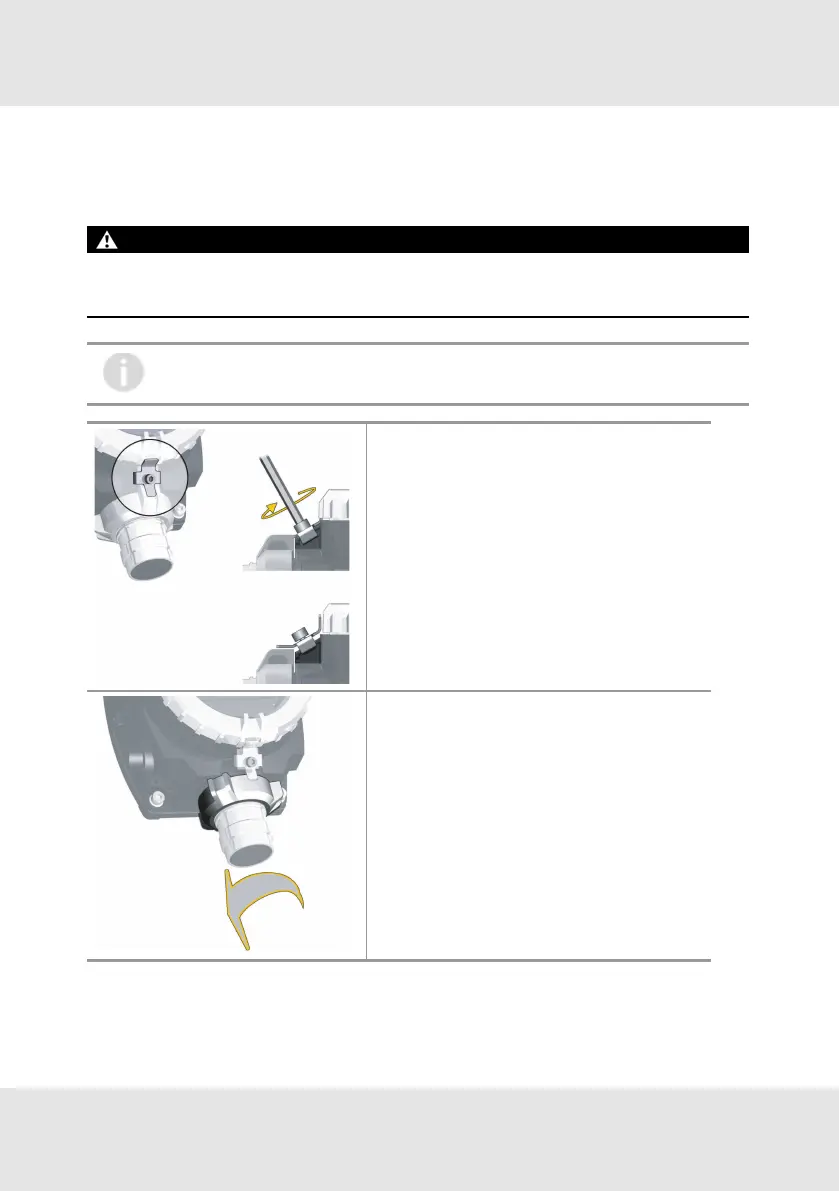
Remove Interlock
1. Unscrew the socket head screw.
2. Remove the interlock.
Remove Bayonet Joint
3. Turn the bayonet ring counter-clockwise.
4. Remove the bayonet ring by pulling it down.
GB PrimaX 32
5 Maintenance



 To Next Page