0=H@M=HA5AJKF
2-15
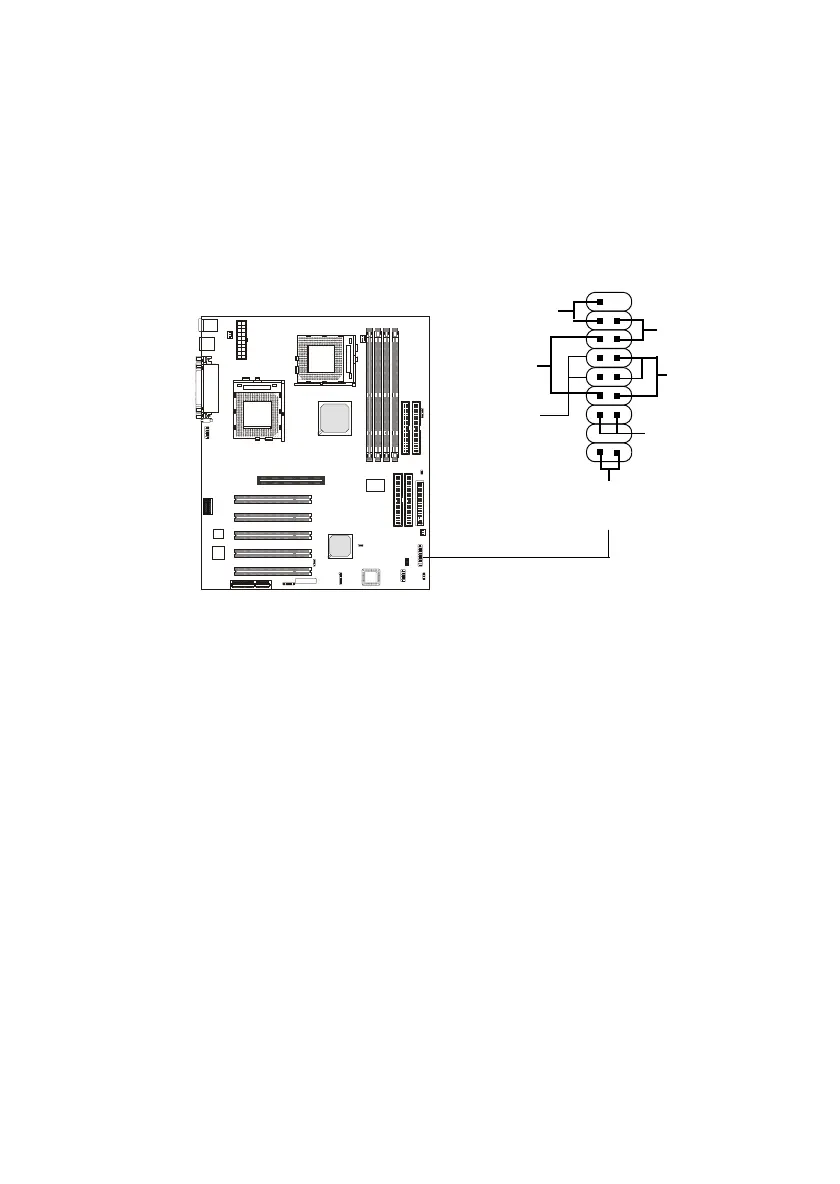
Case Connector: JFP1
The case connector block JFP1 allows you to connect to the Power
Switch, Reset Swtich, Speaker, Power LED, and HDD LED on the case.
Power Switch
Connect to a 2-pin push button switch. The switch has the same feature as
JRMS1.
Reset Switch
Reset switch is used to reboot the system rather than turning the power ON/
OFF. Avoid rebooting while the HDD is working. You can connect the
Reset switch from the system case to this pin.
Power LED
The Power LED is lit while the system power is on. There are two types of
LEDs you can connect from the system case to the pin:
2-pin single color power LED: Connected to pin 5 & 6. When the
system enters the suspend/sleep mode, the 2-pin power LED blinks.
JFP1
Power
Switch
Power
LED
+
Reset
Switch
HDD LED
+
Speaker
Buzzer
(short pin)
14
15
X



 To Next Page