3-17
BIOS Setup
Off Leaves the computer in the power off state.
On Reboots the computer.
Former-Sts Restores the system to the status before power failure or
interrupt occurs.
OnChip IDE Device
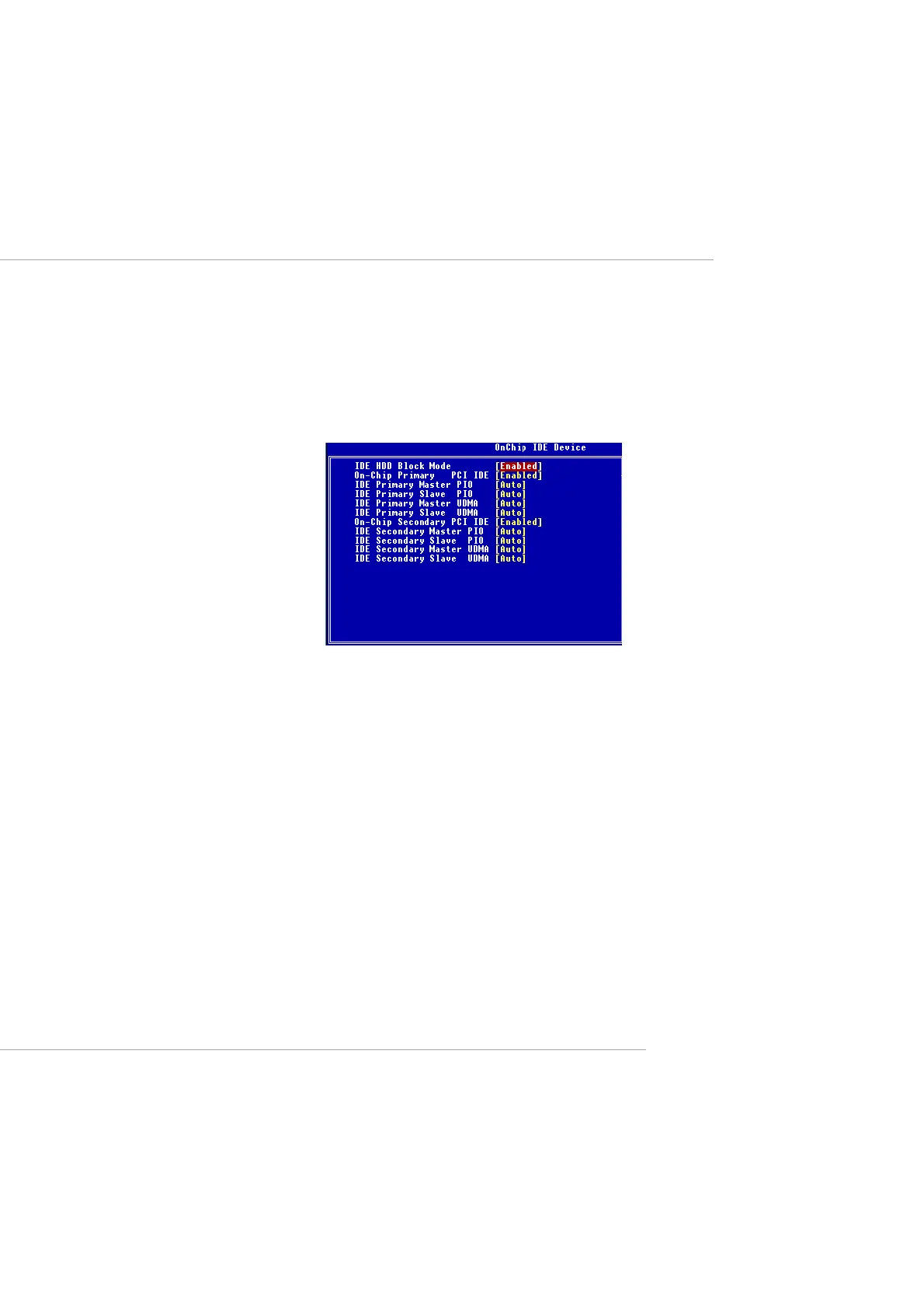
Press <Enter> to enter the sub-menu and the following screen appears:
IDE HDD Block Mode
This allows your hard disk controller to use the fast block mode to trans-
fer data to and from the hard disk drive. Block mode is also called block
transfer, multiple commands or multiple sector read/write. Enabled ena-
bles IDE controller to use block mode; Disabled allows the controller to
use standard mode.
On-Chip Primary/Secondary PCI IDE
The integrated peripheral controller contains an IDE interface with sup-
port for two IDE channels. Choose Enabled to activate each channel
separately.
IDE Primary/Secondary Master/Slave PIO
The four items allow you to set a PIO (Programmed Input/Output) mode
for each of the four IDE devices that the onboard IDE interface supports.
Modes 0~4 provide increased performance. In Auto mode, BIOS auto-
matically determines the best mode for each IDE device.
IDE Primary/Secondary Master/Slave UDMA
Ultra DMA implementation is possible only if your IDE device supports
This manual downloaded from http://www.manualowl.com



 To Next Page