3-24
MS-9121 E-ATX Mainboard
PC Health Status
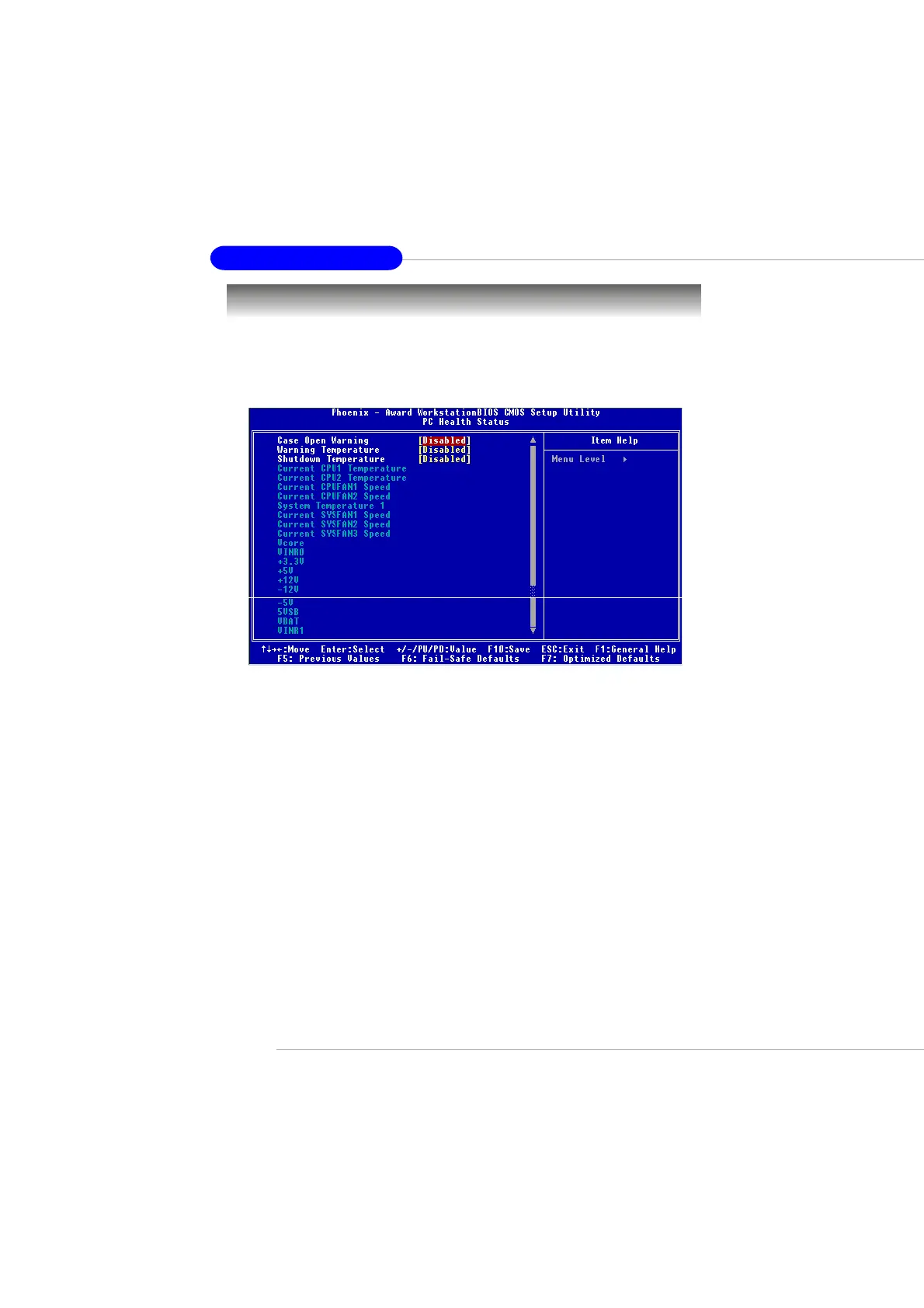
This section shows the status of your CPU, fan, overall system status,
etc. Monitor function is available only if there is hardware monitoring mecha-
nism onboard.
Case Open Warning
The field enables or disables the feature of recording the chassis intrusion
status and issuing a warning message if the chassis is once opened. To clear
the warning message, set the field to Reset. The setting of the field will auto-
matically return to Enabled later. Setting options: Enabled, Reset, Disabled.
Warning Temperature
If the CPU temperature reaches the upper limit preset here, the warning mecha-
nism will be activated. This helps to prevent the CPU overheating problem.
Shutdown Temperature
This option specifies the shutdown temperature level for the processor. When
the processor reaches the temperature preset, the system will be shut down.
Current CPU1/2 Temperature, System Temperature 1, Current
CPUFAN1/2 SYSFAN1/2/3 Speed, Vcore, VINR0, +3.3V, +5V, +12V, -
12V, -5V, 5VSB, VBAT, VINR1
These items display the current status of all of the monitored hardware de-
vices/components such as CPU voltages, temperatures and all fans’ speeds.
This manual downloaded from http://www.manualowl.com



 To Next Page