1-6
Getting Started
Back Panel Quick Guide
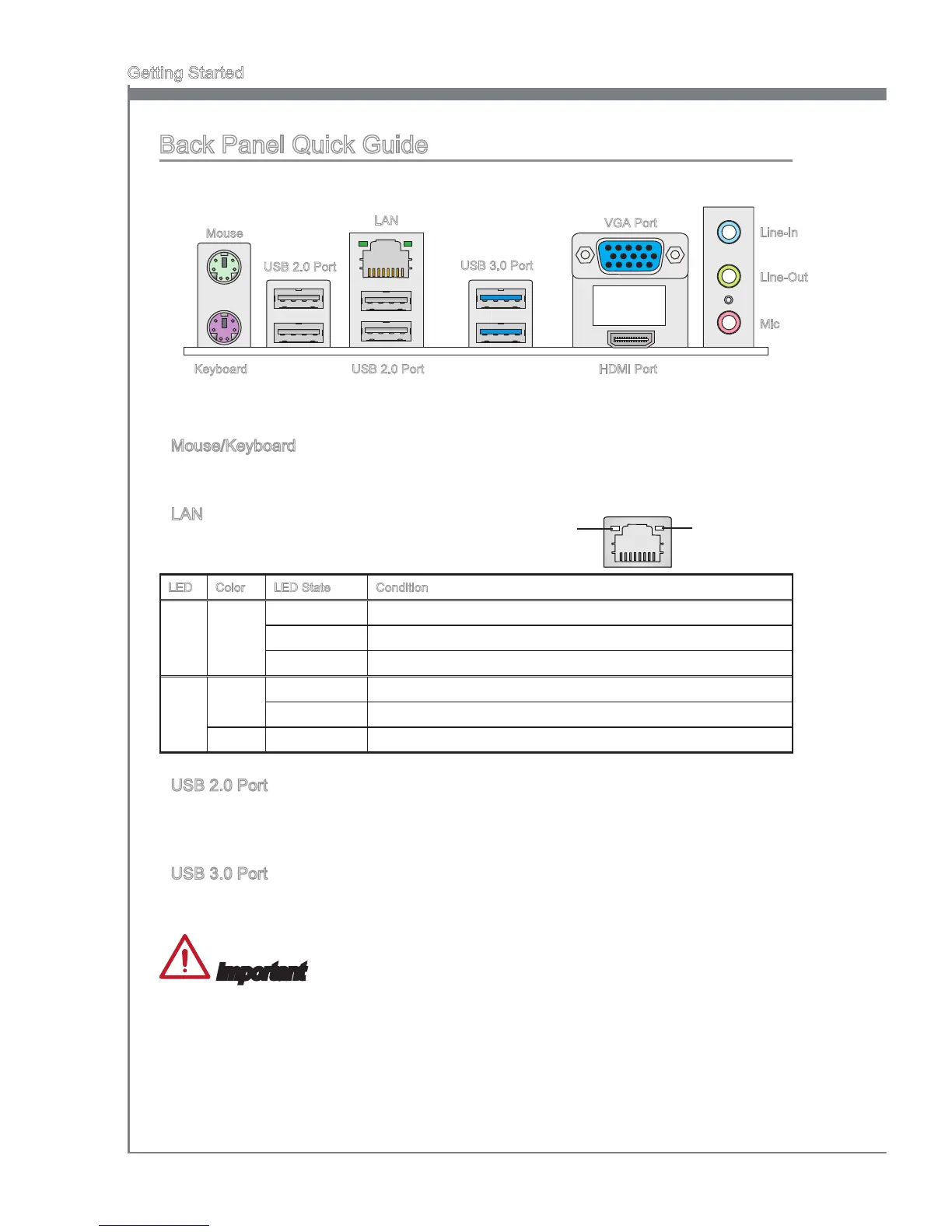
Mouse/Keyboard
A combination PS/2
®
mouse/keyboard DIN connector for a PS/2
®
mouse/keyboard.
LAN
The standard RJ-45 LAN jack is for connecting to
a Local Area Network (LAN).
LED Color LED State Condition
Left Yellow O LAN link is not established.
On(Steady) LAN link is established.
On(ashing) The computer is communicating with another computer on the network.
Right Green O 10 Mbits/sec data rate
On 100 Mbits/sec data rate
Orange On 1000 Mbits/sec data rate
USB 2.0 Port
The USB 2.0 port is for attaching USB 2.0 devices such as keyboard, mouse, or other
USB 2.0-compatible devices.
USB 3.0 Port
USB 3.0 port is backward-compatible with USB 2.0 devices. It supports data transfer
rate up to 5 Gbit/s (SuperSpeed).
Important
In order to use USB 3.0 devices, you must connect to a USB 3.0 port. If a USB cable is
used, it must be USB 3.0 compliant.
▶
▶
▶
▶
Yellow Green/ Orange
Line-In
Line-Out
Mic
USB 3.0 Port
LAN
Mouse
USB 2.0 Port
VGA Port
HDMI PortUSB 2.0 PortKeyboard


 To Next Page