1-9
7797
Chapter 1
CPU & Cooler Installation
When installing a CPU, always remember to install a CPU cooler. A CPU cooler is
necessary to prevent overheating and maintain system stability. Follow the steps below
to ensure correct CPU and CPU cooler installation. Wrong installation can damage both
the CPU and the mainboard.
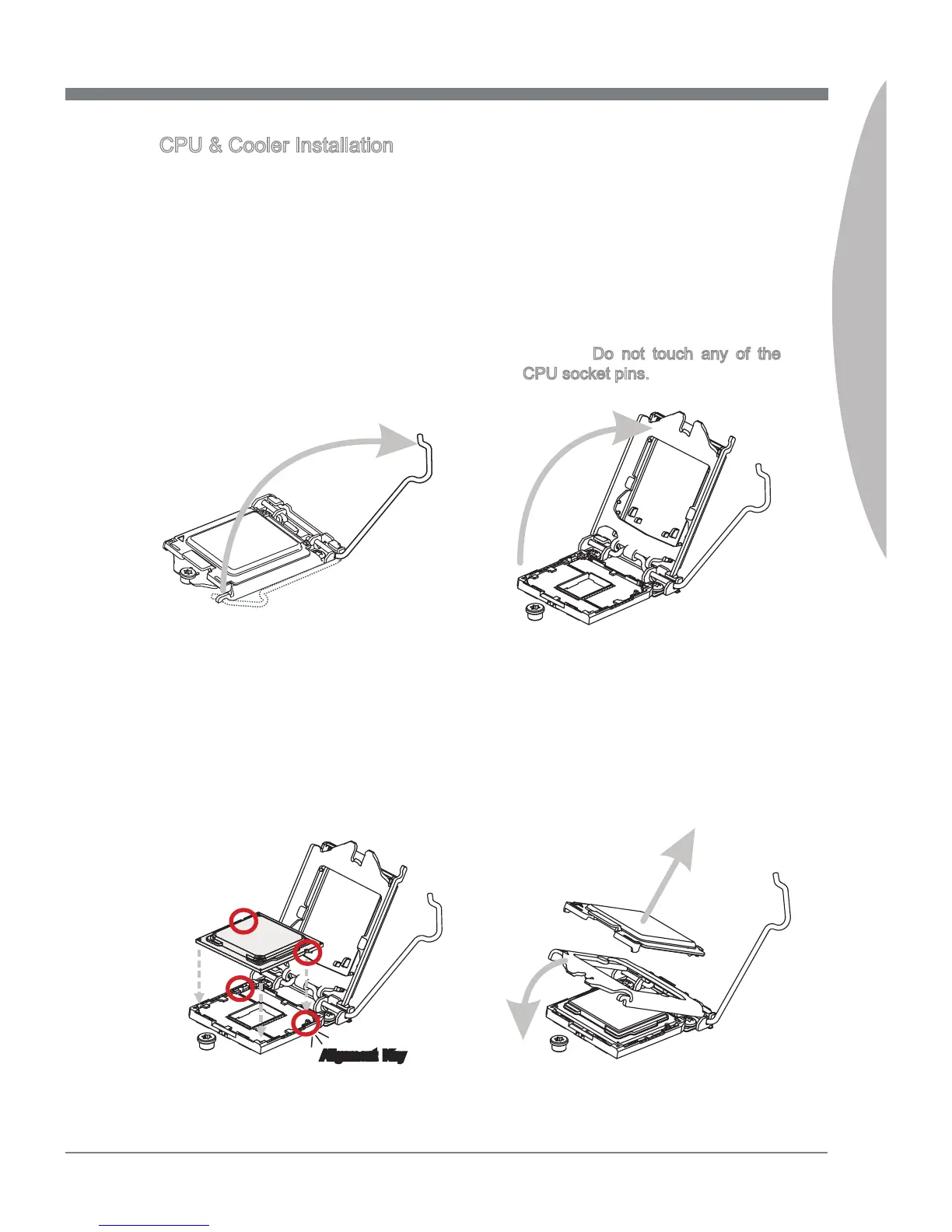
Unhook and lift the loading lever to
the fully open position.
1.
The loading plate should
automatically lift up as the loading
lever is pushed to the fully open
position. Do not touch any of the
CPU socket pins.
2.
Line up the CPU to t the CPU
socket. Be sure to hold the CPU by
the base with the metal contacts
facing downward. The alignment
keys on the CPU will line up with the
edges of the CPU socket to ensure a
correct t.
3. Close the loading plate and remove
the plastic protective cap.
4.
Alignment Key


 To Next Page