1-8
Getting Started
CPU (Central Processing Unit)
Introduction to the LGA 1155 CPU
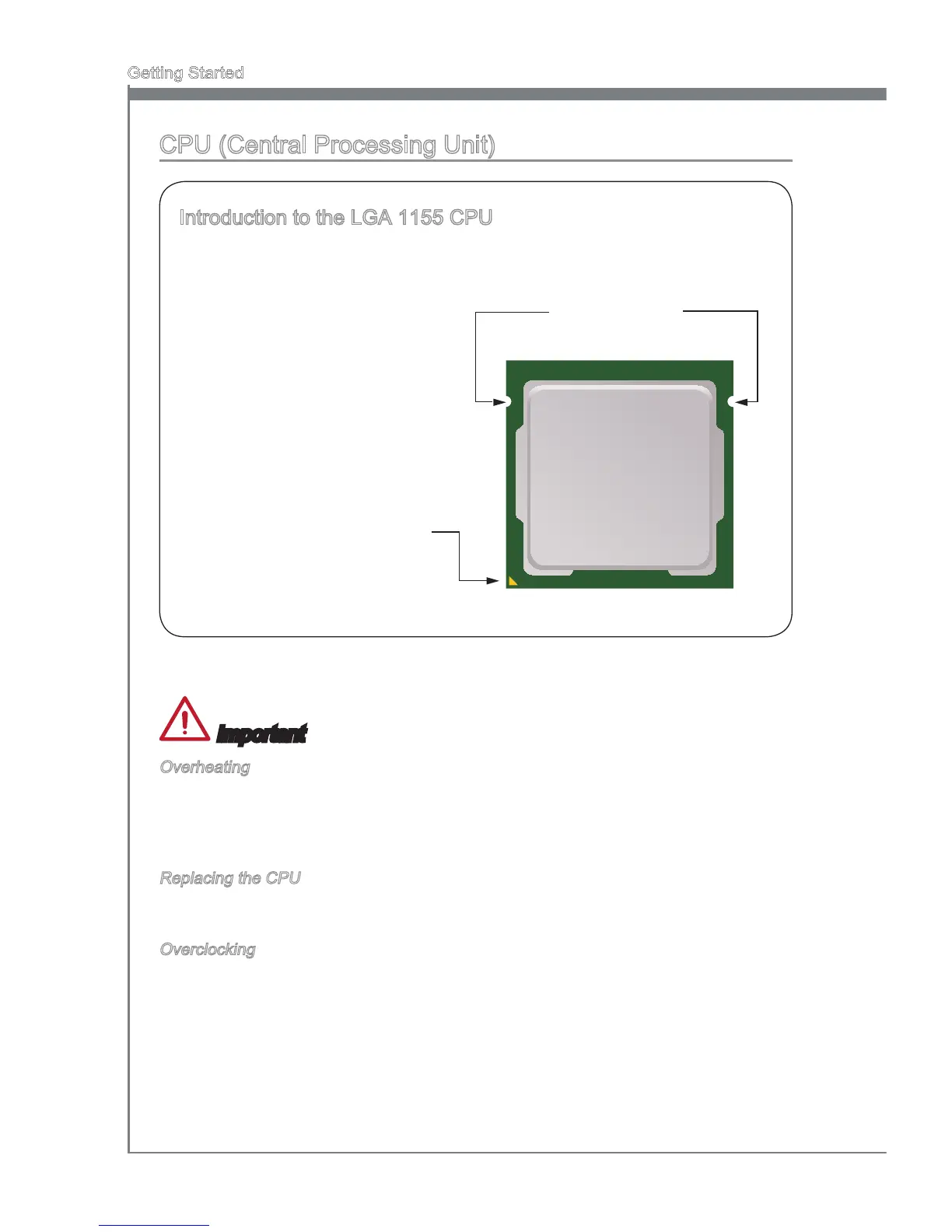
The surface of the LGA 1155 CPU
has two alignment keys and a
yellow triangle to assist in correctly
lining up the CPU for mainboard
placement. The yellow triangle is the
Pin 1 indicator.
Yellow triangle is the
Pin 1 indicator
Alignment Key
Important
Overheating
Overheating can seriously damage the CPU and mainboard. Always make sure the
cooling fans work properly to protect the CPU from overheating. Be sure to apply an
even layer of thermal paste (or thermal tape) between the CPU and the heatsink to
enhance heat dissipation.
Replacing the CPU
When replacing the CPU, always turn o the system’s power supply and unplug the
power supply’s power cord to ensure the safety of the CPU.
Overclocking
This mainboard is designed to support overclocking. Before attempting to overclock,
please make sure that all other system components can tolerate overclocking. Any
attempt to operate beyond product specications is not recommend. MSI does not
guarantee the damages or risks caused by inadequate operation beyond product
specications.


 To Next Page