8.19.3 Battery-charging generator – Removal and installation
Preconditions
☑ Engine is stopped and starting disabled
WARNING
Heavy part, risk of falling or overturning due to lack of stability.
Risk of crushing body or limbs!
• Use appropriate lifting gear and appliances.
• Wear safety shoes.
Removing battery-charging generator
1. Remove protective cover.
2. Mark electric cables on battery-charging generator and remove.
3. Protect all cables from damage.
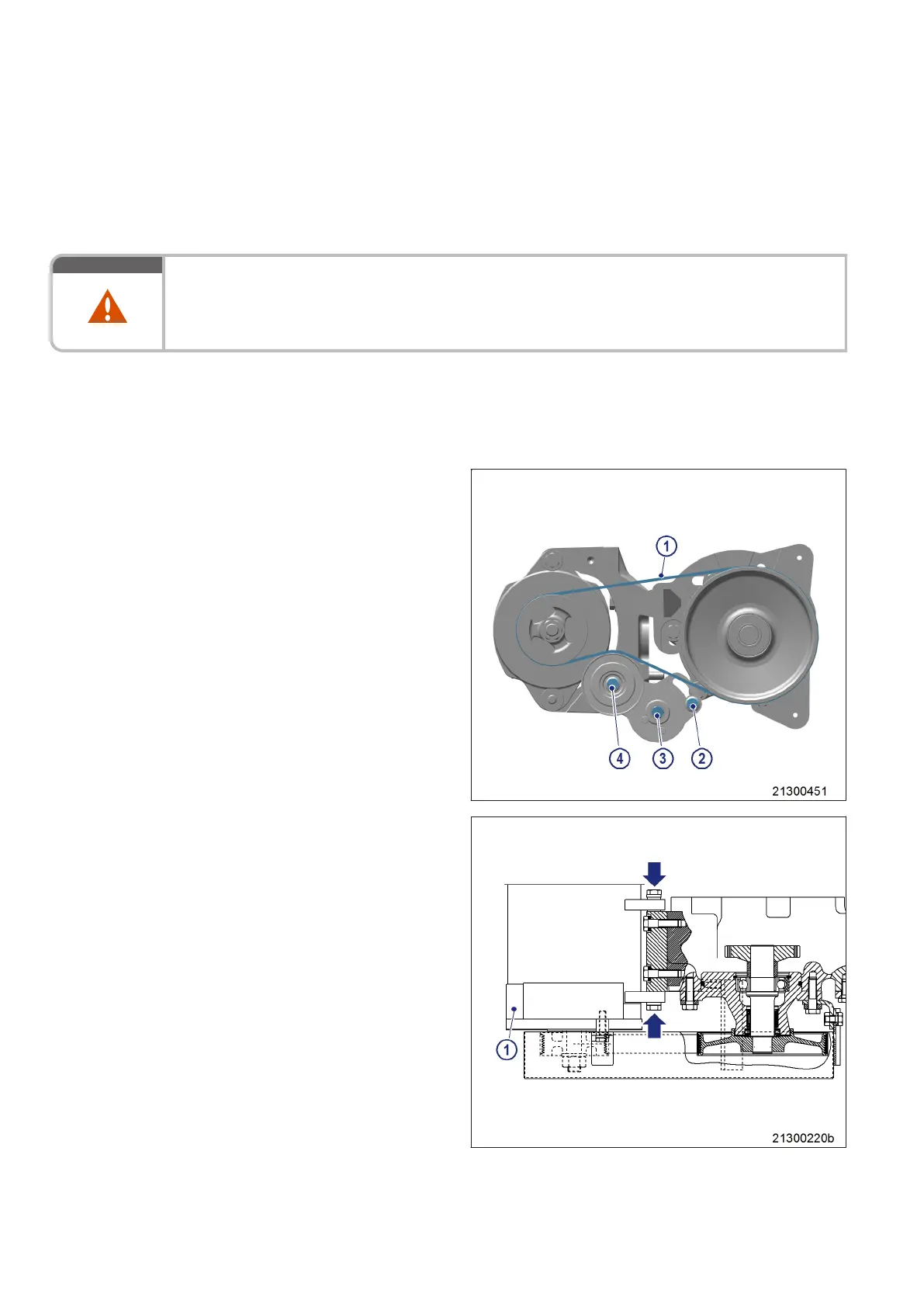
4. Slacken screws (2) and (3) by half a turn.
5. Mount socket or box wrench on screw (4)
and press belt tensioner in direction of arrow
as far as the stop.
6. Tighten screw (2).
7. Remove drive belt (1).
8. Release screws (arrow).
9. Remove battery-charging generator (1).
10. Clean battery-charging generator (1) thor-
oughly (→ Page 137).
11. Install battery-charging generator (1) follow-
ing reverse sequence of working steps.
12. Adjust drive belt tension (→ Page 140).
138 | Battery-Charging Generator | MS150049/04E 2017-04
TIM-ID: 0000007425 - 007



 To Next Page