137
Ultima S / SL Flex & Pro
3/2019
Hooklift Multilift Ultima S / SL Flex & Pro
User Manual
114060421
>>>
>>>
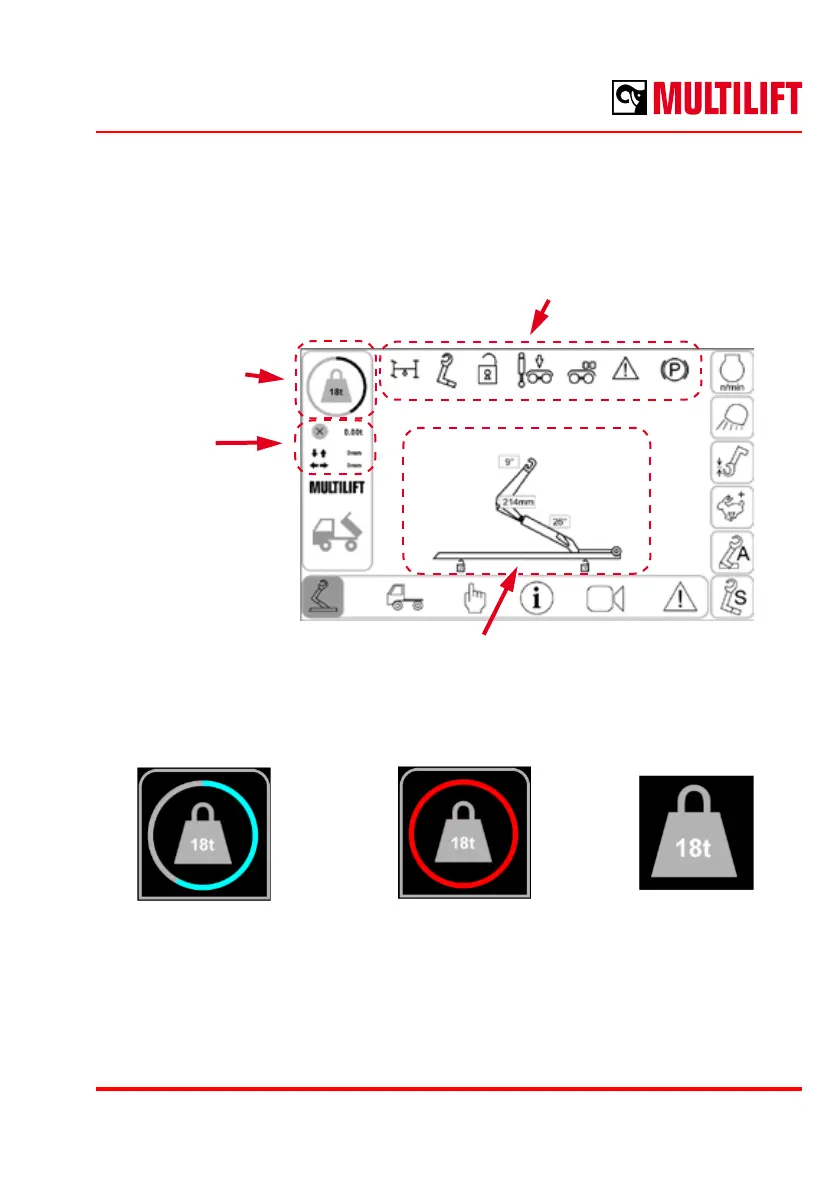
Hooklift status and position
Hooklift position is displayed as an animated hooklift, which moves according to position
sensor information sent by hooklift main I/O module.
Animated hooklift model
Load indicator
Status indicators
Weighing
system
output
Weight & Load information
An indicated momentary load is shown as a percentage on the round indicator. If there is
overload, the indicator will turn red.
Load symbolLoad OK Overload
The load symbol shows the maximum capacity of the hooklift, 18 tons in this case. If
weighing system is not enabled, the maximum weight is not shown.
If weighing system is enabled in the hooklift, the weighing calculation results will be shown
on the left hand side of the screen below the load indication symbol. There are two states
for the weighing system: load estimation and weighing calculation done.



 To Next Page