Chapter 2: Using the Fax Client Software
FaxFinder Client User Guide 21
4. Select a Default Cover Page from the drop down list.
5. Click Save.
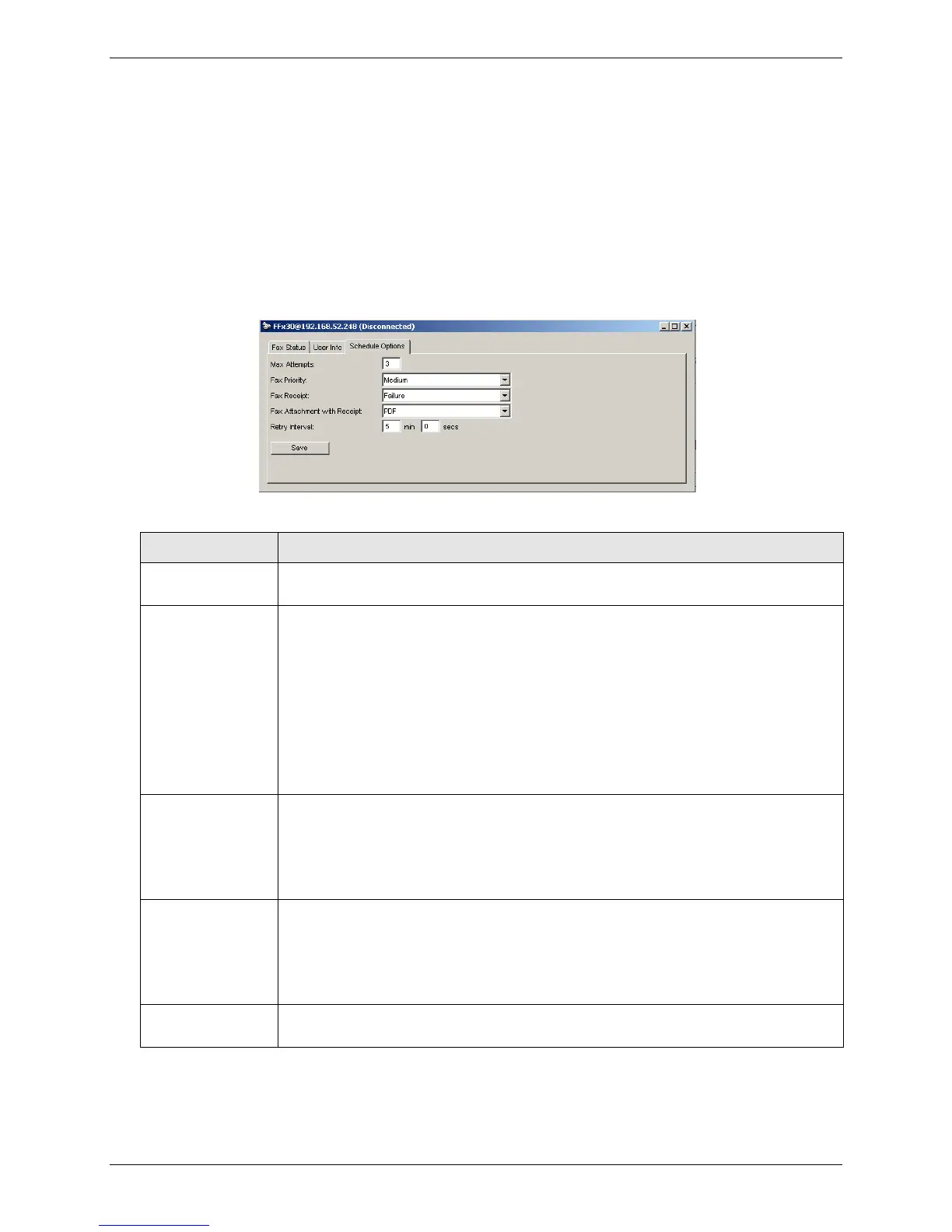
Configuring Default Scheduling Options
To set default fax scheduling options, including maximum number of attempts, priority, retry, and
receipt options:
1. On the Devices tab, right-click on the FaxFinder you want and click Open.
2. Click Schedule Options.
3. Enter the desired settings and click Save.
Enter the maximum number of times you want FaxFinder to try to send the fax
to a recipient. The default value is 3.
Set the default priority. When multiple faxes are scheduled for the same time,
FaxFinder sends those with a high priority before those with a low priority.
Options, from highest to lowest priority, are:
● 1st Priority
● High
● Medium/High
● Medium (default)
● Medium/Low
● Low
Select when you want a receipt for a sent fax. FaxFinder emails the receipt to
the email address set in your user account. Options are:
● Always, which sends a receipt with every fax attempt
● Failure, which sends a receipt only when a fax is not successful
● Never
Fax Attachment
with Receipt
If you want your fax receipt to include an attachment with the original fax,
select the attachment file format. Options are:
● None
● PDF
● TIFF
Enter how long FaxFinder should wait between retry attempts when the fax
does not complete. The default retry time is 5 minutes and 0 seconds.



 To Next Page