TM1215 Iss. 6.0 RPR750
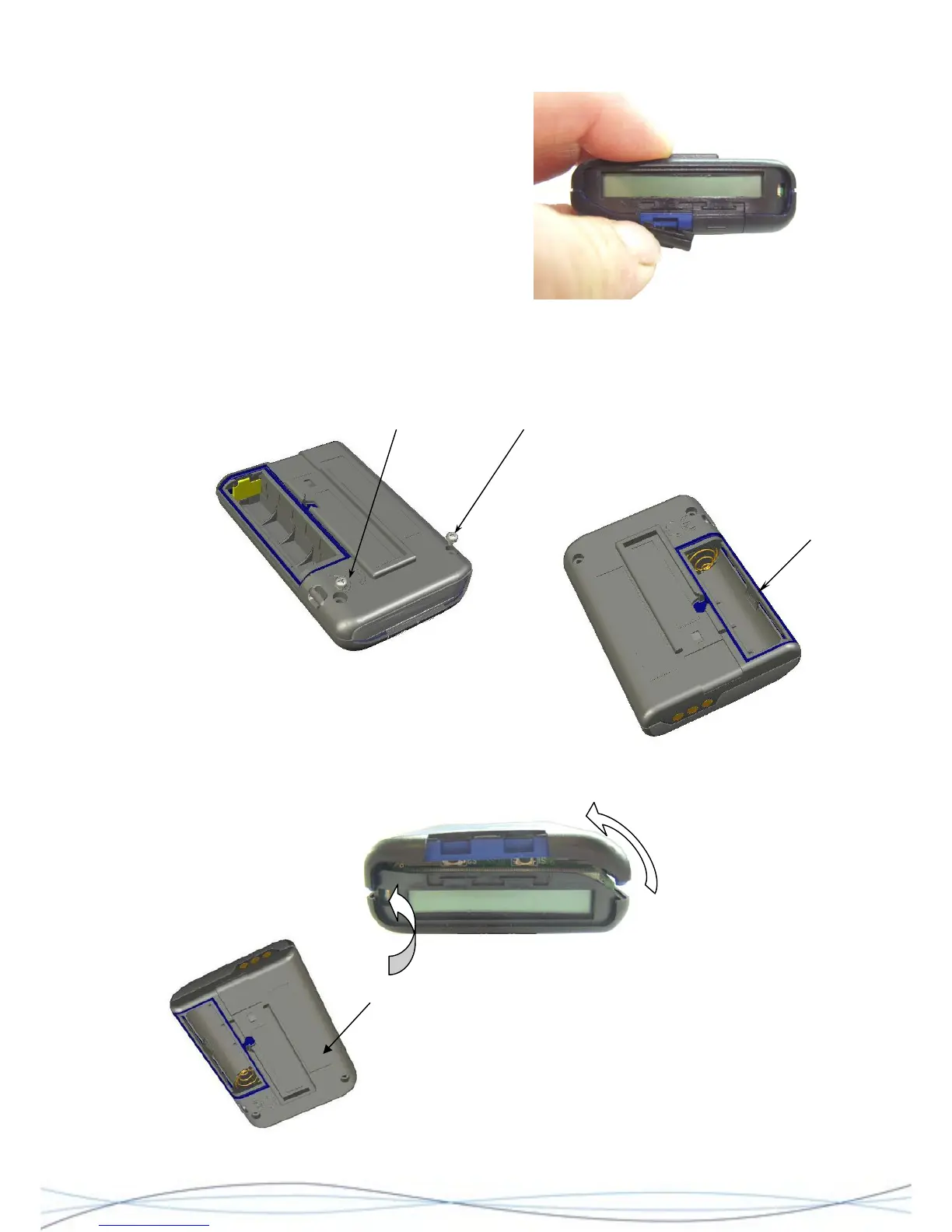
Place tip of finger on the top edge (display) of
a button and pull forward towards the front of
the unit, until it releases from the main
assembly. Repeat the process with the second
button and carefully retain both components.
From this point, dis-assembly is the same for both the early equipments and the later
assemblies with the “raised” OCR/Mute buttons. For later equipments the buttons may
remain in situ in the case front, unless replacement is required.
Remove the 2 fixing screws located at the top/rear of the case.
Locate the catch on the outer edge of the battery
compartment. Apply pressure where indicated and
unhook the rear-case tag from the front-case tab and
release. This will separate this edge of the front and rear
case halves.
Separate the two
case halves and
push here whilst pulling apart. At the same time, apply
pressure to the side of the case back as shown to the left, to
release the tag & tab inside.
30



 To Next Page