EV-030 Rev. 07 – 2008
English
40
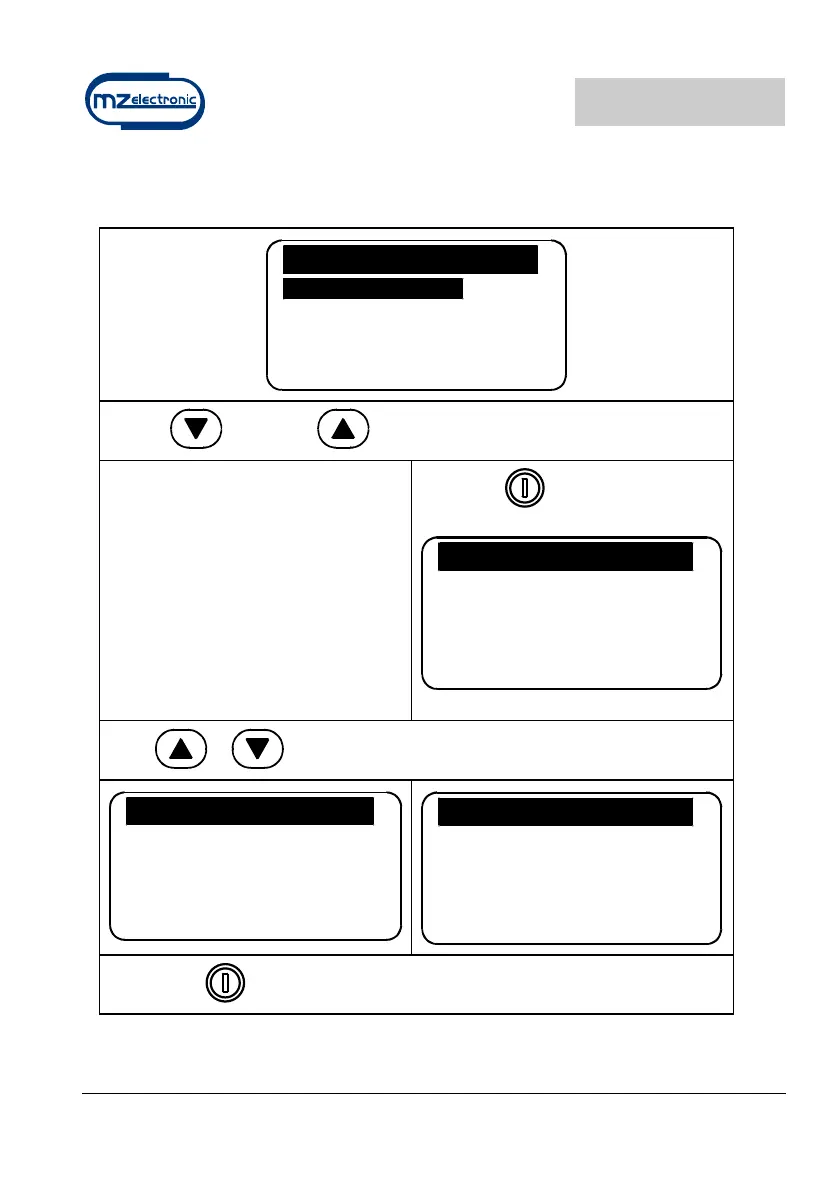
Sensor calibration menu
Sensor Calibrat
Sensor Detect.
Barb. Circ. 33.0
Exit
Use the (DOWN) or (UP) key to move around the parameters.
Sensor Detect
This function has the purpose of
calibrating the instrument according to
the type of sensor installed (Standard
or Project).
The second screen indicates the time
for a sensor period and type.
Select with
Sensor Detect.
Press Up/Down Key
to run the motor
Press or
Sensor Detect
Press Up/Down Key
to run the motor
0.400 sec.
Sensor:Std
Sensor Detect
Press Up/Down Key
to run the motor
0.400 sec.
Sensor:Proj.
Confirm with


 To Next Page