EasyManua.ls Logo

NAD C375BEE - Volume and Speaker Selection; Tone Controls and CD Player Functions; Tuner Control Functions

NAD C375BEE
20 pages
Print Icon
To Next Page IconTo Next Page
To Previous Page IconTo Previous Page
Loading...
IDENTIFICATION
OF CONTROLS
SR
8
REMOTE
CONTROL
8
VOL
[AI'"
J:
Press
[AI"']
button to
increase
or
decrease
the
loudness
level.
Release
the
button
when
the
desired
level
is
reached.
For
NAD
Receivers,
the
VFD
will
also
show"Volume
Up"
or
"Volume
Down"
while
pressing
SR
8's
[VOL
AI"']
.
The
VOLUME
buttons do not
affect
recordings
made
using
the
TAPE
outputs but will
affect
the
signal
going to
the
PRE
OUT
outputs.
9
SPK
A,
SPK
B:
The
[SPK
A]
and
[SPK
B]
buttons
engage
or
disengage
the
speakers
connected
respectively
to
the
Speakers
A
and
Speakers
B
terminals.
Toggle
[SPK
A]
to
switch
ON
or
OFF
the
speakers
connected
to
the
Speaker
A
terminals.
Toggle
[SPK
B]
to
switch
ON
or
OFF
the
speakers
connected
to
the
Speaker
B
terminals.
Press
both buttons to
engage
both
speakers.
10
TONE
OFT:
Tone
Controls
are
enabled
or
disabled
by
pressing
this
button.
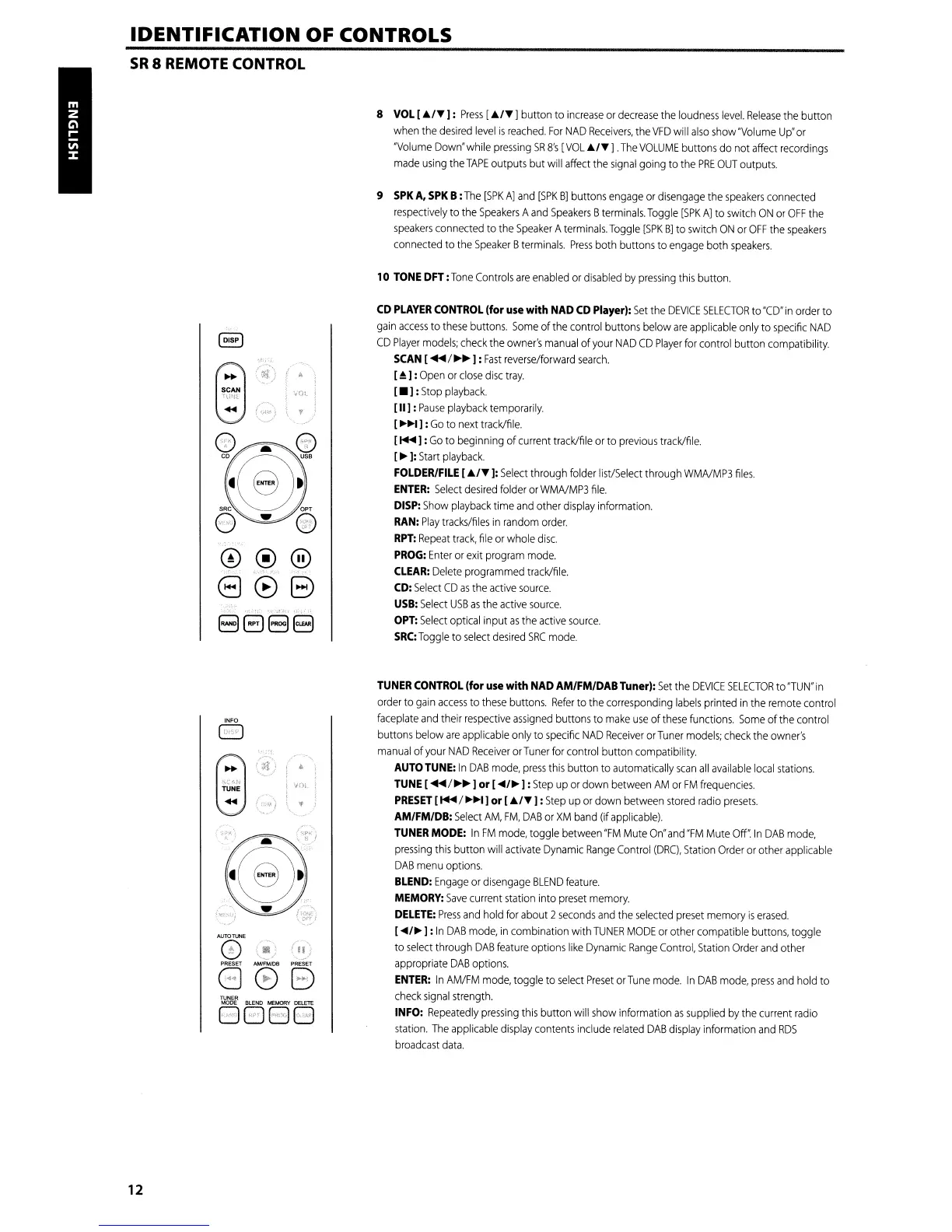
\
VOl
12
~
:N
TUNE
......
I
);_})
\
}
.~
([)'
<~)
(II)
888
TUNER
GBBEl
CD
PLAYER
CONTROL
(for
use
with
NAD
CD
Player):
Set
the
DEVICE
SELECTOR
to
"CD"
in
orderto
gain
access
to
these
buttons.
Some
of
the
control buttons below
are
applicable
only to
specific
NAD
CD
Player
models;
check
the
owner's
manual
of
your
NAD
CD
Player
for
control button compatibility.
SCAN
[
...
/~~
J:
Fast
reverse/forward
search.
[~J:
Open
or
close
disc
tray.
[.
J:
Stop
playback.
[II]
:
Pause
playback
temporarily.
[
~~I
J:
Go
to
next
track/file.
[
....
J:
Go
to beginning of
current
track/file
or
to
previous
track/file.
[~J:
Start
playback.
FOLDER/FILE
[AI'"
J:
Select
through
folder
list/Select
through
WMNMP3
files.
ENTER:
Select
desired
folder
or
WMNMP3
file.
DISP:
Show
playback
time
and
other
display
information.
RAN:
Play
tracks/files
in
random
order.
RPT:
Repeat
track,
file
or
whole
disc.
PROG:
Enter
or
exit
program
mode.
CLEAR:
Delete
programmed
track/file.
CD:
Select
CD
as
the
active
source.
USB:
Select
USB
as
the
active
source.
OPT:
Select
optical input
as
the
active
source.
SRC:Toggle
to
select
desired
SRC
mode.
TUNER
CONTROL
(for
use
with
NAD
AM/FM/DAB Tuner):
Set
the
DEVICE
SELECTOR
to
"TUN"
in
order
to
gain
access
to
these
buttons.
Refer
to
the
corresponding
labels
printed
in
the
remote
control
faceplate
and
their
respective
assigned
buttons to
make
use
of
these
functions.
Some
of
the
control
buttons
below
are
applicable
only
to
specific
NAD
Receiver
orTuner
models;
check
the
owner's
manual
of
your
NAD
Receiver
orTuner
for
control button compatibility.
AUTO
TUNE:
In
DAB
mode,
press
this
button
to
automatically
scan
all
available
local
stations.
TUNE
[
/~~
I
or
["'/~
I:
Step
up
or down
between
AM
or
FM
frequencies.
PRESET
[ /
~~I
J
or
[AI'"
J:
Step
up
or
down
between
stored
radio
presets.
AM/FM/DB:
Select
AM,
FM,
DAB
or
XM
band
(if
applicable).
TUNER
MODE:
In
FM
mode,
toggle
between
"FM
Mute
On"
and
"FM
Mute
OW
In
DAB
mode,
pressing
this
button
will
activate
Dynamic
Range
Control
(DRC),
Station
Order
or
other
applicable
DAB
menu
options.
BLEND:
Engage
or
disengage
BLEND
feature.
MEMORY:
Save
current
station
into
preset
memory.
DELETE:
Press
and
hold
for
about 2
seconds
and
the
selected
preset
memory
is
erased.
[
"'/~
J:
In
DAB
mode,
in
combination with
TUNER
MODE
or
other compatible
buttons,
toggle
to
select
through
DAB
feature
options
like
Dynamic
Range
Control,
Station
Order
and
other
appropriate
DAB
options.
ENTER:
In
AM/FM
mode,
toggle
to
select
Preset
or
Tune
mode.
In
DAB
mode,
press
and
hold
to
check
signal
strength.
INFO:
Repeatedly
pressing
this
button will
show
information
as
supplied
by
the
current
radio
station.
The
applicable
display
contents include
related
DAB
display
information
and
RDS
broadcast
data.

Other manuals for NAD C375BEE

Related product manuals