EasyManua.ls Logo

NAD C375BEE - SR 8 Remote Control; Remote Control Functions

NAD C375BEE
20 pages
Print Icon
To Next Page IconTo Next Page
To Previous Page IconTo Previous Page
Loading...
SR.
IDENTIFICATION
OF
CONTROLS
SR
8 REMOTE CONTROL
The
SR
8
remote
control
handset
handles
the
key
functions
of
the
C
375BEE
as
well
as
other
NAD
Stereo
Receivers,
Integrated
Amplifiers
and
Preamplifiers.
It
has
additional
controls
to
remotely
operate
NAD
CD
Players,
AMlFM
Tuners
and
dedicated
AMlFMlDAB
Tuners.
It
will
operate
up
to
a
distance
of
23ft
(7m).
Alkaline
baneries
are
recommended
for
maximum
operating
life.
Two
AA
baneries
should
be
fined
in
the
banery
compartment
at
the
rear
of
the
Remote
Control
handset.
When
replacing
baneries,
check
that
they
have
been
put
in
the
right
way
round,
as
indicated
on
the
base
of
the
banery
compartment.
When
acommand
from
the
remote control
is
received,
the
Standby
LED
indicator will
blink.
Note
that
the
indicator
may
also
blink
when
receiving
commands
not
necessarily
for
the
C
375BEE
but
for
other
components
in
the
system.
Please
refer
to
previous
sections
ofthe
manual
for
a
full
description of
individual
functions.
NOTE
._----
----
The
remote
control
handset
supplied with
the
C
375BEE
is
of
a
universal
NAD
type,
designed
to
operate
several
NAD
models.
Some
buttons
are
applicable only
to
specilic
NAD
models.
Contact
your
dealer
or
NAD
audio
specialist
for
assistance.
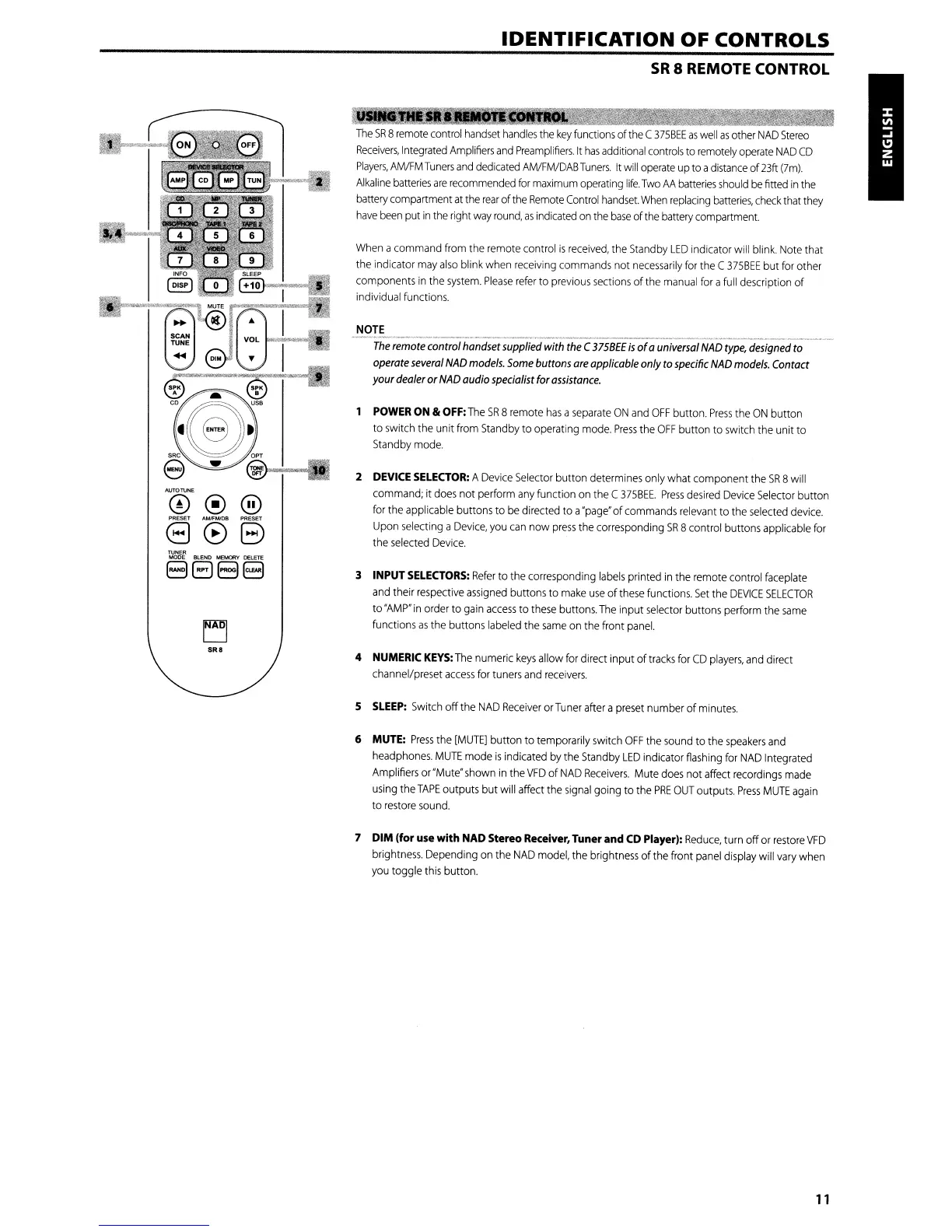
POWER ON &
OFF:
The
SR
8 remote
has
a
separate
ON
and
OFF
button.
Press
the
ON
button
to
switch
the
unit
from
Standby
to operating
mode.
Press
the
OFF
button to
switch
the unit to
Standby
mode.
2 DEVICE
SELECTOR:
A
Device
Selector
button determines only what component
the
SR
Bwill
command;
it
does
not perform
any
function
on
the
C
375BEE.
Press
desired
Device
Selector
button
for
the
applicable buttons to
be
directed to a'page'of
commands
relevant
to
the
selected
device.
Upon
selecting
a
Device,
you
can
now
press
the
corresponding
SR
8 control buttons applicable
for
the
selected
Device.
3 INPUT
SELECTORS:
Refer
to
the
corresponding
labels
printed
in
the remote control
faceplate
and
their
respective
assigned
buttons to
make
use
of
these
functions.
Set
the
DEVICE
SELECTOR
to
'AMP"
in
order to
gain
access
to
these
buttons.
The
input
selector
buttons perform
the
same
functions
as
the buttons
labeled
the
same
on
the front
panel.
4 NUMERIC
KEYS:
The
numeric
keys
allow
for
direct input of
tracks
for
CD
players,
and
direct
channel/preset
access
for
tuners
and
receivers.
S
SLEEP:
Switch
off
the
NAD
Receiver
or
Tuner
after a
preset
number of
minutes.
6 MUTE:
Press
the
[MUTE]
button to temporarily
switch
OFF
the
sound
to
the
speakers
and
headphones.
MUTE
mode
is
indicated
by
the
Standby
LED
indicator
flashing
for
NAD
Integrated
Amplifiers or
"Mute"
shown
in
the
VFD
of
NAD
Receivers.
Mute
does
not affect
recordings
made
using
the
TAPE
outputs but will
affect
the
signal
going to
the
PRE
OUT
outputs.
Press
MUTE
again
to
restore
sound.
7
DIM
Ifor
use
with
NAD Stereo Receiver, Tuner and CD Player):
Reduce,
turn offor
restore
VFD
brightness.
Depending
on
the
NAD
model,
the brightness
of
the
front
panel
display
will
vary
when
you
toggle
this
button.
11

Other manuals for NAD C375BEE

Related product manuals