EasyManua.ls Logo

NAD C375BEE - Reference; Troubleshooting

NAD C375BEE
20 pages
Print Icon
To Next Page IconTo Next Page
To Previous Page IconTo Previous Page
Loading...
REFERENCE
TROUBLESHOOTING
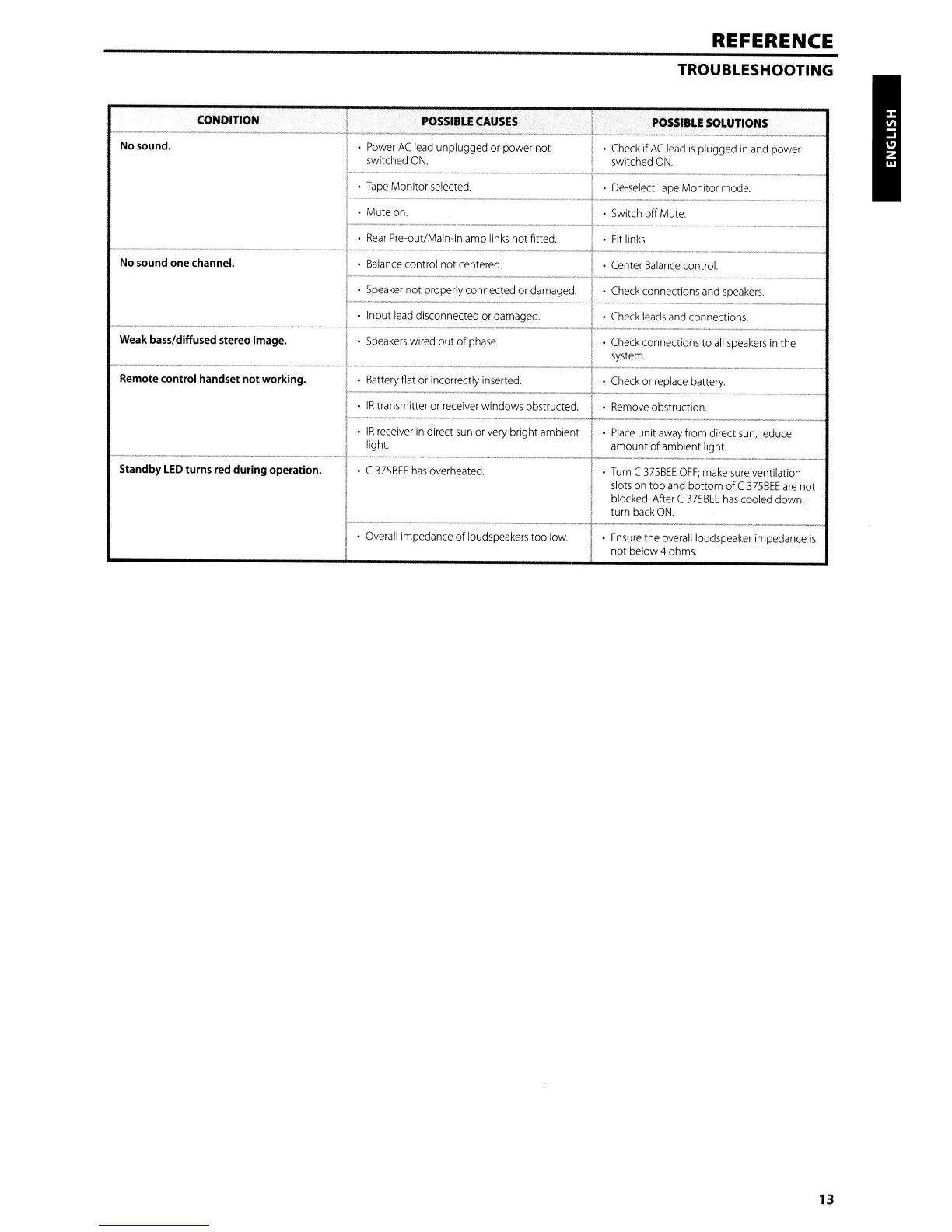
CONDITION
POSSIBLE
CAUSES
POSSIBLE
SOLUTIONS
--------------------
No sound.
Power
AC
lead
unplugged or power not
·
Check
if
AC
lead
is
plugged
in
and
power
switched
ON.
switched
ON.
Tape
Monitor
selected.
De-selectTape Monitor
mode.
.-
Mute
on.
Switch
off
Mute.
Rear
Pre-out/Main-in amp
links
not fitted.
Fit
links.
f----------
-------
-
>----_
...
_._-_.
No sound one channel.
Balance
control not
centered.
Center
Balance
control.
--
.
.-
Speaker
not properly connected
or
damaged.
Check
connections
and
speakers.
Input
lead
disconnected or
damaged.
Check
leads
and
connections.
Weak bass/diffused stereo image.
Speakers
wired out of
phase.
Check
connections to
all
speakers
in
the
system.
--
Remote control handset not working.
Battery
fiat or incorrectly
inserted.
·
Check
or
replace
battery.
IR
transmitter or
receiver
windows obstructed.
Remove
obstruction.
IR
receiver
in
direct
sun
or
very
bright ambient
Place
unit
away
from direct
sun,
reduce
light. amount
of
ambient light.
Standby
LED
turns red during operation.
C
375BEE
has
overheated.
Turn
C
375BEE
OFF;
make
sure
ventilation
slots
on
top
and
bottom ofC
375BEE
are
not
blocked.
After
C
375BEE
has
cooled down,
turn
back
ON.
Overall
impedance of
loudspeakers
too
low.
Ensure
the
overall
loudspeaker impedance
is
not below 4
ohms.
13

Other manuals for NAD C375BEE

Related product manuals