EasyManua.ls Logo

NAD C375BEE - Identification of Controls; Front Panel

NAD C375BEE
20 pages
Print Icon
To Next Page IconTo Next Page
To Previous Page IconTo Previous Page
Loading...
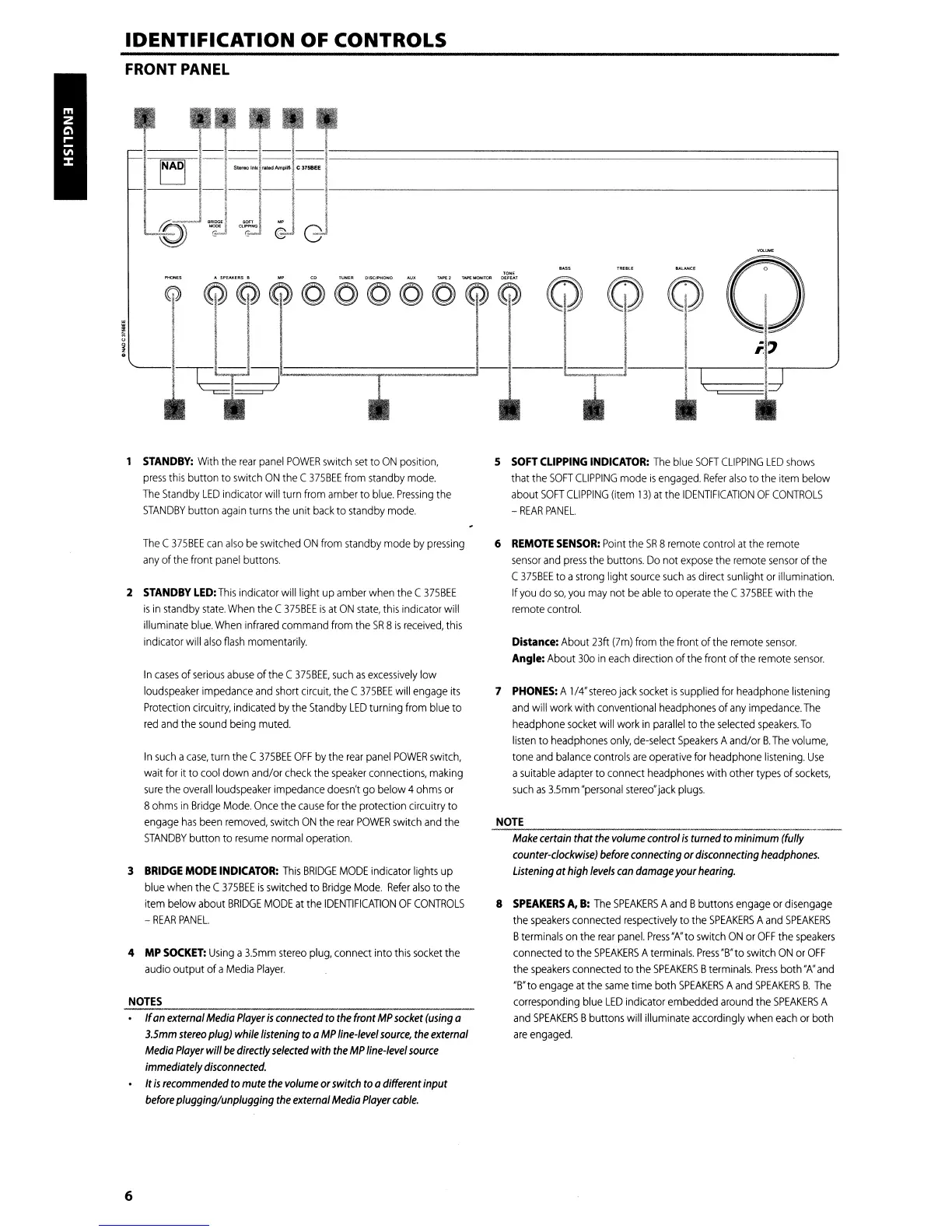
IDENTIFICATION OF CONTROLS
FRONT PANEL
-1-'--
~
-
"«~'""r"'-.
emBE'
~
J-~J-@J-Jl.-
---------------1
STANDBY:
With
the
rear
panel
POWER
switch
set
to
ON
position,
press
this
button to
switch
ON
the
(375BEE
from
standby
mode.
The
Standby
LED
indicator will turn
from
amber
to
blue,
Pressing
the
STANDBY
button
again
turns
the
unit
back
to
standby
mode,
The
(375BEE
can
also
be
switched
ON
from
standby
mode
by
pressing
any
of
the
front
panel
buttons.
2
STANDBY
LED:
This
indicator
will
light
up
amber
when
the
C
375BEE
is
in
standby
state,
When
the
(
375BEE
is
at
ON
state,
this
indicator
will
illuminate
blue.
When
infrared
command
from
the
SR
B
is
received,
this
indicator will
also
fiash
momentarily.
In
cases
of
serious
abuse
of
the
C
375BEE,
such
as
excessively
low
loudspeaker
impedance
and
short
circuit,
the
C
375BEE
will
engage
its
Protection
circuitry,
indicated
by
the
Standby
LED
turning
from
blue
to
red
and
the
sound
being
muted.
In
such
a
case,
turn
the
C
375BEE
OFF
by
the
rear
panel
POWER
switch,
wait
for
it to
cool
down and/or
check
the
speaker
connections,
making
sure
the
overall
loudspeaker
impedance
doesn't
go
below 4
ohms
or
B
ohms
in
Bridge
Mode.
Once
the
cause
for
the
protection circuitry to
engage
has
been
removed,
switch
ON
the
rear
POWER
switch
and
the
STANDBY
button
to
resume
normal
operation,
3
BRIDGE
MODE
INDICATOR:
This
BRIDGE
MODE
indicator lights
up
blue
when
the
C
375BEE
is
switched
to
Bridge
Mode,
Refer
also
to
the
item
below
about
BRIDGE
MODE
at
the
IDENTIFICATION
OF
CONTROLS
-
REAR
PANEL.
4
MP
SOCKET:
Using
a
3.5mm
stereo
plug,
connect into
this
socket
the
audio
output ofa
Media
Player.
NOTES
If
an
external
Media
Player
is
connected
to
the
front
MP
socket
(using
a
3.5mm
stereo
plug)
while
listening
toa
MP
line-level
source,
the
externol
Media
Player
will
be
directly
selected
with
the
MP
line-level
source
immediately
disconnected.
It
is
recommended
to
mute
the
volume
or
switch
toadifferent input
before
plugging/unplugging
the
external
Media
Player
cable.
6
S
SOFT
CLIPPING
INDICATOR:
The
blue
SOFT
CLIPPING
LED
shows
that
the
SOFT
(LIPPING
mode
is
engaged.
Refer
also
to
the
item
below
about
SOFT
CLIPPING
(item
13)
at
the
IDENTIFICATION
OF
CONTROLS
-
REAR
PANEL.
6
REMOTE
SENSOR:
Point
the
SR
8
remote
control
at
the
remote
sensor
and
press
the
buttons.
Do
not
expose
the
remote
sensor
of
the
(
375BEE
to a
strong
light
source
such
as
direct
sunlight
or
illumination,
If
you
do
so,
you
may
not
be
able
to
operate
the
C
375BEE
with
the
remote
control.
Distance: About
23ft
(7m)
from
the
front of
the
remote
sensor.
Angle:
About
300
in
each
direction of
the
front of
the
remote
sensor.
7
PHONES:
A
1/4"
stereo
jack
socket
is
supplied
for
headphone
listening
and
will
work
with
conventional
headphones
of
any
impedance,
The
headphone
socket
will
work
in
parallel
to
the
selected
speakers.
To
listen
to
headphones
only,
de-select
Speakers
Aand/or
B.
The
volume,
tone
and
balance
controls
are
operative
for
headphone
listening.
Use
a
suitable
adapter
to
connect
headphones
with other
types
of
sockets,
such
as
3.5mm
"personal
stereo"
jack
plugs.
NOTE
Make
certain
that
the
volume
control
is
turned
to minimum (fully
counter-clockwise)
before
connecting
or
disconnecting
headphones.
Listening
at
high
levels
can
damage
your
hearing.
8
SPEAKERS
A.
B:
The
SPEAKERS
A
and
Bbuttons
engage
or
disengage
the
speakers
connected
respectively
to
the
SPEAKERS
A
and
SPEAKERS
B
terminals
on
the
rear
panel.
Press
"A'to
switch
ON
or
OFF
the
speakers
connected
to
the
SPEAKERS
A
terminals.
Press
"B"to
switch
ON
or
OFF
the
speakers
connected
to the
SPEAKERS
B
terminals.
Press
both
"A"
and
"B"to
engage
at
the
same
time both
SPEAKERS
A
and
SPEAKERS
B.
The
corresponding
blue
LED
indicator
embedded
around
the
SPEAKERS
A
and
SPEAKERS
Bbuttons
will
illuminate
accordingly
when
each
or
both
are
engaged.

Other manuals for NAD C375BEE

Related product manuals