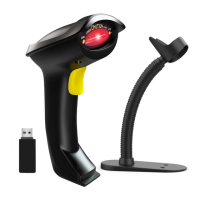
Packing list
•Barcode scanner*1
•USB Cable*1
•Instruction Manual*1
•USB Wireless Receiver*1
Battery & Charging
The scanner is powered by 1400mAh rechargeable battery.
Please charge the scanner at least 30 minutes before use to ensure that the scanner has
enough power.
Insert one end of USB cable into the bottom of scanner, and insert another end to
computer USB interface or 5V DC USB interface adapter.
Charging indicator:
The red indicator light on the top of the scanner will slightly strobe during charging.
The red light will go off when the scanner is fully charged.
NOTE:
1. Please use computer USB interface or 5V DC power adapter for charging, the
abnormal power adapter will cause permanent damage to scanner and battery.
2. The USB cable is only used for charging, not for receiving the barcode.
3. When the top red indicator light cyclically flashes three times, it means the battery is
at low power. Please stop using and recharge it. .


 To Next Page