EasyManua.ls Logo

Nakajima AE-710 - Printwheel

Nakajima AE-710
36 pages
Print Icon
To Next Page IconTo Next Page
To Previous Page IconTo Previous Page
Loading...
Printwheel
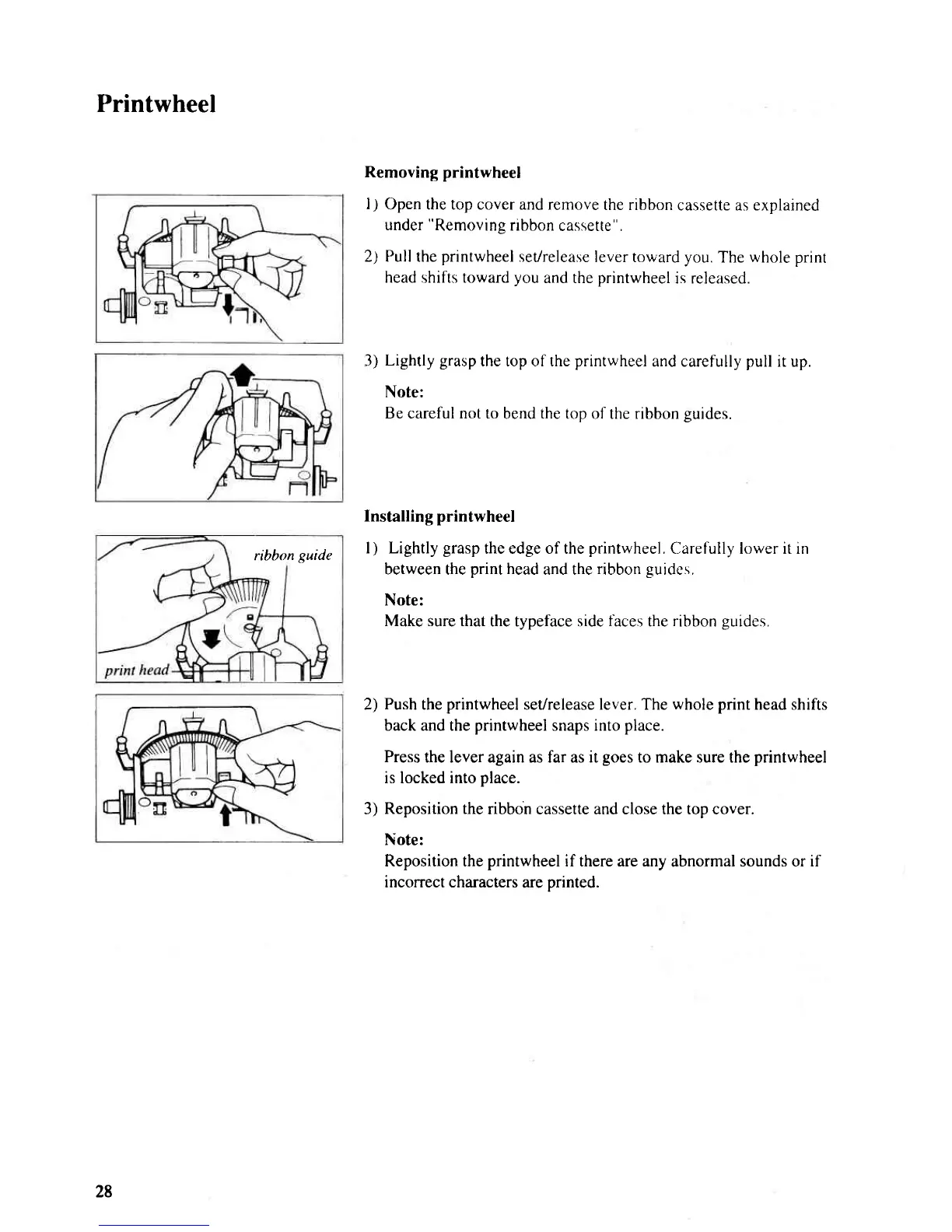
Removing printwheel
l)
Open the top cover and remove
the ribbon
cassette as explained
under
"Removing
ribbon
cassette".
2) Pull the
printwheel
set/release
lever toward you.
The
whole
print
head shifts toward
you
and the
printwheel
is released.
3)
Lightly
grasp
the top of the
printwheel
and carefully
pull
it up.
Note:
Be careful not to
bend
the
top of the ribbon
guides.
lnstalling
printwheel
l
)
Lightly
grasp
the edge of the
printwheel.
Carefully lower it in
between the
print
head
and the
ribbon
guides,
Note:
Make sure that
the typeface side
faces
the
ribbon
guides.
2)
Push
the
printwheel
set/release lever. The
whole print
head shifts
back and the
printwheel
snaps into
place.
Press
the lever again as far as it
goes
to make sure the
printwheel
is locked into
place.
3)
Reposition the
ribbon cassette and close the top cover.
Note:
Reposition the
printwheel
if there are any
abnormal
sounds or if
incorrect characters
are
printed.
ribbon
guide
28

Related product manuals