EasyManua.ls Logo

Nakajima AE-710 - R E M O V I N G P L a T E

Nakajima AE-710
36 pages
Print Icon
To Next Page IconTo Next Page
To Previous Page IconTo Previous Page
Loading...
MAINTENANCE
Removing
Platen
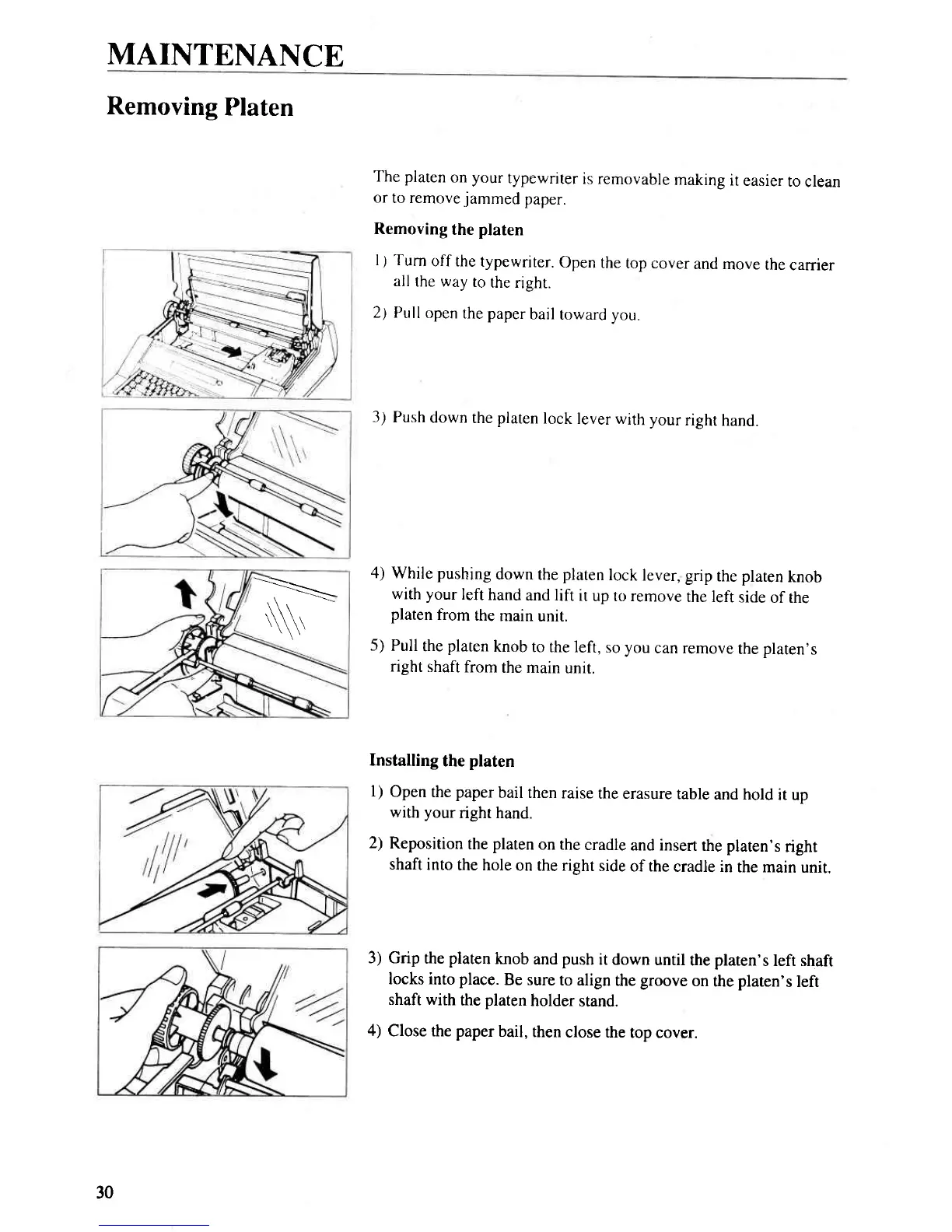
The platen
on your
typewriter
is removable
making
it
easier
to
clean
or
to remove
jammed
paper.
Removing
the
platen
1.1 Turn
off the
typewriter.
Open
the
top cover
and
move
the
carrier
all
the way
to
the right.
2) Pull
open
the paper
bail
toward
you.
3)
Push
down
the
platen
lock
lever with
your
right
hand.
4) While pushing
down
the
platen
lock
lever, grip
the
platen
knob
with your
left
hand
and lift
it
up to remove
the left
side
of the
platen
from
the
main
unit.
5)
Pull
the
platen
knob
to the left,
so you
can remove
the
platen's
right
shaf,t
from
the main
unir.
Installing
the
platen
l)
Open
the
paper
bail then
raise
the erasure
table
and hold
it up
with
your
right hand.
2)
Reposition
the
platen
on the
cradle
and insert
the platen's
right
shaft
into
the hole
on the right
side
of the
cradle in
the main
unit.
3) Grip
the
platen
knob
and
push
it down
until
the
plaren's
left shaft
locks into place.
Be sure
to align
the
groove
on
the
platen's
left
shaft with
the
platen
holder
stand.
4)
Close the
paper
bail,
then
close the
top cover.
.N
30

Related product manuals