Corrections
position
carrier
tsr/^6r.rr r ts6r
A
Your typewriter
has
an
automatic
correction memory.
It remembers
the last 700 characters typed
within
the last l0lines
and
will
correct
any or all of those characters. Characters typed outside the
correction
memory
can
be corrected
easily using the manual
correctlon.
Automatic
character correction
(correcting
characters within
the
correction
memory)
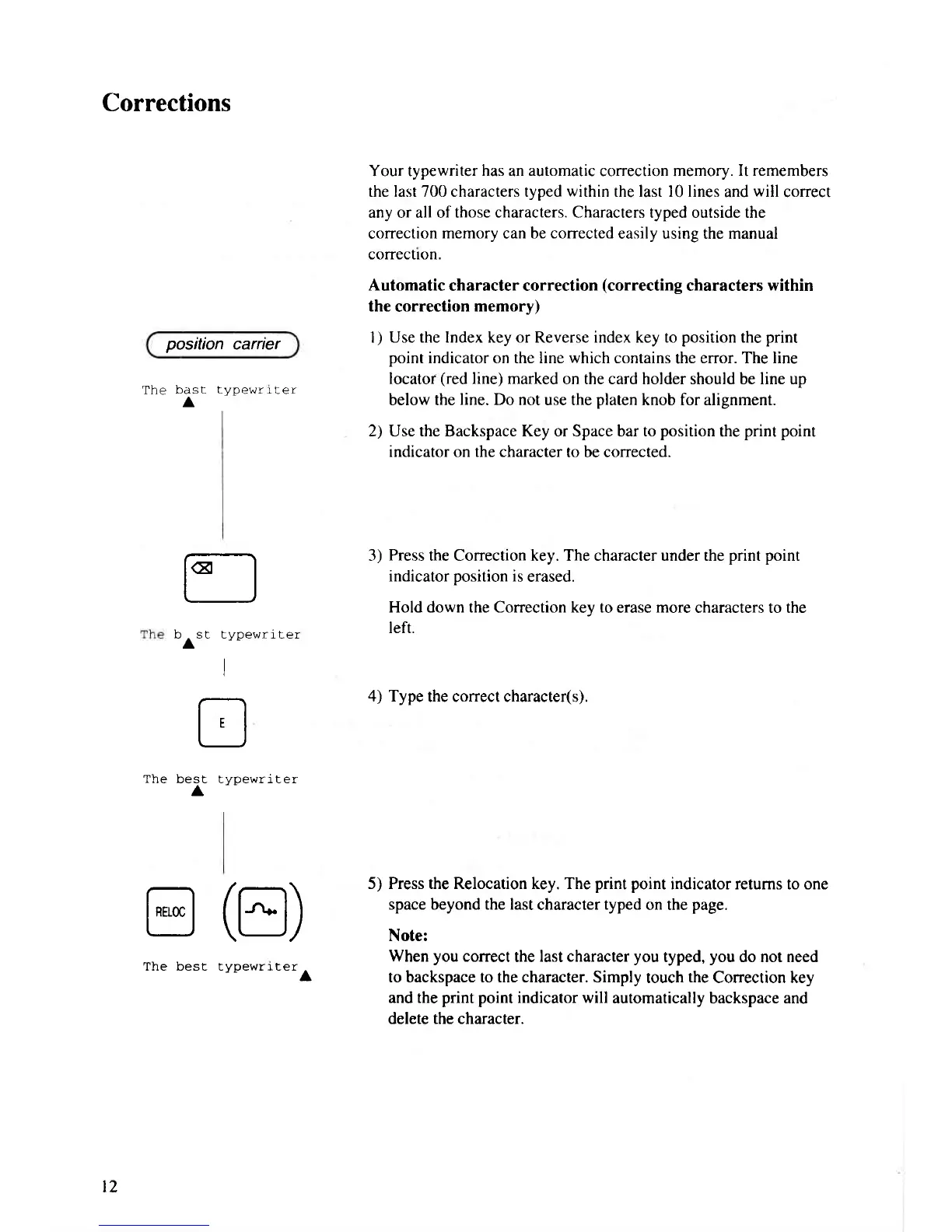
I
)
Use the Index key or Reverse index key to
position
the
print
point
indicator on the line
which
contains
the
error. The line
locatof
(red
line) marked
on the card holder should be line up
below the
line.
Do not use the
platen
knob for alignment.
2) Use the Backspace Key or Space bar to
position
the
pnnt point
indicator on the character
to be corrected.
3)
Press
the Correction key. The character under the
print point
indicator
position
is
erased.
Hold down the Correction key to
erase
more
characters to the
left.
4) Type
the correct character(s).
5) Press the Relocation key. The
print point
indicator retums to one
space beyond the last
character
typed
on the
page.
Note:
When you
correct
the
last character
you
typed,
you
do not need
to backspace to the character. Simply
touch
the
Conection key
and the
print point
indicator will
automatically backspace and
delete the character.
t€l
t_J
h cr f \/^aL'ri r6i
A
I
t
'J
best typewriter
@
(tr)
The best typewriterA
t2



 To Next Page