EasyManua.ls Logo

Nakajima AE-710 - Page 17

Nakajima AE-710
36 pages
Print Icon
To Next Page IconTo Next Page
To Previous Page IconTo Previous Page
Loading...
position
carrier
Tha ^^^d i\/n6L,ri rar
A
typewrr-cer
t\/6dr.rrr tor
@
(tr)
^.
A
-lno
lv. ::*',i':'':A
The best
i,
!
peHr
r
i el
A
I
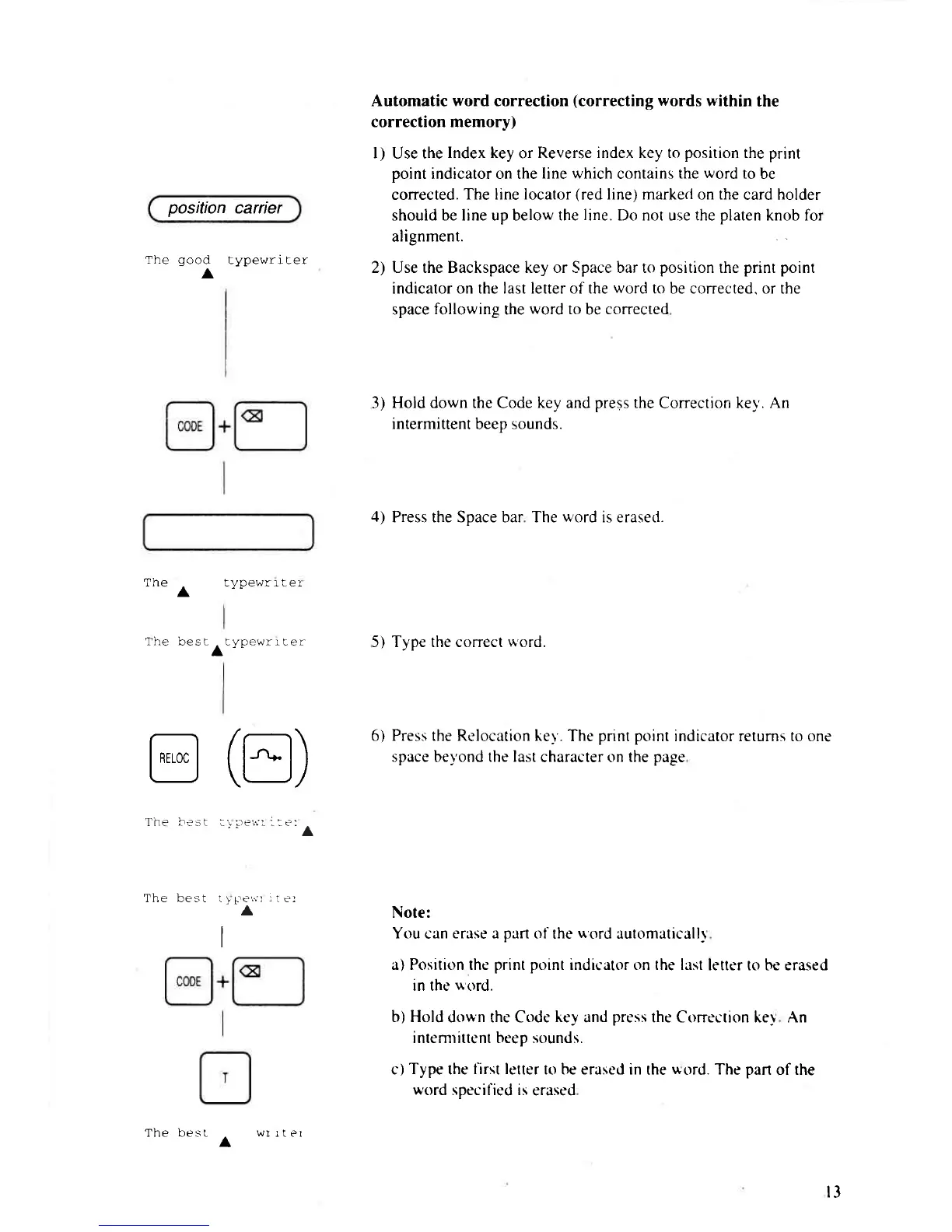
Automatic word correction
(correcting
words
within
the
correction memory)
l) Use the
lndex key
or
Reverse index key to
position
the print
point
indicator on the
line which
contains
the
word
to
be
corrected.
The line locator
(red
line) marked on the
card holder
should be line up below the
line.
Do not use the
platen
knob for
alignment.
2) Use the Backspace key or Space bar to
position
the
print point
indicator on the last letter of the
word
to be corrected. or the
space
following
the
word to
be
corrected
3)
Hold down the
Code
key
and
press
the
Correction
ke1'. An
intermittent
beep
sounds.
4)
Press the Soace bar The
word
is erased.
5) Tvoe the correct
*ord.
6) Press the Rc'location ker'.
The
pnnt point
indicatorreturns to one
space be1'ond the Iast
character on
the page
Note:
You
can
c'rase a
part
of
the
uord
automaticall)
a) Position the
print point
indicatt'rr on the last
letter to be erased
in the
uord.
b) Hold
down the Code
key
and
prc'ss
the Correction key An
i ntemrittent beep sounds.
c)
Type
the
l'irst lctter
to be erasc'd in
the
'*ord.
The
part
of
the
word
specified is
erased
The best
A
r3
wI
rter

Related product manuals