EasyManua.ls Logo

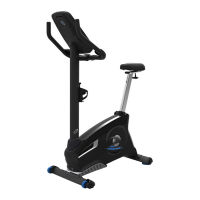
Nautilus U616 - User Manual

Nautilus U616
38 pages
Print Icon
To Next Page IconTo Next Page
Loading...
ASSEMBLY MANUAL / OWNER’S MANUAL

Other manuals for Nautilus U616

Questions and Answers

  • C
    Christina OchoaSep 4, 2025
    What to do if the fan won't turn on but the console works on my Nautilus U616 Exercise Bike?
    • D
      Danielle ScottSep 4, 2025
      If the fan on your Nautilus Exercise Bike won't turn on, but the console operates, unplug the unit from the electrical outlet for 5 minutes. Remove any material from the fan. If necessary, detach the console to help with removal. Replace the console if you're unable to remove the blockage.
  • B
    billybergSep 3, 2025
    Why are the pedals loose or the unit difficult to pedal on my Nautilus Exercise Bike?
    • A
      Alexandra BlackSep 3, 2025
      If the pedals are loose or the unit is difficult to pedal on your Nautilus Exercise Bike: * Ensure the pedal is tightened securely to the crank, and verify the connection isn't cross-threaded. * Make sure the crank is tightened securely to the axle and that the cranks are connected at 180 degrees from each other.
  • T
    Teresa ChambersSep 2, 2025
    Why won't the fan turn on or off on my Nautilus U616 Exercise Bike?
    • M
      Maria MooreSep 2, 2025
      If the fan on your Nautilus Exercise Bike won't turn on or off, check the following: * Ensure all wires in the cable are intact. If any are cut or crimped, replace the cable. * Verify the cable is connected securely and oriented properly, making sure the small latch on the connector lines up and snaps into place. * Unplug the unit from the electrical outlet for 3 minutes, then reconnect it.
  • J
    James PetersonSep 1, 2025
    How to stabilize a Nautilus Exercise Bike that rocks?
    • B
      bryan71Sep 1, 2025
      To stabilize a Nautilus Exercise Bike that rocks or doesn't sit level, adjust the levelers until the bike is level. Keep in mind that adjustments may not compensate for extremely uneven surfaces, so consider moving the bike to a more level area.
  • M
    Mrs. Heather PollardAug 31, 2025
    What to do if contact heart rate is not displayed on Nautilus Exercise Bike?
    • H
      Heidi BennettAug 31, 2025
      If your Nautilus Exercise Bike operates but the contact heart rate (HR) is not displayed, take the following steps: * Ensure the cable is securely connected to the console. * Make sure your hands are centered on the HR sensors, kept still, and applying relatively equal pressure to each side. * Consider using a conductive electrode cream (heart rate cream) to improve conductivity. These are available online or at medical and some larger fitness stores. * If tests reveal no other issues, the handlebars should be replaced.
  • B
    Bradley LuceroAug 31, 2025
    Why isn't the telemetric heart rate displaying on my Nautilus Exercise Bike?
    • C
      Crystal MorrisonAug 31, 2025
      If your Nautilus Exercise Bike operates, but the telemetric heart rate isn't displaying, consider the following solutions: * Ensure the strap is 'POLAR®' compatible and uncoded. Make sure the strap is directly against the skin and the contact area is wet. * If the strap has replaceable batteries, install new batteries. * Select the Edit User Profile option for the User Profile. Go to the WIRELESS HR setting and ensure that the current value is set to ON. * Try moving the unit away from sources of interference (T9, Microwave, etc.). * If eliminating interference doesn't resolve the issue, replace the strap. * If the heart rate still doesn't function, replace the console.
  • N
    Nicole CobbAug 29, 2025
    What to do if my Nautilus U616 Exercise Bike displays 'Please Pedal'?
    • K
      Kevin CooperAug 29, 2025
      If your Nautilus Exercise Bike console displays a 'Please Pedal' error, and there's no speed or RPM reading, check the following: * Ensure all wires in the cable are intact. Replace the cable if any wires are cut or crimped. * Verify the cable is securely connected and oriented properly, making sure the small latch on the connector lines up and snaps into place. * Confirm that the magnets are in place on the pulley. * Check that the speed sensor is aligned with the magnets and connected to the data cable. Realign the sensor if necessary, and replace it if there's any damage to the sensor or the connecting wire.
  • B
    Brett RamirezAug 28, 2025
    Why won't the resistance change on my Nautilus U616?
    • M
      Makayla WyattAug 28, 2025
      If the resistance on your Nautilus Exercise Bike isn't changing, try these steps: * Replace the batteries and check for proper operation. * Check the console for any signs of damage and replace it if damaged. * Inspect the cable wires for crimps or cuts and replace the cable if necessary. * Ensure the cable is securely connected and properly oriented, reseating all connections. * Check that the magnets move; if they do, adjust them to the proper range. If the servo motor isn't functioning, replace it.
  • J
    Joel RichardsonAug 27, 2025
    How to fix a Nautilus U616 Exercise Bike when it won't turn on?
    • C
      Christopher OlsonAug 27, 2025
      First, ensure the exercise bike is plugged into a functioning wall outlet. Check that the connection is secure and undamaged; replace the adapter or connection at the unit if either is damaged. Make sure all wires in the cable are intact, replacing the cable if any are visibly crimped or cut. Also, verify the cable is connected securely and oriented properly, ensuring the small latch on the connector lines up and snaps into place. Inspect the console display for cracks or other damage, replacing it if damaged. If the console only shows a partial display and all connections are fine, replace the console.
  • C
    Carrie BoydAug 26, 2025
    What to do if my Nautilus Exercise Bike workout results will not sync?
    • E
      ehowellAug 27, 2025
      If your Nautilus Exercise Bike workout results aren't syncing with your Bluetooth® device, make sure the machine is in Idle Mode by pushing the PAUSE/END button until the Power-Up Mode screen is displayed. Ensure the workout was longer than 1 minute to be saved and posted by the Console. Unplug the unit from the electrical outlet for 5 minutes, then reconnect it. Check that the Bluetooth® wireless feature is enabled on your device.

Summary

Safety Instructions

General Safety Instructions

Read and follow all warnings and instructions for safe operation and assembly.

Safety Warnings and Compliance

Assembly Instructions Part 1

Attach Stabilizers to Main Frame

Step-by-step instructions for attaching the front and rear stabilizers to the main frame.

Install Console Mast and Mast Boot

Instructions for connecting the console mast and mast boot to the main assembly.

Assembly Instructions Part 2

Install Handlebars on Console Mast

Guide for securely attaching the handlebars to the console mast.

Assembly Instructions Part 3

Install Console on Console Mast

Steps for mounting the console onto the console mast.

Assembly Instructions Part 4

Install Seat Post on Frame

Instructions for inserting and securing the seat post into the frame.

Attach Seat to Seat Post

Steps to correctly attach the seat to the seat post.

Assembly Instructions Part 5

Install Pedals

Instructions for attaching the left and right pedals to the crank arms.

Assembly Instructions Part 6

Connect AC Adapter and Final Inspection

Instructions for connecting the power adapter and performing a final check of the assembly.

Before You Start

Leveling Your Bike

Guide on how to adjust the levelers to ensure the bike is stable and balanced.

Heart Rate Monitoring

Operations and Usage

Setup and User Profiles

Advanced Workout Modes

Maintenance and Care

General Maintenance Guidelines

Important safety precautions and general maintenance advice for regular care of the machine.

Troubleshooting Part 1

Display and HR Sensor Issues

Solutions for problems like no display, partial display, or contact HR not being displayed.

Telemetric HR and Speed;RPM Issues

Troubleshooting steps for telemetric HR not displaying correctly or no speed/RPM readings.

Troubleshooting Part 2

Resistance, Fan, and Leveling Issues

Solutions for problems with resistance changes, fan operation, and unit leveling.

Pedal and Crank Arm Issues

Troubleshooting for loose pedals, difficult pedaling, and crank arm connections.

Troubleshooting Part 3

Sound, Cycling Screens, and Bluetooth Sync Issues

Solutions for clicking sounds, console cycling through screens, and Bluetooth sync problems.

Warranty Information

Nautilus U616 Specifications

General IconGeneral
TypeUpright Exercise Bike
Resistance Levels25
DisplayLCD
Programs29
Bluetooth ConnectivityYes
User Profiles4
SpeakersYes
Resistance TypeMagnetic
Seat TypePadded
Transport WheelsYes
Heart Rate MonitoringContact and Telemetry Enabled
Maximum User Weight300 lbs
Seat AdjustabilityVertical
PedalsStandard

Related product manuals