17
Part
3
-
Setting
up
and
programming the terminal
Changing the terminal characteristics
-
an
example
Before going into detail about all the terminal
characteristics you can change, here is an example which
will give you an overview of how to program your
terminal.
Let us say that you have just logged in and started to work
at the terminal, but you
are
annoyed by a high-pitched
clicking sound every time you press a key. You would
prefer a "quiet" keyboard.
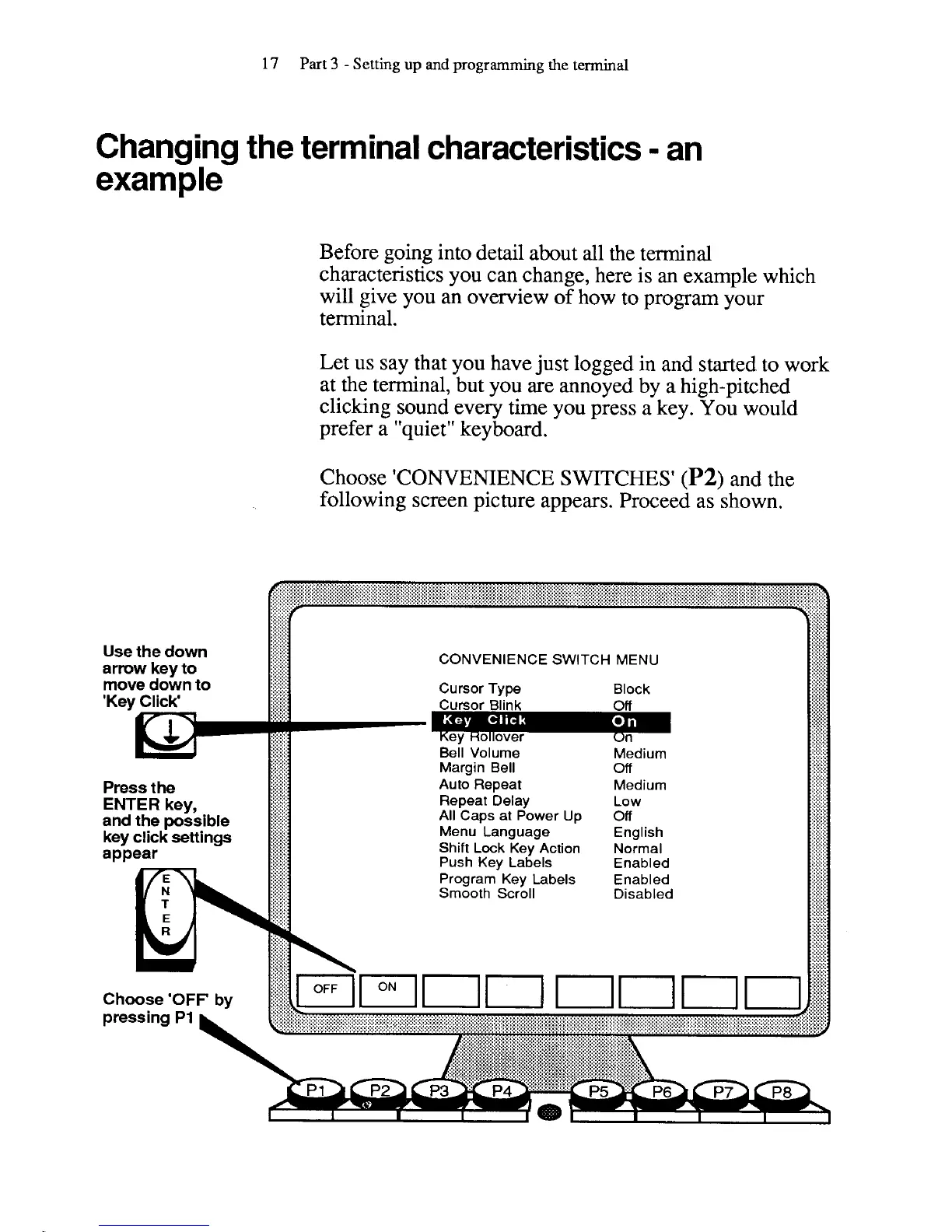
Choose 'CONVENIENCE SWITCHES'
(P2)
and the
following screen picture appears. Proceed as shown.
CONVENIENCE SWITCH MENU
Bell Volume
Press
the
Auto Repeat Medium
ENTER
key,
Repeat Delay
and
the
possible
All Caps at Power Up Off
key click
settings
Menu Language
Shift Lock Key Action Normal
Push Key Labels Enabled
Program Key Labels Enabled
Smooth Scroll Disabled



 To Next Page