6
Part
1
-
Before you
begin
Assembling the terminal
The basic
ND
Display Terminal
1200
package consists of
the terminal, the keyboard and a simple stand (or plinth).
A
pedestal stand which permits height adjustment and
rotation of the terminal is available as an option. The
mounting procedure described below applies to both the
plinth and pedestal stand.
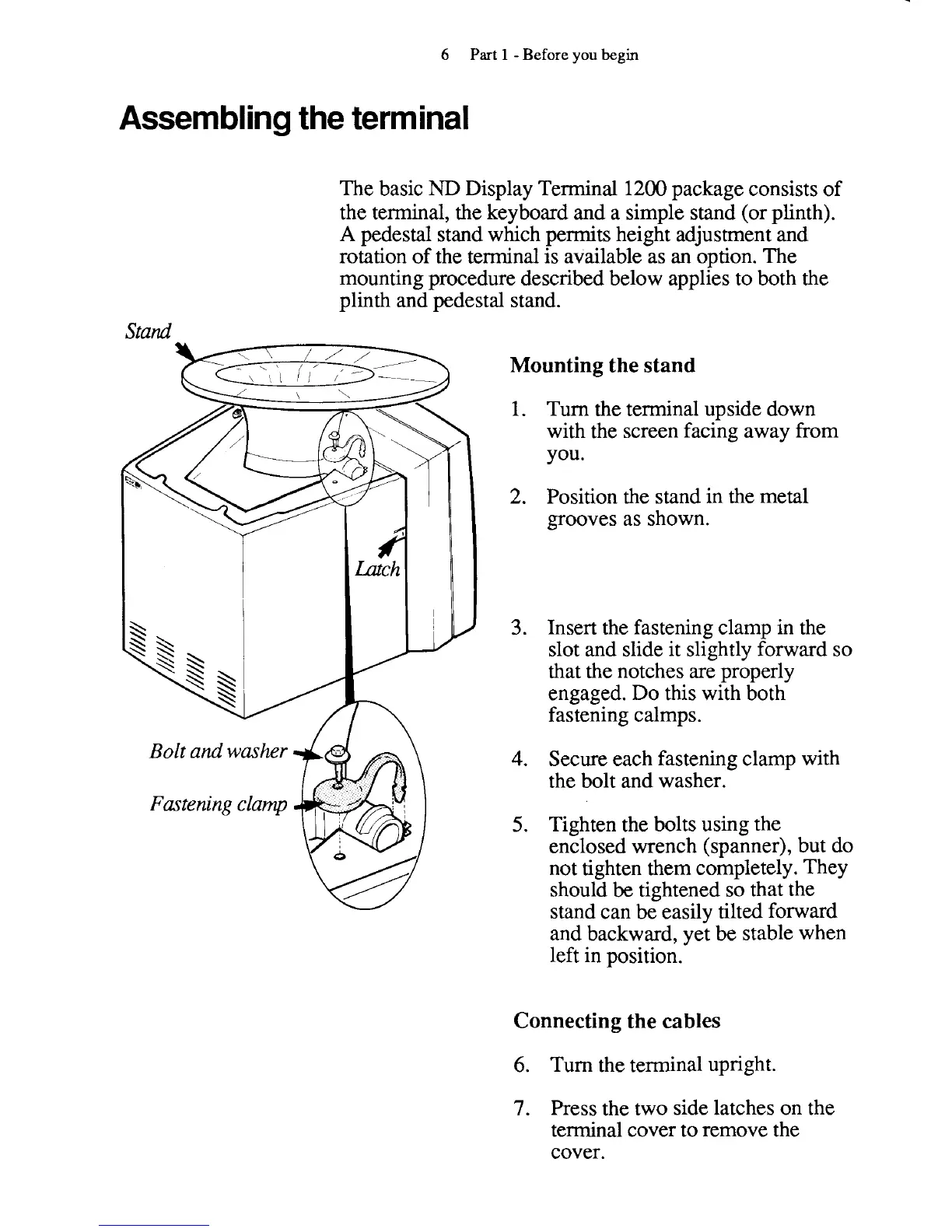
Bolt and washer
Fastening clamp
Mounting the stand
1.
Turn the terminal upside down
with the screen facing away from
you.
2.
Position the stand in the metal
grooves as shown.
3.
Insert the fastening clamp in the
slot and slide it slightly forward so
that the notches are properly
engaged. Do this with both
fastening calmps.
4.
Secure each fastening clamp with
the bolt and washer.
5.
Tighten the bolts using the
enclosed wrench (spanner), but do
not tighten them completely. They
should
be
tightened so that the
stand can be easily tilted forward
and backward, yet be stable when
left in position.
Connecting the cables
6.
Turn the terminal upright.
7.
Press the two side latches on the
terminal cover to remove the
cover.



 To Next Page