EasyManua.ls Logo

ND 1200 - Page 27

Default Icon
48 pages
Print Icon
To Next Page IconTo Next Page
To Previous Page IconTo Previous Page
Loading...
26
Part
3
-
Sening up
and
programming the
terminal
Programming a
PUSH-key
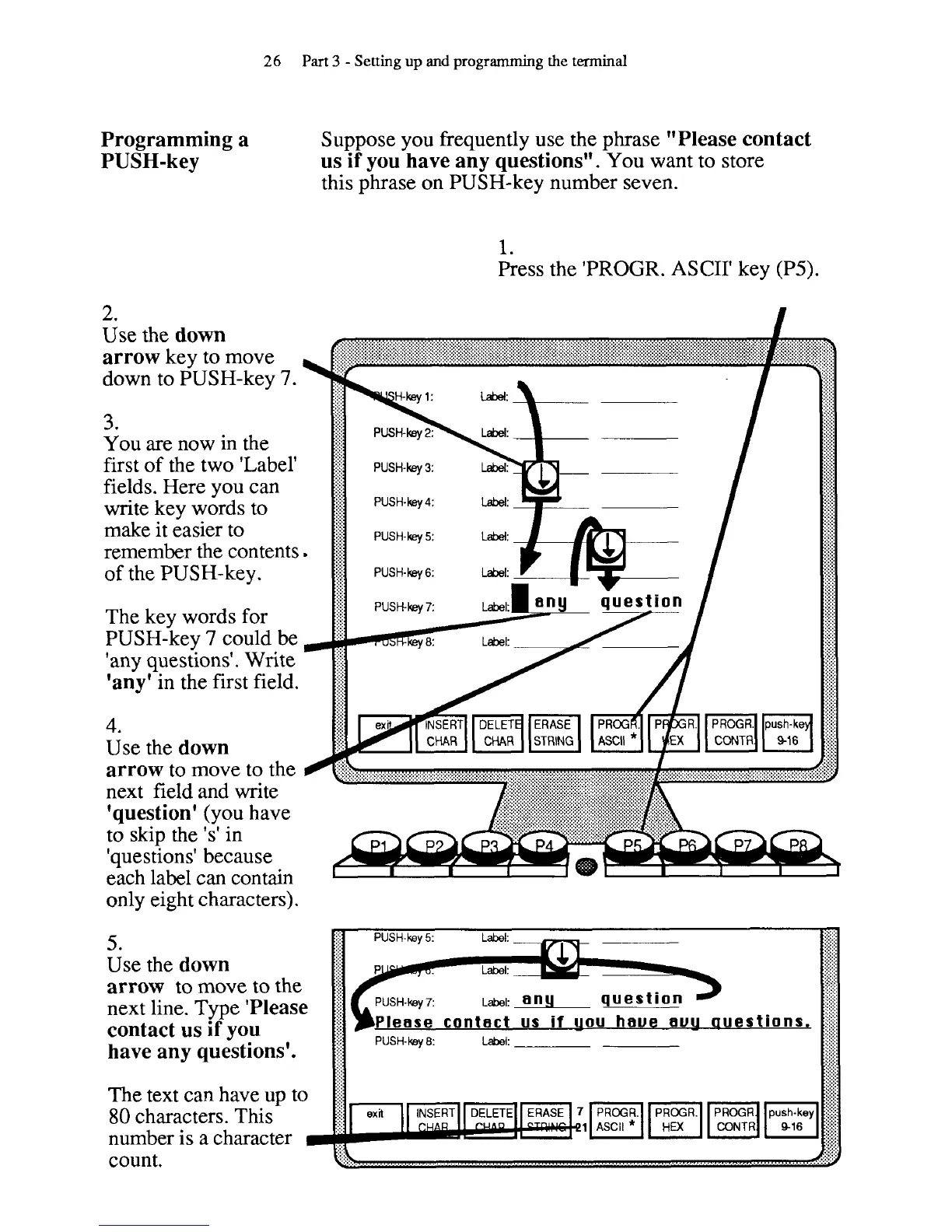
2.
Use the
down
arrow
key to move
down to PUSH-key
7.
3.
You are now in the
first of the two 'Label'
fields. Here you can
write key words to
make it easier to
remember the contents
of the PUSH-key.
The key words for
PUSH-key
7
could be
'any questions'. Write
'any'
in the first field.
4.
Use the
down
arrow
to move to the
next field and write
'question'
(you have
to skip the 's' in
'questions' because
each label can contain
only eight characters).
Suppose you frequently use the phrase
"Please contact
us if you have any questions".
You want to store
this phrase on PUSH-key number seven.
1.
Press the 'PROGR. ASCII' key (P5).
5.
Use the
down
arrow
to move to the
next line. Type
'Please
contact us if you
Please contact us
if
uou haue u auestions,
have any questions'.
The text can have up to
80
characters. This
number is a character
count.