27 Part
3
-
Setting
up
and
programming
the
terminal
Moving in the
menu
Insert character
0'2)
You
n
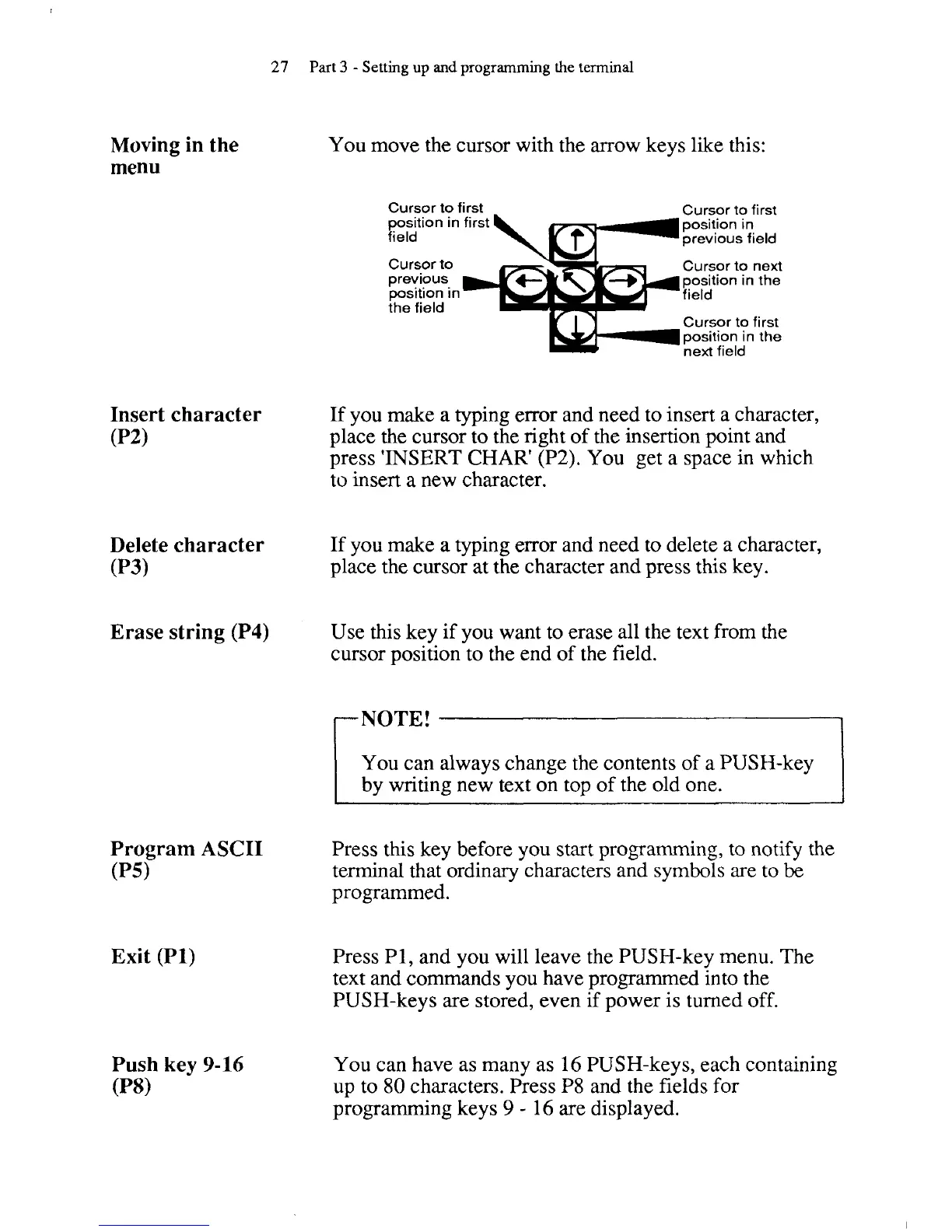
nove the cursor with the arrow keys like this:
Cursor to first
Cursor to first
~
-
position in first position in
field previous field
Cursor to
-Y
previous
position in
the field
1
Cursor to next
position in the
Cursor to first
position in the
next field
If you make a typing error and need to insert a character,
place the cursor to the right of the insertion point and
press 'INSERT CHAR'
(P2). You get a space in which
to insert a new character.
Delete character
If you make a typing error and need to delete
a
character,
0'3)
place the cursor at the character and press this key.
Erase string (P4)
Use this key if you want to erase all the text from the
cursor position to the end of the field.
You can always change the contents of a PUSH-key
by writing new text on top of the old one.
I
Program ASCII
(PSI
Exit (PI)
Push key
9-16
(Pa)
Press this key before you start programming, to notify the
terminal that ordinary characters and symbols are to
be
programmed.
Press
PI, and you will leave the PUSH-key menu. The
text and commands you have programmed into the
PUSH-keys are stored, even if power is turned off.
You can have as many as 16 PUSH-keys, each containing
up to 80 characters. Press
P8 and the fields for
programming keys
9
-
16 are displayed.



 To Next Page