26
Thread cutter button
Press this button after nishing sewing and
the machine will trim the threads.
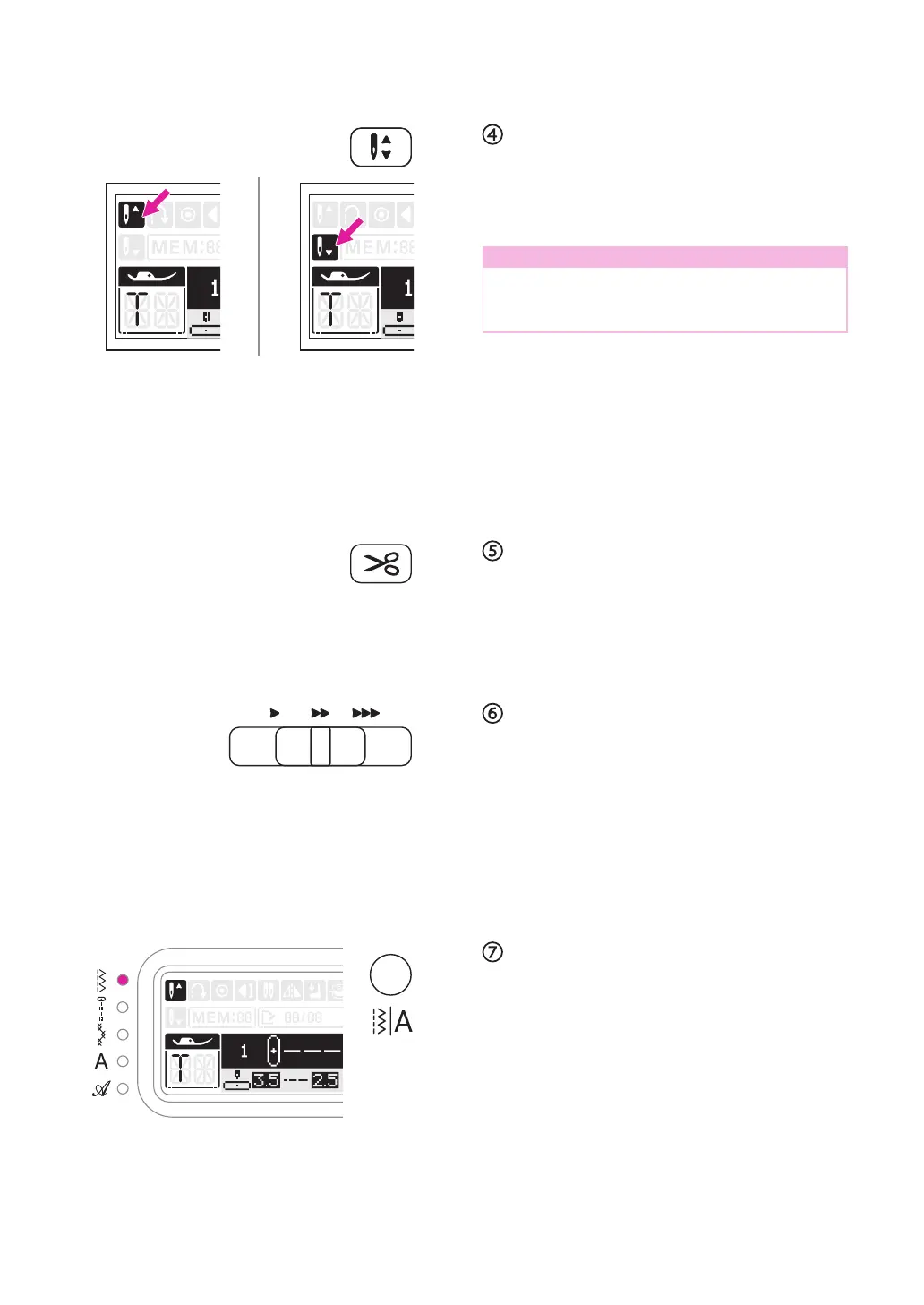
Needle up/down position button
With the needle up/down position button,
you decide whether the needle stops in the
highest or in the lowest position (i.e. in the
fabric) when you stop sewing.
Note
During sewing, press the needle up/down
position button, it can not to change the
needle position.
Press the button so that the arrow on the LCD
screen points upward and the needle stops
in the highest position. Press the button so
that the arrow points downward, the machine
stops with the needle in the lowest position.
Speed adjustment slider
The speed adjustment slider can control the
sewing speed. To increase the speed, slide
the lever to the right. To decrease the sewing
speed, slide the lever to the left.
The sewing speed can be adjusted without
foot controller.
Pattern group switch button
When machine is turned on, the LED light will
be set at Direct Pattern Group. By pressing
the pattern group switch button, LED light will
move step by step to select the pattern group:
Direct Pattern Group
→
Regular Pattern Group
→
Quilting Pattern Group
→
Alphabet Group-Block style
→
Alphabet Group-Script style
→


 To Next Page