EasyManua.ls Logo

Nederman FilterBox - Page 18

Nederman FilterBox
261 pages
To Next Page IconTo Next Page
To Previous Page IconTo Previous Page
Loading...
FilterBox
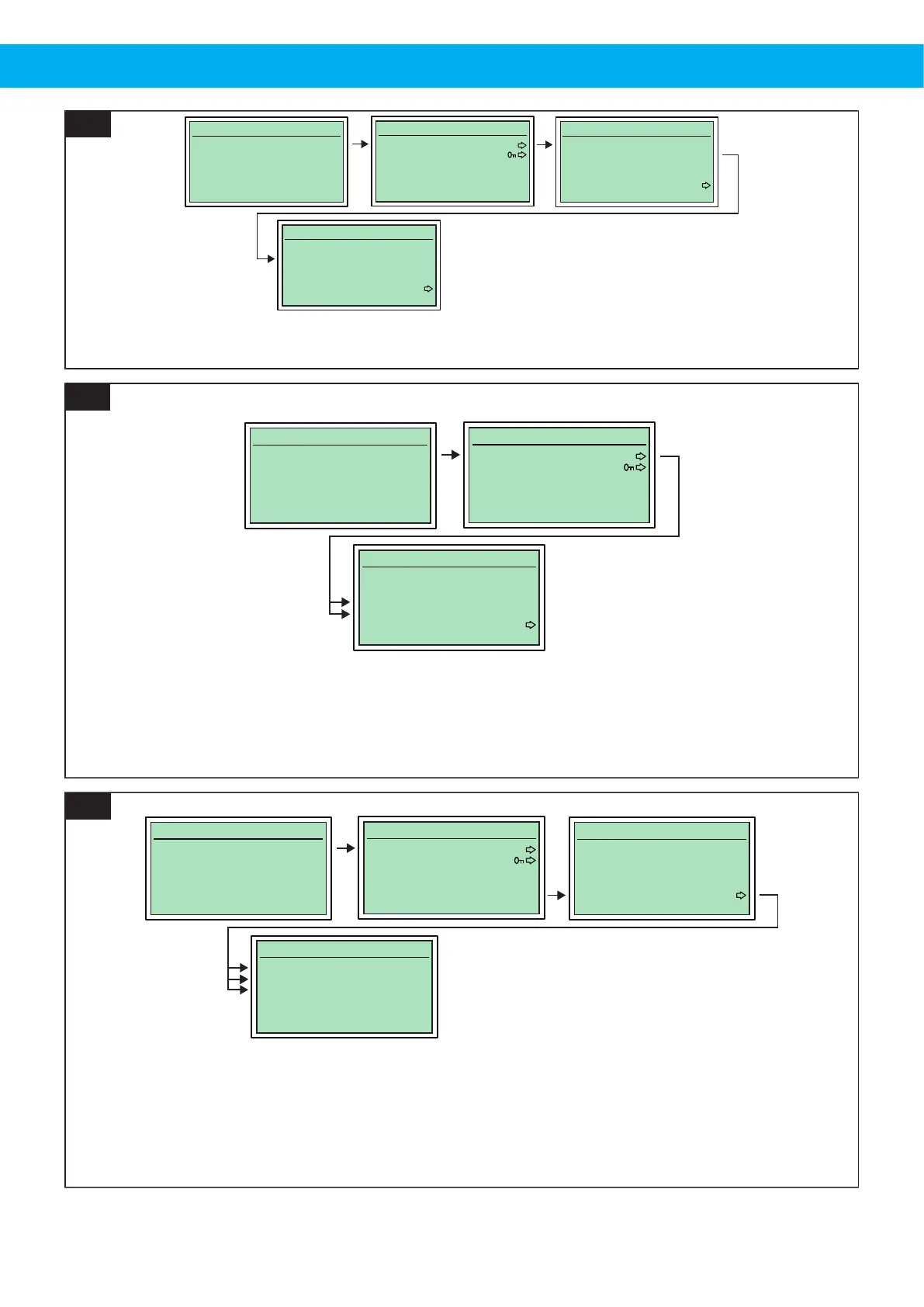
Press ESC for menu
Time to service:
3000 Hours
Idling
Press OK to select
1. Start/stop Settings
2. Maintenance
-
-
-
>
-
Press OK to edit
1. Fan off delay: 1
2. Auto. cleaning: On
3. Timer cleaning: On
4. Tmr.clean interval: 0
5. A./M. fan start
-
>
Press OK to edit
1. Fan off delay: 45
2. Auto. cleaning: Off
3. Timer cleaning: On
4. Tmr.clean interval: 0
5. A./M. fan start
-
*
2. Auto. cleaning: [ON/OFF]
16
Press ESC for menu
Time to service:
3000 Hours
Idling
Press OK to select
1. Start/stop Settings
2. Maintenance
-
-
-
>
-
Press OK to edit
1. Fan off delay: 45
2. Auto. cleaning: On
3. Timer cleaning: On
4. Tmr.clean interval: 30
5. A./M. fan start
-
*
3. Timer cleaning: [ON/OFF]
4. Tmr.clean interval: [10-60 min]
17
Press ESC for menu
Time to service:
3000 Hours
Idling
Press OK to select
1. Start/stop Settings
2. Maintenance
-
-
-
>
-
Press OK to edit
1. Fan off delay: 1
2. Auto. cleaning: On
3. Timer cleaning: On
4. Tmr.clean interval: 0
5. A./M. fan start
-
>
Press OK to edit
1. Welding clamp: On
2. Air tool flow: Off
3. Receptacle: On
-
-
-
*
1. Welding clamp: [ON/OFF]
2. Air tool flow: [ON/OFF]
3. Receptacle: [ON/OFF]
18
18

Table of Contents

Other manuals for Nederman FilterBox

Related product manuals