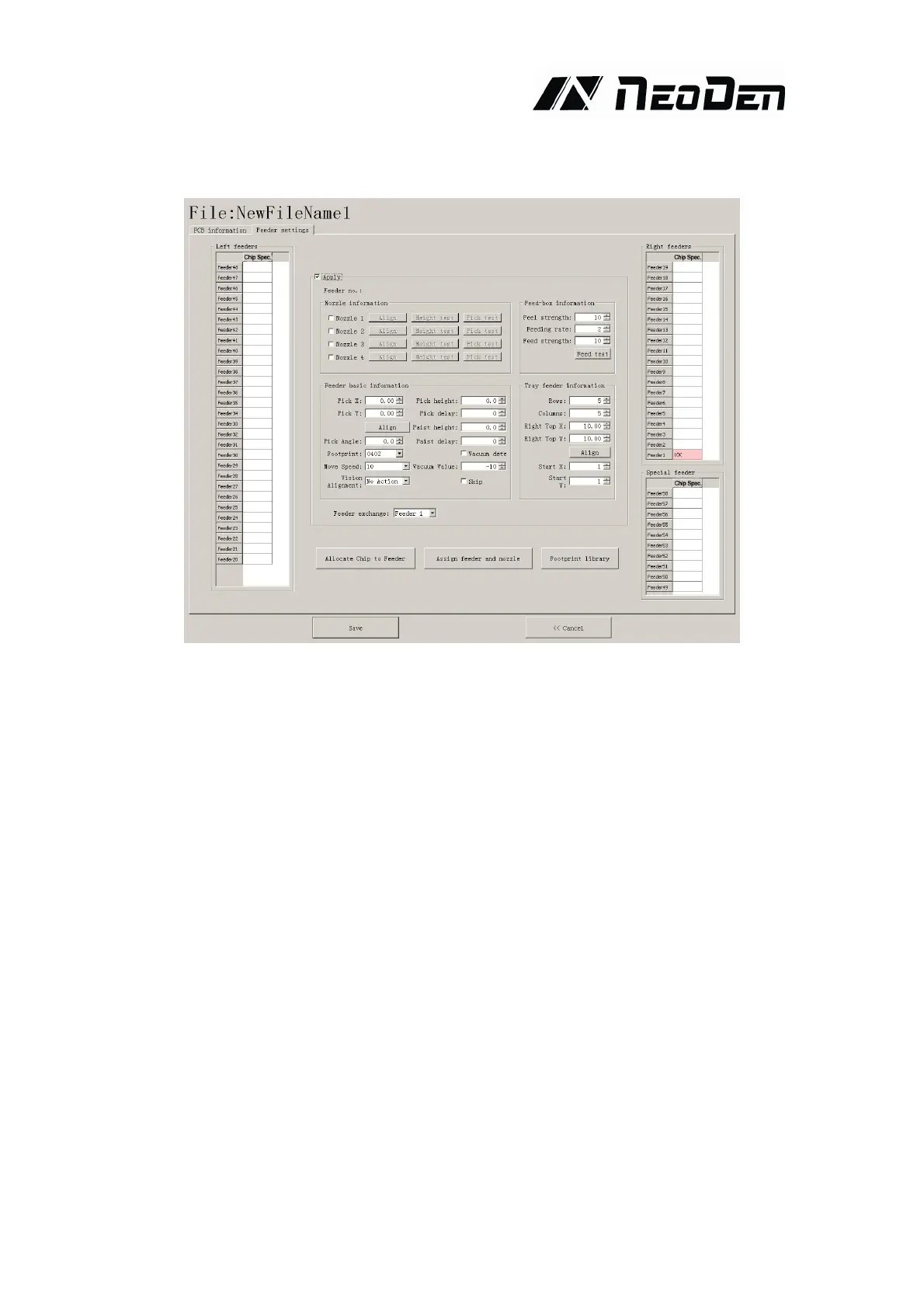
4.1.5.Feeder configuration
(1) Feeders Arrangement:Left Feeders(Feeder20-48),Right Feeders(Feeder1-19),Special
Feeders(Feeder49-58).
There are two ways to setup feeders.
①Before installing tape&reels.
Press “Allocate Chip to Feeder”, it will calculate how many different components according to
Chip List, and automatically allocate them to each feeder in sequence.
②After installed tape&reel
Click on each feeder, it will pop out a drop-down list with all components’specification, select one
by one according to actual allocation.
(2) Feeder Configuration:Select one feeder,tick the item”Apply”,all configurations will be
unlocked for this feeder,then can do amendment.There are five items:Nozzle information,
Feed-box information,Feeder basic information,Tray feeder information,Feeder exchange.One
item will be always locked for Feed-box information and Tray feeder information according to the
differences of components.Operation sequence: Feed-box information(Tray feeder information)
—Feeder basic information—Nozzle information—Feeder exchange(used if placed wrong tape).


 To Next Page