Saturn B – Chapter 3. Configuration3.12
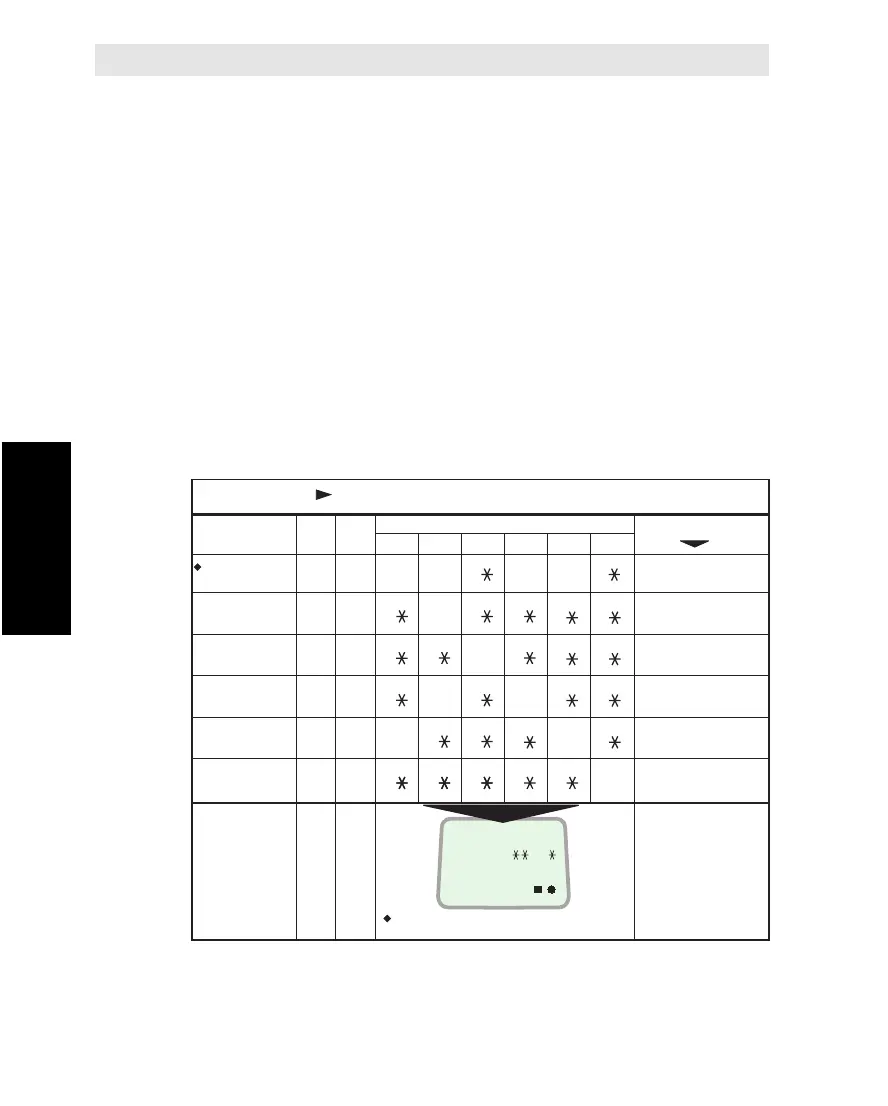
Routing Table (Example)
The table below shows examples of routing of incoming calls (with
IMNs and Destination Ids provided by Inmarsat) to the end terminals.
As indicated, some of the incoming calls have been extended to also
call other end terminals. Note that an incoming call can be extended
to maximum three additional telephones.
A blank table is provided in appendix F, allowing the owner to fill in
the routing implemented in his particular installation. If changing the
routing later, it is recommended to update the table accordingly.
If a printer is connected to the MCU, a "Configuration info" printout will
provide the call route settings, see "Printout of Lists and Settings".
Note!
If changing the service for an end terminal from telephone to telefax
or vice versa, all routes to the connectors involved must be deleted
first, see “Deleting Call Route”.
ROUTING OF INCOMING CALLS
IMN
662420510
662420511
662420520
662420512
662420513
662420521
DI
1
2
17
3
4
18
1
1
1
1
1
1
1
1
1
1
1
Calls to Handset also
routed to TEL.1, 3&4
Comments
No extended
routing of calls
Calls to TEL.3 also
routed to TEL.1
Calls to TEL.4 also
routed to HANDSET
Telefax calls. No ext.
routing allowed.
Telefax calls. No ext.
routing allowed.
Connectors on MCU
HDST TEL.1 TEL.2 TEL.3 TEL.4 TEL.5
The IMNs
(Inmarsat
Mobile
Number) are
examples
only.
Destination
Identification digits
Example showing routing of DI no.1
1
1
2
1
1
2
Ser-
vice
Telephone = 1
Facsimile = 2
ON
RING H12345P
ON 11 11
Incoming Call Route * Cont’d
Incoming Call Route Cont’d



 To Next Page