Saturn B – Chapter 3. Configuration 3.13
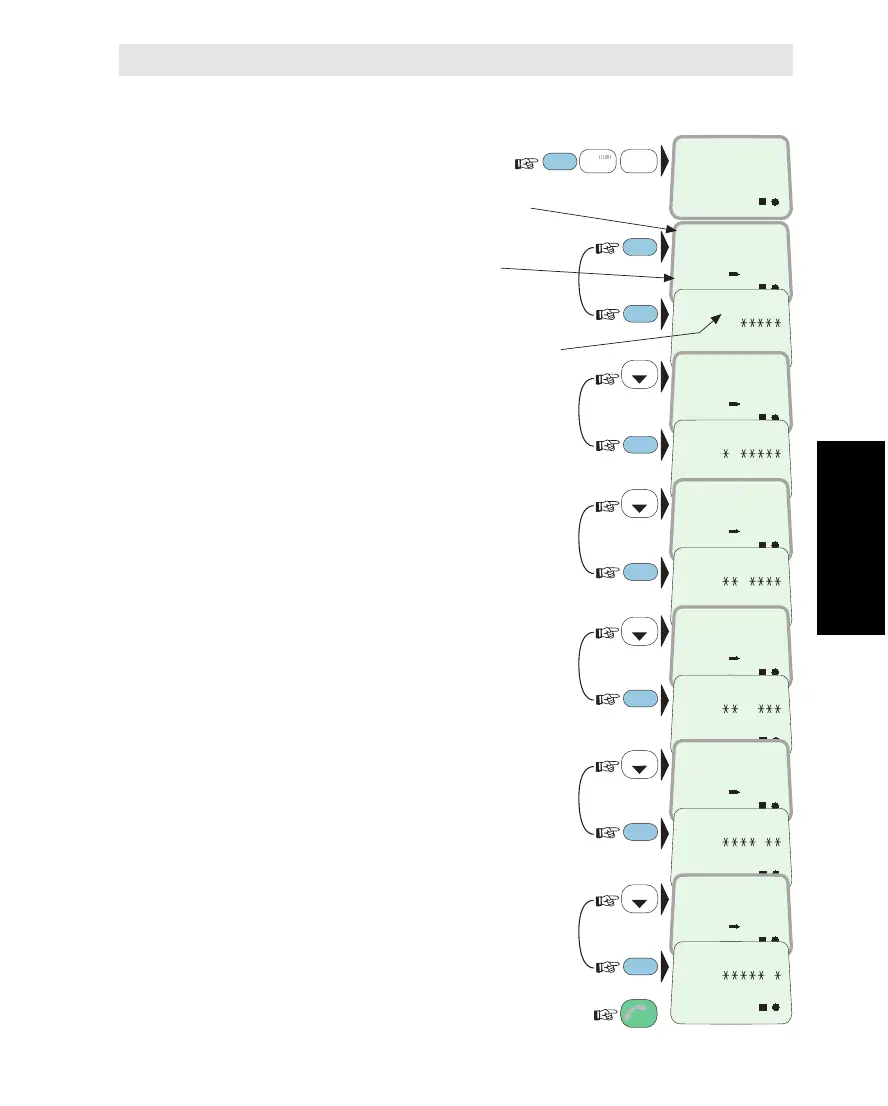
To check the settings in the Routing Table (see preceding page)
1Select INCOMING
CALL ROUTE function (71):
(* operator level function)
2Read out Display Handset
service and Destination Id:
and
check setting:
3Scroll down to DI no.2:
and
check routing to TEL.1:
4Scroll down to DI no.17:
and
check routing to TEL.2:
5Scroll down to DI no.3:
and
check routing to TEL.2 and TEL.3:
6Scroll down to DI no.4:
and
check routing to TEL.4:
7Scroll down to DI no.18:
and
check routing to TEL.5:
Revert to IDLE mode:
FUNC
ON
7
STU
1
ABC
LIST
LIST
LIST
LIST
LIST
H: Handset
connector
1, 2, 3, 4, 5:
Telephone
connectors
P: Not used
on Saturn B
INCOMING
CALL ROUTE
71
DI
Service
ON
TELEPHONY
1
RING H12345P
ON 11
ON
ON
TELEPHONY
2
RING H12345P
ON 1
ON
ON
FACSIMILE
17
RING H12345P
ON 1
ON
ON
TELEPHONY
3
RING H12345P
ON 11
ON
ON
TELEPHONY
4
RING H12345P
ON 1
ON
ON
FACSIMILE
18
RING H12345P
ON 1
ON
ESC
3x
MORE/
HELP
ENTER
MORE/
HELP
MORE/
HELP
MORE/
HELP
MORE/
HELP
MORE/
HELP
Incoming Call Route * Cont’d
Incoming Call Route Cont’d



 To Next Page