Page 22
4.3 Configuring Accounts
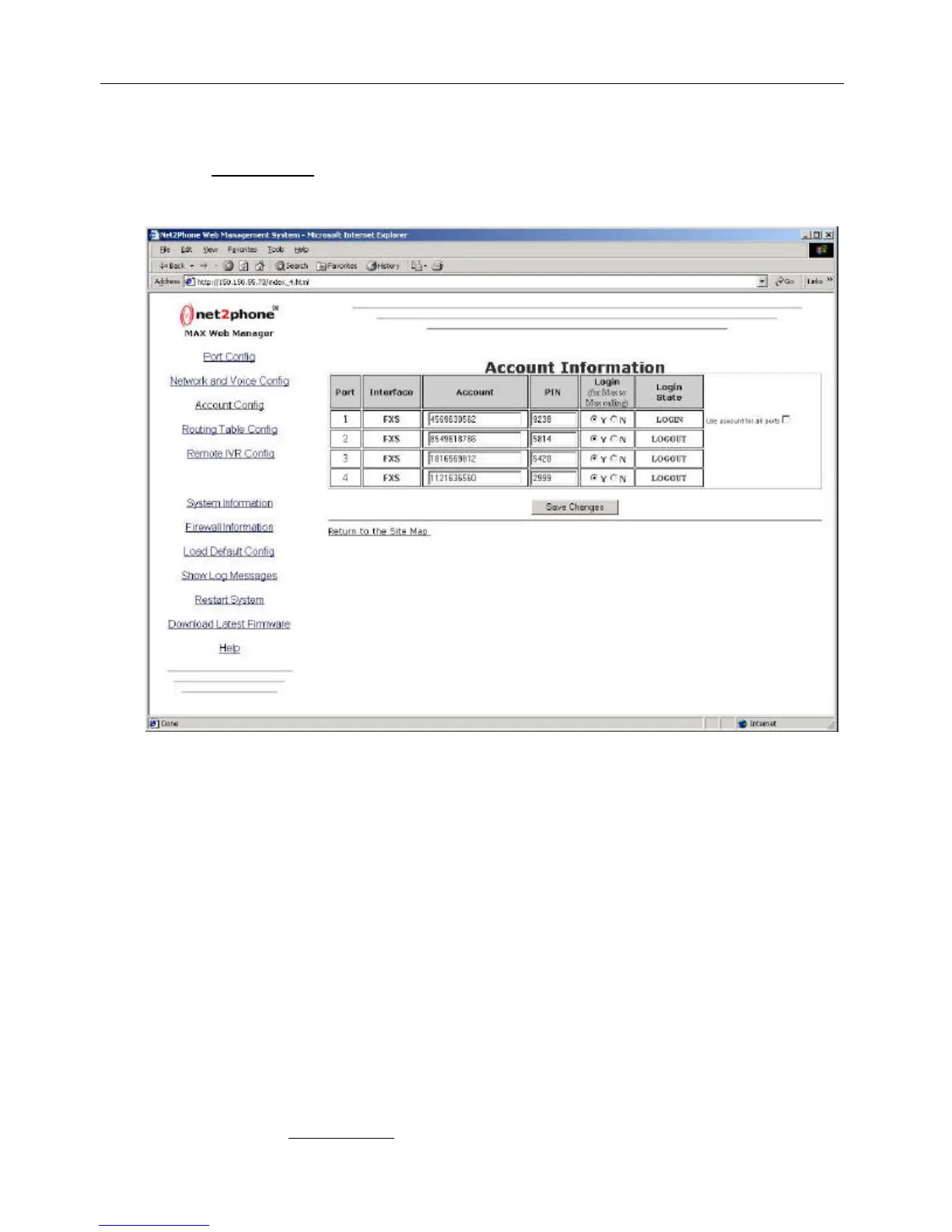
Click the Account Config link to access the Account Information page, illustrated below.
The Net2Phone MAX 410/420/430 allows accounts to be managed in either of two ways:
?? Single Account Management - All of the ports on the MAX 410/420/430 can operate from a
single account number and PIN, or
?? Multiple Account Management - You can use a different account and PIN for each port.
4.3.1 Single Account Management
For single account management:
1. In the box for Port #1 in the Account column, enter a Net2Phone account number.
2. In the PIN field, enter the Personal Identification Number for that account.
3. Check the Use account for all ports checkbox.
4. If you wish to be able to receive incoming MAX-to-MAX calls on a given port, select the Y
radio button in its Login column.
5. After the desired changes have been entered, click the Save button at the bottom of the
page to save them.
6. Click the Restart System link on the Site Map page to reboot the system.
Figure 16
Net2Phone MAX 410/420/430 User Guide Section 4.3 – Configuring Accounts



 To Next Page