SHAPING THE FUTURE SATELLITE OF COMMUNICATIONS
6.3.2.2 Tree Tab
The tree tab shows all device variables arranged in a tree structure. This tree
structure is consistent with the structure of the menus accessed via the front panel.
Only users with the expert profile can access and modify all variables in the menu
pages of the tree structure. Other user profiles do not see all variables.
The tree structure in this GUI is equivalent with the tree structure
in the previous user interface version for this device.
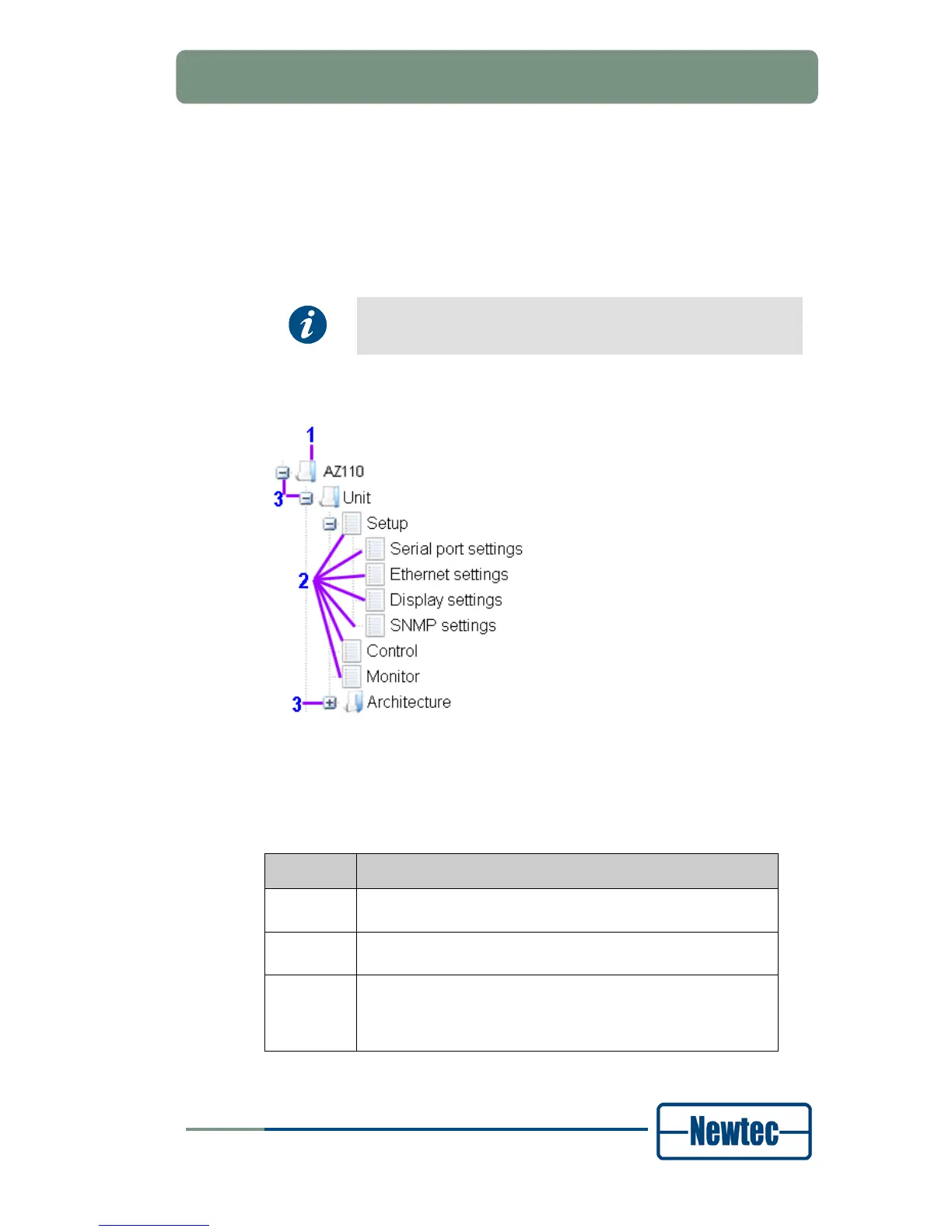
The tree structure contains different types of icons.
Figure 20 – Tree Navigation Icons
The following table describes the properties of each icon type in the tree structure
(see Figure 20):
Icon type Description
1 The folder icon indicates a node that is for navigation only. It
does not have a corresponding parameter page.
2 The form icon indicates that the tree structure contains a
parameter page on that level with editable parameters.
3 The expand icon (+) indicates that the tree structure can
expand one or more levels (branches) below. Lower levels
can contain other folders and/or parameter pages. The
collapse icon (-) collapses the selected tree branch.
Table 5 - Tree navigation Icon Description



 To Next Page