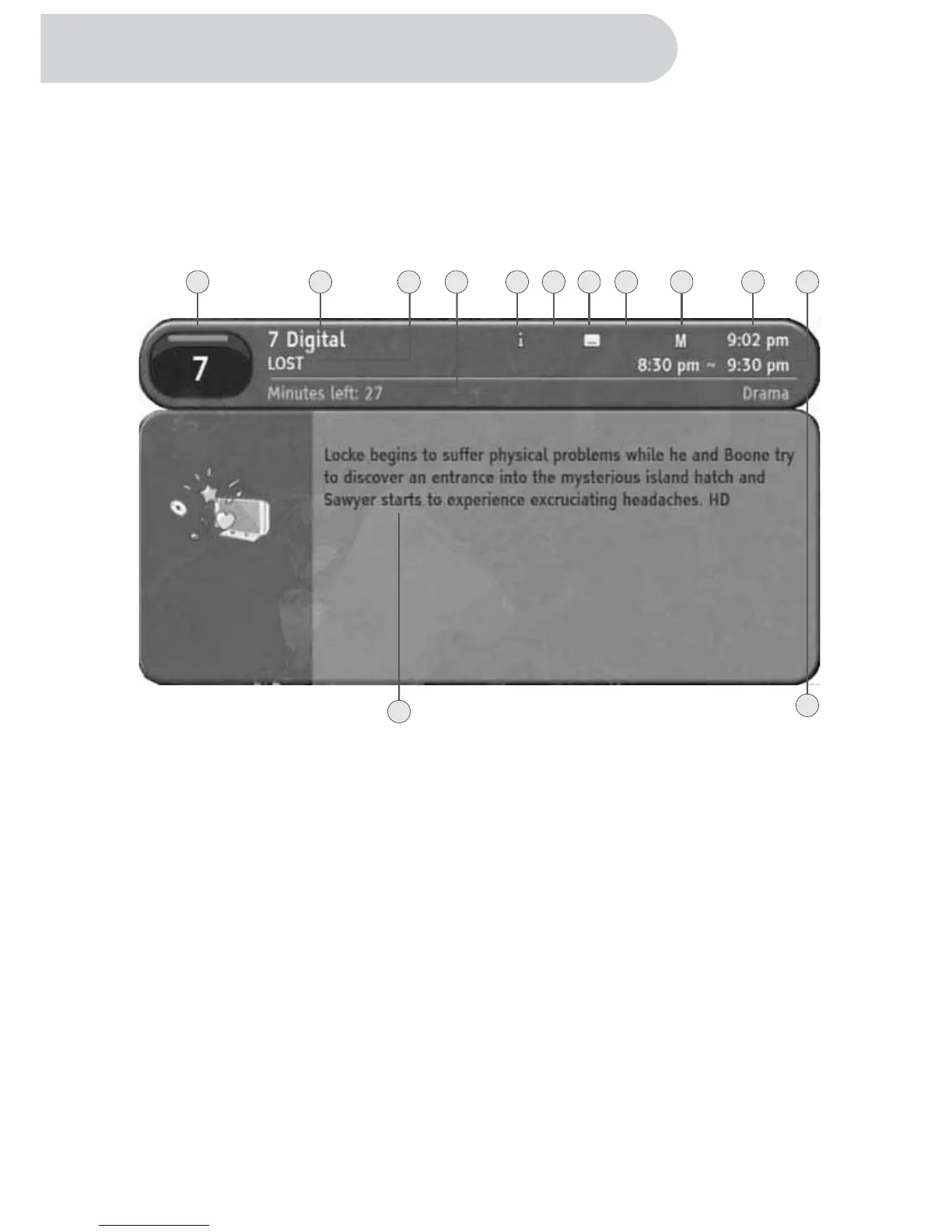
1. Using INFO button
This HD-STB has the ability to display additional information about programs.
By pressing INFO button while watching TV you will get simple program information.
By pressing INFO button again, you will get the detailed NOW program information
display.
By pressing INFO button again, you will get the detailed NEXT program information
Display. Press INFO button fourth time to return to TV mode. You can quit the program
Information display at any time by pressing MENU or EXIT button.
1. Program Number
It is Program Number. It is also called Logical Channel Number.
2. Program Provider Name
It showed current program provider's name.
3. Program Title
It showed program title.
4. Remain Program Time
It shows remained program time.
5. Information Display
It showed the program has additional information.
6. Sound Mode Display
Display the program has additional sound mode present.
7. Subtitle Information
Display the program has subtitle present.
8. Fav Mode Indicator
It indicates current channel mode whether FAV mode or ALL channel list mode.
9. Rating Information
It showed program's rating information for Parental Guide.
28
135678911
13
1024
12
Using the Remote Control Button



 To Next Page